


MattDH
Members
-
Joined
-
Last visited
Everything posted by MattDH
-
Nobody’s replied to this but I wanna thank you dude haha, it’s been driving me nuts
-
Found out my fix for me, I had a corrupted file somewhere, must have accidentally dropped a mod in the core game somewhere. Just verify your game data and that should do it.
-
Rage loads fine, everything else appears to work great, but lspdfr is stuck loading forever. Even after not loading it on startup and then loading it in game, it still is stuck in infinite loading.
-
So I haven’t been able to play for a while now, due to gtav messing up for me and having to redownload it. Except I haven’t been able to redownload until I borrowed my friends internet, then I was able to download it, but by the time I got back to my house, despite being able to get on the internet and download all of the lspdfr stuff to put back into my game, I constantly get a message that I can’t connect to rockstar servers when attempting to launch gta. I have AT&T fixed wireless where my IP is constantly changing, or dynamic as they call it, rather than a static IP. Has anyone else had this problem? Does anyone know a solution for it? It’s just rockstar. I can play/update/Ect games on my pc and Xbox, like Battliefield V, but even on Xbox I can’t connect to the rockstar servers, despite having fantastic internet everywhere else. This is the same ISP and type of internet I had when first downloading the game, so I believe it’s just because my current IP just isn’t compatible with Rockstar. Does anyone know some fix for this or do I need to just wait it out?
-
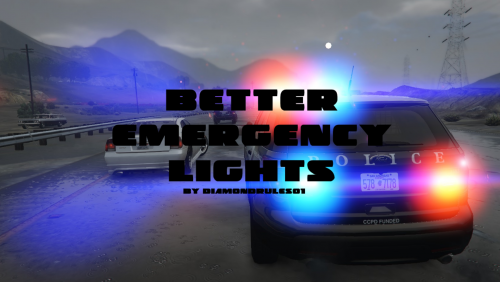 No it’s not the car, but it could be my settings. You know what I’m describing though right? When the lights are on at night, there’s this awful pulsating effect that gives me a headache. I chose the lowest setting (3000 and 10) and it still does it. Do you know what setting would effect that?
- 25 comments
- 1 review
-
How would I stop the stuttering shaking screen like effect when I have my lights on at night? It’s only at night and from the back of the car, the front is normal.
- 25 comments
- 1 review
-
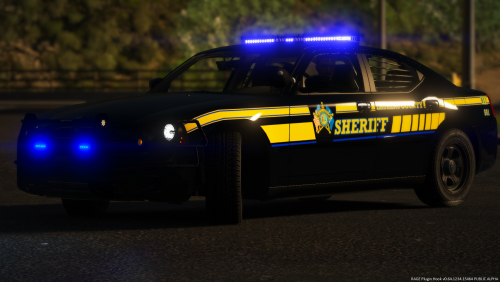 I have looked for so long, for an f250, slicktop, with a brushguard and all blue setup. I never thought to check inside a pack. Downloaded just for that. Converted it to an unmarked, and oh man. It’s amazing, awesome work.
- 14 comments
- 2 reviews
-
-

- 1
-
-
 Hey man would you be willing to do me a solid and get this Vic > an an all blue setup?
- 269 comments
- 17 reviews
-
-
- 1
-
-
Hey I’m having this same problem but it only started recently. It’s with my police3 slot and I haven’t touched anything on it before or since this started happening. Anyone have any idea what it could be?
-
 Hey man, love the call outs so far, but every time I get a call for domestic, assault, and person with a weapon, I instantly get the “situation is code 4” message. Everything else works fine, the burglaries are great, but those three just end immediately every time. Have you heard of this problem before? Have an idea how to get it back going? Edit: just saw the recent comments above^^, and that’s exactly what’s happening with me, forgot about the ambients.
- 422 comments
- 73 reviews
-
 Thanks man. That’ll work, though I hope we can get a smoother transition soon. Preciate it.
- 1,178 comments
- 137 reviews
-
Hey man, love the mod, adds the perfect touch to the game. But I was wondering if you might be able to help me out? Every time I order someone out of their car I lose the ability to interact with them. When they’re out they just walk off. Idk if this is common or I’ve just messed up some where.
- 1,178 comments
- 137 reviews

