


timnboys
Members
-
Joined
Everything posted by timnboys
-
okay but is that the 2013 version or the 2015 version as both versions must be installed together.
-
you don't download arm that is a processor for phones please download the one that says vcredist_x64.exe please
-
yes I can.https://www.microsoft.com/en-us/download/confirmation.aspx?id=40784&6B49FDFB-8E5B-4B07-BC31-15695C5A2143=1 or here: https://www.microsoft.com/en-us/download/details.aspx?id=40784 make sure you download the x64 bit version for either one though.
-
yes that is because scripthookvdotnet and ragehook uses two different versions of visual c++.
-
you wasn't actually supposed to copy all the files for scripthookvdotnet only the .asi file itself also do you have the requirements for scripthookvdotnet installed? Install both the Microsoft .NET Framework 4.5.2 (or higher, so skip this on Windows 10)and the Microsoft Visual C++ Redistributable Package for Visual Studio 2013 (x64). Do that again even if you think you already have them. Download and install the latest Script Hook V(including the ASI loader). If mods break due to a game update, don't forget to update this one! Download Script Hook V .NET and copy the ASI file into your game directory (The DLL is for developers). Put .NET scripts inside a "scripts" sub-folder in your game directory!
-
please tell me do you have any log files? if you do please put each one in a spoiler please.
-
do you have the steam version or the rockstar warehouse version? in steam just click verify game cache and it should verify the files and update the ones that need changing otherwise rockstar warehouse version should have a option to update as well just google that one as I don't have the rockstar warehouse version or retail version.
-
okay could I ask then what do you have currently installed on your machine dependencies wise as my guess is if it doesn't create the log files the scripthooks aren't even working. could you grab me a screenshot of your root gtav directory as I want to see if all the files are there just to be on the safe side to verify that you aren't missing a critical file for something. I am on a different computer that isn't my gaming pc otherwise I would have given you a screenshot of my root gtav directory and let you compare it to yours. Also what game version do you have? as I know the latest game version is v573 so check to make sure your game is up to date at least with that game version please as I do know ragepluginhook removed all support for all previous versions of the game in the latest release. to be honest you really was supposed to put lspdfr after you install the latest ragehook as the latest lspdfr download includes a old ragehook like .20 that won't work on latest games. so to make sure you get it installed right first copy the latest ragehook .29 and then only copy the plugins and other requirements from the lspdfr download but do not copy anything related to the ragehook out of the lspdfr download as it won't work as explained above. you should only copy the following files for lspdfr to work in its latest download with the latest ragehook(.29) LSPDFR Readme.pdf Plugins folder LSPDFR folder and that is it don't copy anything else out of the lspdfr download as it will have to do with the old ragehook which won't work as explained above.
-
you should find the ragepluginhook.log and other logs in your root gtav folder.
-
read the instructions please Spike Strips V Deploy spike strips pressing K in the keyboard or LB + DPadDown in the controller. Then you can delete them by holding O in the keyboard or LB + DPadUp in the controller. If you go to far they will be deleted. Change the size with the Right and Left arrows in the keyboard or LB + DPadRight and LB + DPadLeft. You can enable a modifier key in the configuration file Check the .ini file to change the keys and buttons, disable the modifier key or button, disable the keyboard or the controller and few other features. http://www.lcpdfr.com/files/file/7864-spike-strips-v/
-
okay can you give me your logs in a spoiler please?
-
try 4.6 .net framework as that is the min for ragehook now. see here: http://ragepluginhook.net/Requirements.aspx
-
no not that I know of because either it is in a ini or it is hardcoded in the script but my spike strip mod actually helps with that by knowing whether you are doing a traffic stop or not by detecting if your sirens are silent or not. I actually coded that into it myself to make sure my spike strip mod actually stops the spikes from spawning if you are doing a traffic stop as well as preventing any patrol cars or police car tires from being popped as it checks internally for that too to make sure no police car tires are popped only the suspects. because doing my development of my own spike strip mod I got annoyed by the spikes spawning when writing in the computer. and fixed that from happening along with other fixes as said above. my spikes strips mod is called stopstickv please just search the name in google if you want to know more about it.
-
No, I was trying to pm @Xplicit92 to figure that out but haven't got a answer yet.
-
I have the dev version me & xplicit92 was working on together privately our bitbucket private git repo. but I would prefer to hear back from xplicit92 if that is okay as I am all for letting people use evl but it isn't just me who is programming evl it is xplicit92 as well and since well it's our project together I would prefer for xplicit92's input as well(as in a project you have to get the other person's approval as well before doing anything.) sorry if that doesn't help much that I cannot give out the evl files without getting approval from xplicit92 as well but hey all I can say is maybe xplicit92 is working on fixing the door bug or some other improvement and hide it so no one else can get the old bugged files when xplicit92 releases the new fixed and improved files.
-
that would be nice for developers like me for posting a code sample as I currently just use a webclient to download a txt file from my server with the latest version in it check the version and compare the version hardcoded into the script to see if it is the latest version or not.(but the hardcoded part is kinda hard to keep up with considering I sometimes forgot to change the hardcoded version to the latest version in the txt file when releasing a new version.)
-
okay here is my trainer link if you want to try it: http://www.lcpdfr.com/files/file/8856-godmodev/
-
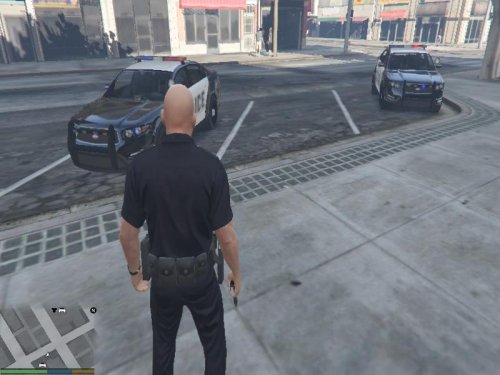 This script will be renamed TrainerV immediately
 -
did you look at all the other features it has besides "these Godmode"?
-
It will automatically enable all of the "core" features I call it. the spawning of cars, etc are done manually via hotkeys. as explained in the description. Note in the next update I will be redoing the teleport function to allow people to set in the text file that is created for settings whether they want to teleport straight to the mission row police station when one of the character story models or not.
-
my trainer unlocks the jail section and now the locker-rooms in mission row police station(though the locker room unlocking update will come soon as it is still being q&a tested basically meaning it is being tested for stability right now) Also I never noticed the chief's office locked(wasn't that the "captains" office)? the update has been released
-
New Update coming soon! that will besides unlocking the police cell interior in mission row police station that was the easter egg in last update 1.0.0.14 It will come with another easter egg as well which includes the mission row police station locker room unlocked as well! New Update Released!
-
glad you like it.
-
-
it loads automatically when the script is loaded did you make sure your scripthookv/scripthookvdotnet is installed correctly? and you put the dll file in the rootgtavfolder/scriptsfolder correct according to the scripthookvdotnet instructions?

