



londonrials
Members
-
Joined
-
Last visited
Everything posted by londonrials
-
@stani45 | Hello. French Version J'espère que tu vas bien et que ça se traduit bien pour toi ! Je sais que vous avez dit que RAGENativeUI a été mis à jour, par souci de vérification, cela vous dérangerait-il de partager votre fichier RagePluginHook.exe situé dans votre dossier racine Grand Theft Auto V? English Version I hope you're doing good and that this translates well to you! I know that you said RAGENativeUI was updated, for just verification sake, would you mind sharing your RagePluginHook.exe file located in your Grand Theft Auto V root folder?
-
Okay took a bit a troubleshooting because Visual Studio originally didn't want to accept version 4.7 but I got it to work. Thank you LMS ❤️ One more question if you will, created a simple callout. All it is when the player accepts the call and go the callout location, if a pursuit isn't already happening one will start. Problem I'm having is that the ped and the vehicle spawns but a pursuit never starts or occurs once arriving to the callout. They just stay there, in the middle of the road until I force them out the vehicle then they'll run away with the callout still going. Via the log, it never ended. Here's my callout code after accepting it. (providing a new one because it has small changes from the overall code .zip I posted above). Any ideas? HighSpeedChase.zip
-
 I might. It's a good idea, I'm just super busy at the moment trying to bring callout ideas to life, dealing my own life, YouTube shit, etc etc so whenever I get the time, I might just make a little short showcase like 4, 5 mins or so.
- 24 comments
- 3 reviews
-
-

-

- 2
-
-
Hey 👀❤️ So I'm following with a simple Beginner's tutorial series on YouTube (https://www.youtube.com/watch?v=sNlUcnBl0g0&list=PLIdBLpIJcplhbczHl_OmfHIWciMZqzd4J&index=3) and with this video in specific I'm up to the part where you create the .dll, install, and test it out in game. I'm try to test it out in game but it crashed so obviously it was the new ass plugin I just created of course lol, so I wanted to see what I did wrong. I got an System.IO.FileNotFoundException at the very end of my log so if 1+1=2 then a reasonable man would say this error caused my game to crash. I'll attached the Rage log here as well so you can see all the juicy details yourself. I'll attach my Visual Studio files as well so you can see my code. It's just a test/learning callout anyone, not a normal release so I don't mind sharing my code if it'll help solve my problem. If the problem isn't me and it something in the video like it's outdated then just let me know and I'll try to find the newest possible. Btw because of the whole Rage Hook situation with the newest version only being apart of the LSPDFR download, I couldn't get the newest SDK .dll, so I had to download the newest version on the Rage Hook website (which is an old version overall) to steal the SDK .dll file. Do note: I had to delete LSPDFR's .dll file from both Learning Callouts > References & Learning Callouts > Learning Callouts > bin > Debug, in order to actually zip the file below 4MB which is the file limit. No worries, of course I had them install in both places and properly referenced inside the files. Just wanted say that so when you download it and see that .dll missing, you'll know why. RagePluginHook.log Learning Callouts.zip Notice: I didn't mean to post in this forum, if a moderator could please just move this for Tutorials & Questions in the Development forum I would appreciate it, thanks. Rather not just copy and paste this whole in a new message.
-
@ChancellorGrunt | I just noticed you said install the lspdfr_049_8037_setup.exe file from the download. Completely delete that and your current LSPDFR installation. Go back to the download page and download the manual installation. The automatic setup tend to start weird issues some times for some people which the manual normally fixes so let's try this. Take a deep breath, you don't need to be stressing about this buddy.
-
@ardakarakulak | Hey and welcome to the LSPSDFR community! I see that you're having issues with your menu appearing in Stop the Ped and Ultimate Backup. I also see that you have linked your RagePluginHook log. For the safety of myself and all the other regular helpers in this thread, I highly recommend that you just attach the file here with your reply rather than posting it on a third party websites and linking it in your message.
-
Honestly this is a tiny bit out of my wheelhouse but you really need the help considering this issue is preventing you from playing LSPDFR at all. So here's some desperate last minute troubleshooting ideas. Idea #1 Make sure that in your antivirus that RAGEPluginHook.exe is excluded (meaning it's allowed to hook into your game). Idea #2 If idea doesn't work, do follow these steps: 1. Go to your Grand Theft Auto V root directory. 2. Locate your RAGEPluginHook.exe file. 3. Right click on it and press Properties. 4. Find and click the Compatibility tab. 5. See the option Run this program as an administrator click that. 6. Make sure that option is checked now, and click Apply. 7. Run the game and if it doesn't work, let's try the next idea. Idea #3 Delete your RAGEPluginHook.exe, and redownload it via the newest LSPDFR manual install option on the download page. Do NOT use the official RagePluginHook website as the version they have is outdated. Idea #4 Download your platform (Steam, Epic Games, or Rockstar Launcher), GTA V, and LSPDFR freshly on a brand new Windows user.
-
 Looks super nice. I'm going to make a installation video and a review video. So for credit purposes, how would I verbally say your name? I'm going to link it in the description and pinned comments in both videos, but for the videos themselves I would normally "oh this is created by..." just for context.
- 130 comments
- 4 reviews
-
@ChancellorGrunt | Okay let's try another method. Launch the game normally through Steam or Rockstar Launcher or where you got the game from. Launch it normally then when it gets to the part where it shows Settings, Online, and Single Play options on the screen, launch RageHookPlugin.exe then.
-
Thanks!! I was trying to learn how to make plugins because I got some nice ideas, but in the meantime I really wanted to upload something so I choose preset characters! Aww shucks.. thank you! I'm planning to add some characters to this file and maybe another file with another theme like a celebrity edition or maybe one for TV/movie characters!
- 24 comments
- 3 reviews
-
-
- 3
-
-
-
UPDATE v1.1.0: I got a friend I need to introduce to you guys. Meet, Astro McKay! Astro McKay is a sergeant for the LSPD, at the age of 24. He's talkative, very cocky, and loves dogs. Mr McKay is in your hands now! You have all the power, so what's your next move? Play Astro McKay + 3 other characters in RexyFiles' Character Starter Pack today! ABOUT THIS FILE Are you a new LSPDFR player and you want a nice-looking character without the effort? How about you're an experienced player but you can't design to save your life? Am I hitting close to the needle here boys? I'm happy to introduce my Character Starter Pack. The purpose of this pack is to provide a great preset of diverse characters that allow for quick gameplay when you first install LSPDFR without having to spend the time trying your hardest to make a character that you end up not liking the results of. Take the easy way out, and download Character Starter Pack today! p.s - My terms/rules for this file is included in the README file. Make sure to read, especially if you're a content creator of any kind. R E Q U I R E M E N T S ➤ Legal copy of Grand Theft Auto V on PC ➤ Latest version of LSPDFR ➤ Extractor Tool (7ZIP, Winrar, etc) INSTALLATION Installation is included within the download. Look for the README.pdf file! SUPPORT If you require assistance please come by the brand new RexyFiles Discord server! Help build up a future community. FYI: We're searching for staff. Must be 16+ and understand English. A second language is a bonus. Direct message lujerex on LSPDFR or Discord for details or to apply for a position. REXYFILES RexyFiles is a download center that holds and creates a variety of custom files from GTA V police vehicle liveries to Minecraft houses built for the players of survival. It's a special way for my to distribute my files, from all kinds of games. Where to download Character Starter Pack is up to you, both ways support me a lot. Just keep it in the back of your mind, whenever LCPDFR.com is having downtimes and the website isn't working, to come to RexyFiles as the backup place to download my files. https://www.rexyfiles.com FUTURE PLANS ➤ _____________________________________________________________________________________________________________________________________ CHARACTER STARTER PACK IS WAITING FOR YOU... D O W N L O A D T O D A Y 🎮
- 24 comments
- 3 reviews
-
-
-
- 16
-
-
@ChancellorGrunt | Hello! So I see the issue you're having, it's not a rare issue so you should be in luck. First things first, let's verify your game files. In order to do that depends on the edition of Grand Theft Auto V you own. If you own many editions, just focus on the one you got the error from. Steam Edition Locate Grand Theft Auto V in your steam library. Right click on the game in the left side menu and click Properties. When you do that a little cute menu will appear with a very options such as general or updates. Pick the option titled, Local Files and proceed to that page. Click the button Verify integrity of game files... and follow any additional steps it provide. Epic Games Edition Go to your library and find Grand Theft Auto V. Click the (...) button and within the drop down menu select the Verify option. Rockstar Launcher Edition Click the Settings option in the far upper right corner. Within the My installed games section, please select Grand Theft Auto V. An option called Verify game file integrity should be available. Click that option. Once you verify your game files, which should take a pretty long time, go back into your game. Let me know if it works or not!
-
@cas4056 | To piggyback on what superx said, we need to know what's wrong as well as any additional helpful information. Just for clarification, he's talking about your RagePluginHook.log in your root Grand Theft Auto V directory.
-
@adjustingdrift | Hi 👋🏾 I see you're having troubles with your game, and based on the information in this thread it seems that the problem may be coming from your mods folder. So before I start handing ideas and suggestions, when your game crashes, does it give an error message of any kind? If so, attach it as a photo to your next reply. Based on the error message, I may or may not be able to help you solve it. After I looked at your second log, my second message: Okay, I looked at your second log file and my god. You have quite a few outdated mods. I'm pretty sure this is unrelated to your issue, but it's pretty important or else you might run into more issues later. 1. You don't need Arrest Manager AND Ultimate Backup. Delete Arrest Manager as it's outdated and a lot of it's features are already in Ultimate Backup. 2. Remove PoliceSmartRadio & Traffic Policer those are outdated as well. If you read a BejoIjo readme, no worries the readme is just a bit outdated it's not your fault. 2b. If you used the pullover features with Traffic Policer, no worries there's an updated plugin for it. Download it here:
-
@awdawdwad | Hello and good morning! I took a quick peek at your latest RAGEPluginHook file and I noticed that you have some of BejoIjo's plugins in your game. I'm a senior staff member for his community and we have this problem a lot so let me help you out. Go to your root Grand Theft Auto V directory and locate the file called RAGENativeUI.dll. Delete that the file. Completely delete it. If it goes to the recycle bin, empty it. Download the newest version of RAGENativeUI from the official source on Github using the provided link below: https://github.com/alexguirre/RAGENativeUI/releases Please let me know if that works or not!
-
Hey! Welcome to the LCPDFR & LSPDFR community ❤️! I see that you have some plugins installed as well. Let's see if we can fix your game! By the way, you posted this in the incorrect forum. Unless you want to post it in the correct one, a website moderator will most likely move it themselves. Okay so first things first, I need your RAGEPluginHook.log file. This file can be located in your Grand Theft Auto V root directory.
-
^^ That's my account signature as it appears from my POV. Reason I added a photo even though my signature is literally right below this message is that it may be normal for other people I'm not sure. So I was making my signature from nothing/blank and when it got to the photo, it was too big for the guidelines. So instead of just downsizing it on the website like I did originally, I just exported it to the size I wanted in Photoshop so I wouldn't get any errors here on the website. So here where the issue began, once I saved the new picture the one at the bottom appeared. The one to the left is the actual photo I inserted, the one at the bottom is the ORIGINAL photo that I deleted because it was too big via the website guidelines. I highlighted it and and I cut it (not delete) and saved then it popped up again. So I tried again but actually deleted it this time, and it appeared again. I'm not sure what to do next. If someone can help, I highly appreciate, thank you. I feel stupid. As soon as I posted this, restarted Chrome and the issue was fixed. Sorry for the trouble, I would delete this whole post but I couldn't find the option!
-
I don't remember if I knew this back then, but a few weeks ago I learned you can just use your left caps button to perform the current selected action without having the menu open, so that's way better than having to open the menu every time you want to flash your badge, or intimidate someone.
-
Only reason I liked LCPDFR more was because I like Liberty City more than San Andreas. Always been more of a city person rather than the giant suburbs with like 7 skyscrapers of Los Santos 😂. Besides for that personally for me, LSPDFR is way more fun, way less buggy, and just overall better experience.
-
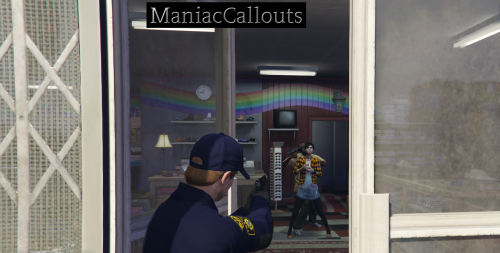 ManiacCallouts caught me by total surprise! A couple of things to note: + This review was originally going to be a in video format for YouTube and later post here but my mic audio got deleted beyond my control so instead I'm going to write my review manually here as well as share some pictures from the video. + I removed all my other callout packs. That includes the file folders, the .dll files, the config .ini files, and the .pdb files! While I still kept all of my normal gameplay mods, the only callouts that remained were the default LSPDFR callouts and of course ManiacCallouts. + I did NOT try all the callouts. I only played 2 store robberies in the city, money truck panic button, & backup traffic stop (not in that order). So my review, impressions, & thoughts will only reflect upon of those callouts so make sure to take that in mind. Always Remember: Try out this item yourself, we all have different experiences playing the game so please download it properly and see how you like it yourself. My reviews are only written/published to give a different view and guide your decision. Not to make it for you! Let's begin. -------------------------------------------------------------------------------------------------------------- First Impressions When I was looking for a plugin to review and saw ManicCallouts then later saw the callouts available for it; I thought hey, this seems okay. It could be fun to play but it's not going to be the next big thing or some crazy pack with never before seen methods for the callouts. While that is still not the case in my opinion, this callout pack really really really past my expectations for it. I really like (hence the 4 stars). First Callout I Tried Backup Traffic Stop Okay so I forced this call after no calls coming in and it was fun. Police officer that needed help stayed in his vehicle the entire time which I didn't like at all. The suspect came out with a knife and I tazed him. That... I did like. I'm very curious on the other endings this specific callout has. Second Callout I Tried Store Robbery in the City (Alta, Vinewood) After that I rode around for a little bit waiting for dispatch to lil' ole me another callout. I gave up after 2 minutes in lol, and forced one myself! The one I got was the store robbery in Alta but it code 4'd itself upon me accepting it. I'm assuming it was just too much for the game to handle in that split second I accepted it hence why it forced shutdown the callout. I honestly don't think that's something your end or something you can control, so no worries. Not putting that on you. Second Callout... RETRY Store Robbery in the City (East Los Santos) I went on and tried it again and it went through this time. Heading to the scene code 3, I noticed the awesome animations. I was not thinking this was going to happen. I thought it was going to be more similar to how it is in most store robbery callouts including the default itself, where the suspects (more like criminals now lol...) are running from the store with some type of bag prop in their hand or even a gun. NOTTTTTT I repeat NOT the case here. Sputtman tried this speical thing, completely unheard called being- C R E A T I V E. Haha no hate to other callout developers but seriously jokes aside Sputtman did well with the callout animations and lining them up properly. Not only that but it felt really immersive. I REALLY felt like I was the border being the hostage dying and living. Newsflash, he died and I died as well. I should have never put my AR away! Third Callout I Tried Money Truck Panic Button Now THIS is the callout that broke. Oh sorry, I didn't mean it broke the game. It broke ME. This callout was top mothering fucking tier. I dare someone properly tell me otherwise. I was thinking I was going to make it to the scene (which dispatch properly called me to, no need to force it 😉) and all I had to was pull over the hijacked money truck one of two things was going to happen. Either the criminals was going to run away thus starting a boring pursuit or it was going to be a case of me getting shot by 4 ARs at once then landing in the hospital again as Mr. De Santa. But nope, I arrived to the scene to two crown vic riding officers getting mowed down instantly. They had ZERO chance of making it. I called in a shots fired, the streets was shutdown, people starting running, two people ended up getting shots by the crossfire (not by me, really, it was the hijacker's bullets), many officers died, I almost died myself, and all the hijackers ended up dead too! I loved it. Then the clean up. Let's just saying when I was looking at the footage to get the screenshots for this review my God. The clean up process are about 15 to 17 minutes long. I had to call not one, but TWO EMS to verify the alive or dead status. Call corners for those who died. Collect the weapons (feature of Stop the Ped). Finally I called tow trucks to pick up everything. I had to manually stop CIVs who had the balls to pass the police barriers during clean up. I personally haven't felt a callout from ANY pack this detailed and this big since that iconic Pacific Standard Bank callout from like 2016, where you talk to the scene leader to speak to the hostage with a bunch of dialogue. Final Thoughts This shit was fucking fun. That's all I have to say! But there are some things I would change such as the officer AT LEAST getting out of his vehicle during the traffic stop backup. As well as with that callout, the call ended as soon as the suspect was in cuffs. I don't like that. Could it be possible to make it so that the call don't end until the player press the end button or some other button? It helps roleplay wise so the other officer that's coded with the callout don't leave the scene since it's literally he's scene and I'm just the backup unit. Thank you for ALL of the hard work you put into this mod and I'm sure that everyone will have fun playing this. Thank you! ❤️
 -
Saw this in the number 1 trending spot, congrats!! Most definitely going to check this out and maybe make a video first impressions and review on it. Not sure on it but if I end up doing it, it'll be uploaded on the 11th of this month. Honestly, I might just post the video link here so you could see it for yourself. Based on the description don't look like anything too special in terms of uniqueness but I love how many different locations you have. Locale variety really makes a difference. I can't wait to play! 🙂
-
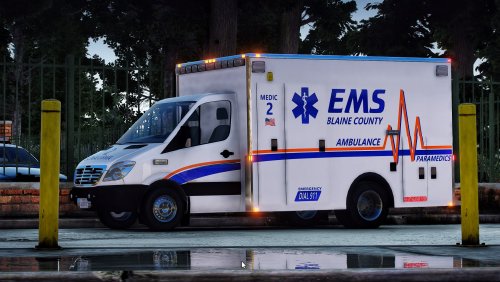 Perfect for what I was looking for. I'll post a review once I've used it for a while. Thanks for the file and the hard work!
 -
 The plugin works fine for me. I just installed it like a week ago, and I just finished playing. You might want to check your plugins folder (all of your plugins not just this one) to see which ones are broken or not.
- 344 comments
- 42 reviews
-
 Nice scene setup!


