


PlanetZing
Members
-
Joined
-
Last visited
Everything posted by PlanetZing
-
I recently installed three Non-ELS, FiveM ready police cars onto an experimental FiveM server and none of them have a functioning siren. I checked the vehicle metas and they all contain the correct emergency flags and are all classed as emergency vehicles as well. The sirens for the stock police and emergency vehicles work as well. Im not sure if FiveM requires a script or plugin to run addon sirens, and I tried adding the Luxart siren control and it didnt work. Has anyone else experienced this issue?
-
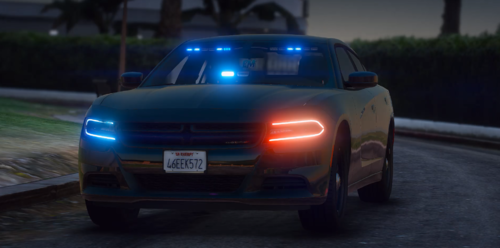 Im having an issue where I cant turn on sirens on my FiveM server.. I checked the vehicles.meta file and all the flags and classes are correctly set to emergency, so i dont know what could be causing it
 -
 I am having an issue with EUP crashing LSPDFR after creating and saving a character, has anyone else experienced this/know a fix?
- 2,353 comments
- 238 reviews
-
Hey guys I am a college student new into script design for GTA, I was looking into maybe designing a few beach callouts for Vespucci, Sandy, and Paleto but I dont know where to start, ideas?
-
 Where can I find the different liveries? Cant seem to find them anywhere in the download file, nor in OpenIV
- 253 comments
- 53 reviews
-
I am currently having this issue, I remapped the keys and everything. I can't get it to work
-
 Love this!! Any reason it spawns with completely blacked out tint on the rear windows and back window? I couldnt even see the back window lights through it
- 93 comments
- 17 reviews

