
TakeYaBackToStation4BumVio
Members
-
Joined
-
Last visited
Everything posted by TakeYaBackToStation4BumVio
-
From the album: Dumping some good stuff and the rest of it lol
© Do wot ya wont sonny
-
TakeYaBackToStation4BumVio replied to TakeYaBackToStation4BumVio's topic in GTA V Discussion & MediaHere's some demos:
-
Whens the first version of this mod coming out?
-
-
So, first what ya gotta do is get the following mods. Damn the people who made these are basically Gods: BetterVehicleFirstPerson Manual Transmission DrivingModes GTA 6 Leak (Only joking) Here's my set up of da setup required to do amazing, gaming mf changing driving DOWNLOAD ME NAAA Drop the scripts folder and the .ASIs where they need to go, but before launching you should probably have a look around and see what's happening. In GTA V the steering from both keyboard and mouse is unrelative to the direction of the physical wheels of the vehicle, AND the direction of the path being drawn that the vehicle physics is going to follow. Those 3 things are all seperate and we are using that idea to make our driving so realistic and flexible. The range of steering from left to right in GTA V is usually anywhere from around 40 to 50 degrees. In real life steering wheels can turn 190 degrees, 220 and 340, again depending on the drive mode of the car, I.e is it a massive dumper truck or a small hatchback(?) Also of course in real life [rl] when you are driving at slow speeds, the wheels require muuch more turning than at high speeds, due to urm yeah da universe of course but also another thing, cambering. Google it So this is how the steering part is achieved: If you go to the controller/keyboard settings on ManualTransmission you'll find I have set the steering under multiplier to around 30. I change this soooometimes not that much, 0.20 is better for some trucks and jeeps, 0.33 might be better for 360 degrees steering wheels, and so on and so on and so son and son, damn son where'd you find- Sorry on with the tutorial... These are the most important values for the vehicle handling. I've chosen to show you all this effect on a baller. Baller4 is biggest so I chose that model. I've set the steering radius [loooock] to 189 and the reason curve max and min is like that [all fucked up] is because with a massive turn radius via every vertex of every mouse mother fecking steering degree will make the game recalculate crash paths, 2.38 is perfect for a LWB vehicle to do majorly tight turns and 0.98 is PERFECT for parrallel parking. Handling of Baller4 in notepad via DriveModes (allows you to edit handling in game, mwha) Finally for the steering we use these values in the first person driving script from RazorWings18 (PLEASE COME BACK YOU ARE A DRIVING MOD GOD) Okay, my wrists hurt from urm typing. So let's get this over with quick so we can get back to SP RP DRIVING!!! Head bob delay. This is going to be the biggest thing for some people, if you DON'T want to tap A and D to LOOK the direction you're TURNING whilst mouse steering, set this to a lower value, max 250. The reason for this is because 777 might be Almighty and look amazing when driving in a straight line, turns will make the camera look the OPPOSITE way. Set this to around 200 for perfect 50/50 between sway and direction facing animations. I set my IN GAME MOUSE STEERING SENSETIVITY to 0, minimum bar. You must do this as well, you can use any mouse input mode, I.e Raw Input (best for those who use high DPI on windows and things). I REPEAT YOU MUST SET IN GAME MOUSE STEERING SENSITIVITY TO MINIMUM GRRR! Another in game setting you must apply in the driving control setting, it's under mouse in settings. Select "camera". This will make it so your mouse is a constant steering wheel. You'll get used to it, bitch. Here's a pic if you need help finding it: So that's pretty much it for steering. Now for braking, clutch action and accelerating. All my custom controls are already in the setup download, so I won't bother explaining them here. But I'll note them here so you know what to press. When you get in game spawn a Baller4 and open DrivingModes (press f5), go to the second option to edit the vehicles handling. Then press up once and that'll scroll you all the way down and then select "Reload from CFG config file" (Not the first page of the mod's menu, but after you click edit). This will load the handling file I made to upload with this tutorial. Now you have done that you will find your mouse is steering the SUV you're in and that the steering wheel rotates 1 and a half times. Start the engine by holding X, shift into first gear by pressing LShift and pull away. You'll notice at low speeds and in car parks, near the sides of roads, at bays, near shops and petrol stations the car will be much more modest in accelaration, until you get into a road, highway, then you can really open up the engine. Clutch is space bar, brake is S, HANDBRAKE (VERY IMPORTANT LIKE RL) is Q. If you use enhanced native trainer you must set a bind for Q to "Toggle Handbrake". This will make it possible to sit on hills and slopes with the handbrake on. Brakes are now delievered via each wheels traction (this part isn't reaistic but each wheel has a tiny bit of camber wiggle to allow off road terrain to REALLY jiggle the car's susspension. It's amazing. Using the clutch: Okay, all ya gotta do is figure out a basic thing. The clutch is just for play. It limits the engine load and caps the revs at around 10% and oscilates them both up and down at different times to simulate clutch bite, stalling noise and a slower car. So if you're RPing that you're pulling up to the kurb (however you americans write that word) and you're gonna pull up, whack da handbrake on, op out da whip and unleash da ting well now you can hold the clutch on approach and that will leave you free to focus on perportions and stopping. The clutch will slow you down alot when parking, but nearly not at all at high speeds, though you can flood the engine if you rev at mfers too long, so don't play ya self fool. Okay and as for accelarating ya wheels, just fucking charge the shit out of the clutch, tap the gears up n down fucking whatever it takes to make u feel like da real rock da wyane johnson. Oh and also in the download is the sound file fixes cos here's the bugs: Bug number fun: BetterVehicleFirstPerson sets a line into the games environment code to toggle the state of "exterior". This means you can hear rain as though you're outside, when you switch gear it sounds like a crunch rather than a gear stick, perciptation particles (not fog and smoke though) will not show behind the glass of some vehicles. This is all super easy to fix. So here's how: For the sound just use my vehicles.oac (or if you have mods you wan't to keep just find EXTERIOR_GEAR_CHANGE and INTERIOR_GEAR_CHANGE, export them all (11 in total) and SWITCH their file names. You'll be left with 1 Spare. Love him or throw him in da bin I don't care. For the rain not showing when in a vehicle just go to your trainer and detach the windows. Every trainer has dis fam. Okay that's it. Enjoy. Oh yeah bug list that one When you switch gear whilst reversing and holding C to look back, it will toggle first person, just let go of C and tap it again. So yeah. Enjoy son, she's a keeper. Oh and one more thing, sorry for not ya know making this easy to read, spelling like a complete fucking idiot even though I'm from english and also the no youtube video preview to see wtf im talking about. Just trust me. Finally mess around with the settings. Enjoy da tings guys and post here for any problems or questions. Thanks for reading!

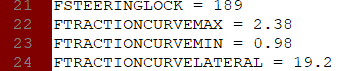
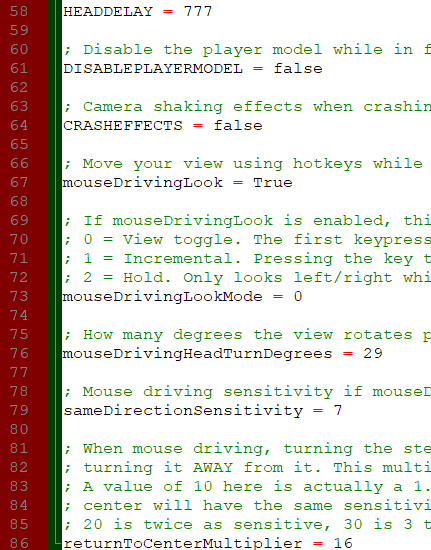

-
Read please: https://www.lcpdfr.com/forums/topic/93615-drive Over the 4 years gta V has been with us modder sons of slags (sorry mum love you just a joke for this thing called internet) and no one not 1 fucking person has said hey urrhh why do we all tap A and D when there is mouse steering? Thick0s Anyway here ya go fellas and gellas.
-
-
 @Union612 Most of the time I have to export audio made from Audacity in mp3 form and write a batch convert in Wavepad to convert them to wav and in that script there is a line for Db level which everyone in the entire universe of making mods for gta iv and v seems to of forgot... except mwa. So ya bmt
- 56 comments
- 10 reviews
-
Hey thanks man. Sorry if some of the sirens are too quiet, can you tell me which ones? I was planning on updating this in June but I can fix any EQ problems right now Thanks again!
- 56 comments
- 10 reviews
-
From the album: Spent a while crafting these scenes, mwha perfecto
-
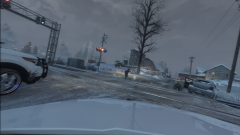
From the album: Spent a while crafting these scenes, mwha perfecto
-
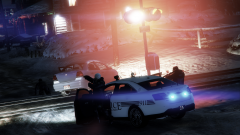
From the album: Spent a while crafting these scenes, mwha perfecto
-
-
-
 Well I want to delete my review not leave a star but heck not my phpbb site and also here is real comfortable driving:
- 330 comments
- 24 reviews
-
Ah got ya, fair enough. Thanks for the review and configuring it for fiveM. Enjoy 0.4 if you manage to get it working!
- 56 comments
- 10 reviews
-
Can't fix ERR_FIL_PACK 1 no matter what I do 😞
-
I cant wait to chase some scrotes in a ford focus also, ooooo: https://pasteboard.co/I2yEark.png
-
If you look at the Internet archive, the first ever release of LCPDFR was uploaded at 2:08PM https://web.archive.org/web/20100910021027/http://www.lcpdfr.com/cops/ 208...2...8...last day of FEB LADS
-
Sorry sam here meant 2020 not 2019 sorry fellas next year
-
I liked club penguin too 😞
-
-
-
Why are you like the fourth person to say to me don't play it?!?! I have been playing lcpdfr for yearrrrrs. If anything I have the most experience in LCPDFR because I never got into lspdfr as much. LCPDFR has always been the better, and it's just a bit of a shitter to not see cool chases or forensics or murder scenes or even *callouts* in this release date announcement.
-
Yeah I have read them in the lead up to this announcement. Apart from the Sync thing which looks cool, this post doesn't have anything to excite me. so sorry 🤨 You seem to of (not have) missed what I said in the first place which is the 4 things sort of showcased aren't very original to the 2 lc/lspdfr mods. They are more like new add-ons, I don't like the lack of RP and gadgets. This leaves all to the imagination; flashlight, tazer, searching multiple people... it's all be mentioned but I still just want a version 1. A proper massive mod which is what 0.4 looks to be, but finalised so we are not all expected to pretend we're beta testers. LCPDFR only got out the womb last year and that is nearly 10 years old. You cant say you don't understand me. Black mesa source was quicker than this 😄