


Nach
Members
-
Joined
-
Last visited
Everything posted by Nach
-
.thumb.png.915a8cf6e3a492dc1526e5980d67c978.png) Tag us when it'll happen. The texture is not bad at all!
Tag us when it'll happen. The texture is not bad at all! -
 Maybe you've already solved the problem, but I solved it following this video.
- 964 comments
- 158 reviews
-
-

- 1
-
-
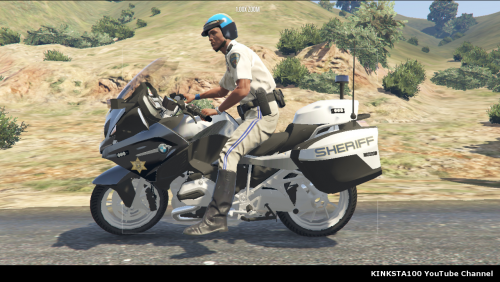 Hi. I got a little problem installing this BMW bike as a new vehicle. I state this is not the first vehicle that I install as new, and, in order to do that, I always follow this handy video guide. Anyway, I've installed the mod as sahpb, and in the vehicle.meta file I pasted the code that I found in the rar of this mod. The issue comes out when I spawn the bike in game: it is pratically muted. It doesn't make any kind of sound, as you can see hear in this video Can anyone help me to fix it? It's a real awesome mod. Thanks in advance! SOLVED: I had to change <audioNameHash / > with <audioNameHash>policeb</audioNameHash>
- 30 comments
- 7 reviews
-
Sure.
-
Hi. I have not played LSPDFR since June. Today I tried to play, but when I launch RAGE it starts an infinite loading (click). It doesn't crash, it exactly does nothing, for minutes, quaters of hour and even entire hours. I even turned my antivirus off, but nothing changes. So I unistalled lspdfr (via .exe in the directory), and I deleted the entire game folder; I've reinstalled GTA 5, then lspdfr via manual installation and... the same problem came out. So I installed lspdfr again, this time via installer, and I got exactly the same issue. What do I have to do? EDIT: I've altready tried to set Plugin timeout threshold to 30000, but nothing changed.
-
-
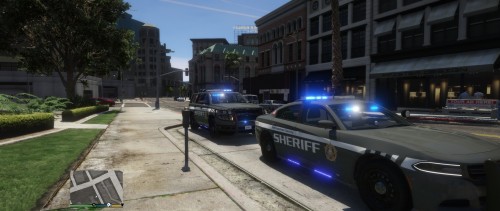 The Tahoe's lightbar is black. I know I have to replace the diffuseTint in vehicle.meta file, but with what? Anyway, this pack is awesome.
- 31 comments
- 7 reviews
-
Okay, problem solved. Thank you very mutch mr YoshePlays. Honest, I owe you a favour!
-
Got it. I'll do it as soon as possible. How can I do it? I'm a new modder, as I said before, I don't know OpenIV really well... Anyway, this is the screenshot of the file. What I have to do exactly?
-
.thumb.jpg.4066677156985e22489bfecddc2f6c45.jpg) But... how? I still don't understand how I can uninstall it. The installation instructions say to install a package with OpenIV... so should I uninstall the package? If yes, how?
But... how? I still don't understand how I can uninstall it. The installation instructions say to install a package with OpenIV... so should I uninstall the package? If yes, how?- 376 comments
- 81 reviews
-
I've installed it in the mods folder, but the mod has to be installed with "package installer" of OpenIV. I opened OpenIV > Tools > Package Installer, so I selected one of those packages (LASD_1.4A.oiv or LASD_1.4A_&_1.4OSS.oiv ; I've installed both). Then I selected "Install*", and I selected the mods folder.
-
Hi. Today I've downloaded and installed this car models mod. Nice mod, but I don't understand how to uninstall it. I saw an old topic, where a user asked the same question, but nobody replied. I'm a new user, so I don't know if this is the correct forum where ask questions like this. I'm also a bad modder, so, for who wants to help me, explain me what I have to do, step by step xd. Ahem, sorry for my bad english!
-
Hello. Nice mod, but I wish to know how to unistall it... I wanna try other models, and I don't understand how it is reversible. Plese, give me any istruction.
- 376 comments
- 81 reviews

.thumb.png.915a8cf6e3a492dc1526e5980d67c978.png)

.thumb.jpg.4066677156985e22489bfecddc2f6c45.jpg)