Skip to content
View in the app

A better way to browse. Learn more.

LCPDFR.com

A full-screen app on your home screen with push notifications, badges and more.

To install this app on iOS and iPadOS
  1. Tap the Share icon in Safari
  2. Scroll the menu and tap Add to Home Screen.
  3. Tap Add in the top-right corner.
To install this app on Android
  1. Tap the 3-dot menu (⋮) in the top-right corner of the browser.
  2. Tap Add to Home screen or Install app.
  3. Confirm by tapping Install.

DarrOw FR

Members
  • Joined

  • Last visited

  1.    nofreeusernames123 reacted to a comment on a file: Deadly Weapons
  2.    Ugvar reacted to a gallery image: 20180808123414_1.jpg
  3. Naudexer77 started following DarrOw FR
  4. Darrow Reeves     Finished responding to a [UC] Reports of an Armed Clown in Vinewood Hills, Normandy Drive
  5. Darrow Reeves     Responded to a [UC] Reports of an Armed Clown in Rockford Hills, Boulevard Del Perro South
  6. Darrow Reeves     Finished responding to a Public Intoxication in Rockford Hills, Boulevard Del Perro South
  7. Darrow Reeves     Finished responding to a CC Public Dispute Call in Burton, Boulevard Del Perro South
  8. Darrow Reeves     Finished responding to a Serve Warrant - Known Criminal in Burton, Boulevard Del Perro South
  9. Darrow Reeves     Finished responding to a Arson Attempt in Burton, Boulevard Del Perro South
  10. Darrow Reeves     Finished responding to a CarAccident2 in Burton, Milton Road
  11. Darrow Reeves     Finished responding to a gang leader take down in Burton, Milton Road
  12. Darrow Reeves     Finished responding to a Heavily Armored Gunman in Burton, Milton Road
  13. Darrow Reeves     Finished responding to a Fight in Burton, Milton Road
  14. Darrow Reeves     Finished responding to a GangDriveBy in Burton, Milton Road
  15. Darrow Reeves     Finished responding to a Fight in Burton, Milton Road
  16. Darrow Reeves     Finished responding to a [UC] Reports of a Stolen Emergency Vehicle (2) in Burton, Milton Road
  17. Darrow Reeves     Finished responding to a S136Shoplifting in Burton, Milton Road
  18. Darrow Reeves     Finished responding to a S136PersonWithKnife in Burton, Hawick Avenue
  19. Darrow Reeves     Responded to a S136PersonWithKnife in Burton, Eastbourne Way
  20. Darrow Reeves     Finished responding to a Homicide in Burton, Eastbourne Way
  21. Darrow Reeves     Finished responding to a [UC] Warrant for Arrest in Burton, Eastbourne Way
  22. Darrow Reeves     Finished responding to a cyber security threat in Burton, Eastbourne Way
  23. Darrow Reeves     Finished responding to a Animal involved in Car Accident in Burton, Eastbourne Way
  24. Doesn't work for me... I've got no audio when requesting callouts
  25.    Teekay reacted to a post in a topic: [WIP] Agency Dispatch Framework
  26.    LSPDhotstuff reacted to a post in a topic: [WIP] Agency Dispatch Framework
  27. Hey, I came here cause I saw your thread on @ziipzaaapM16A4's one. Your plugin seems absolutely amazing, and I think you two should collaborate ! This would be the greatest enhancement to LSPDFR since STP and UB ! By the way, integration with Bejoljo plugins would be awesome as his mods are now widely used. Can't wait to see a release !
  28. I can't wait to download the next version with the accurate LAPD launcher !! Do you have an ETA ?
  29. I'll try it out right away ! Amazing idea. Only thing I could suggest would be that when you fire your weapon, it activate the Panic Button from Ultimate Backup, this way it's fully customizable
  30.    DarrOw FR reacted to a comment on a file: Deadly Weapons
  31.    Jesyx reacted to a review on a file: Be On The Lookout Call
    Absolutly amazing !! I was looking out for a vehicle for about 20 minutes all across Los Santos before finally finding him. Really immersive, keep it up !
  32.    Reddington reacted to a gallery image: 20200417235443_1
  33. Images added to a gallery album owned by DarrOw FR in GTA V Galleries
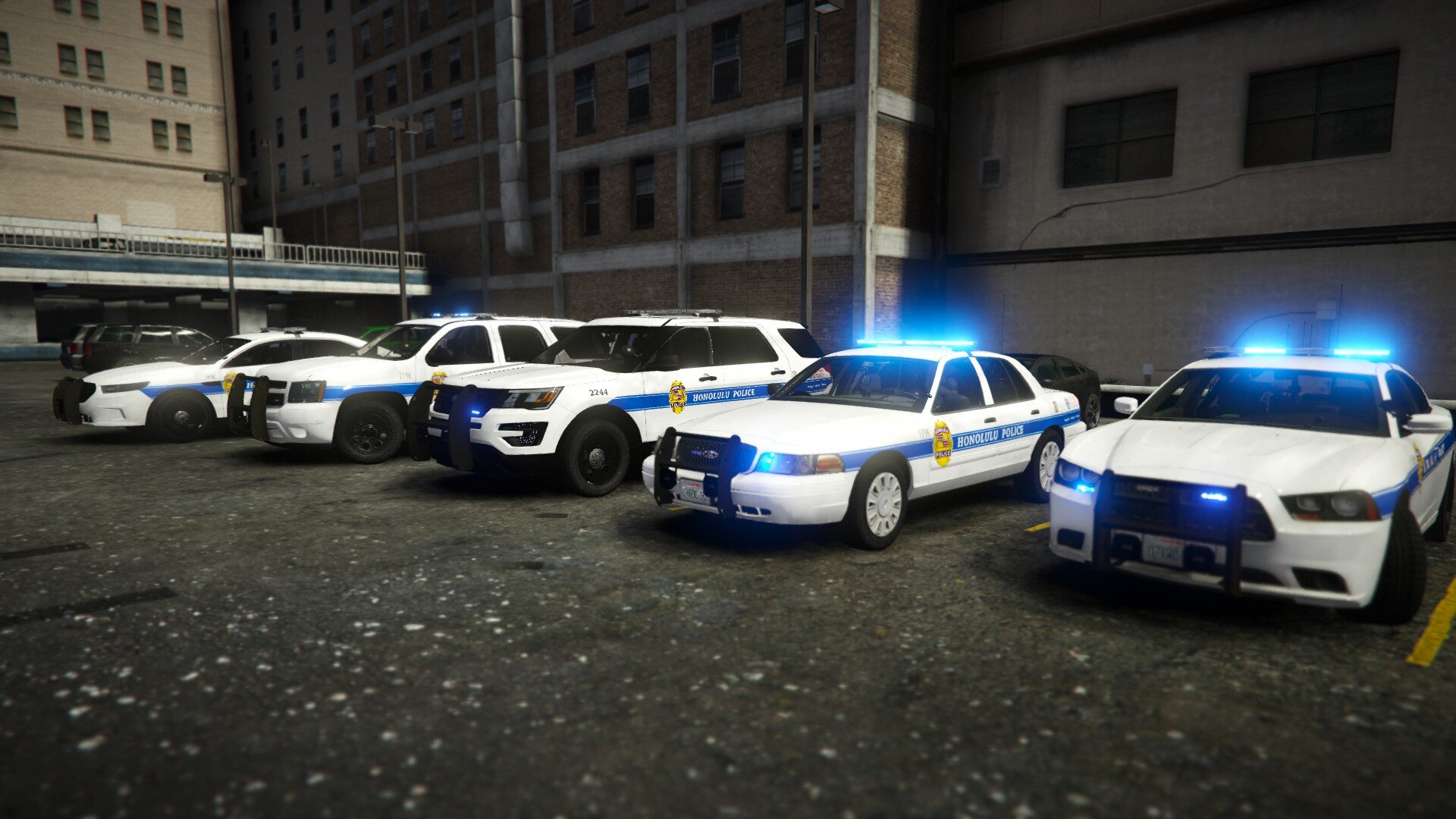
    Finally back after more than a year away from this project. HPD Pack should be released soon and the uniformes are on their way I'm also working on the Public Dept. Of Safety, Airport Police, Port Authority and Fictive Highway Patrol ! Most vehicles are from Ripple, I'm only doing the textures !
  34. Hi, I'm currently working on a texture pack for EUP, but the dept. I'm creating doesn't have the same ranking system, so I need to create models to replace some decal model. The issue is that I have no idea how to make a such thing so... if anyone knows, your help would be much appreciated Thanks
  35. Hi, I'm currently working on a texture pack for EUP, but the dept. I'm creating doesn't have the same ranking system, so I need to create models to replace some decal model. The issue is that I have no idea how to make a such thing so... if anyone knows, your help would be much appreciated 🙂 Thanks
  36. Look this video, he managed to close a lane with cones. I dunno if that's what you want
  37.    DarrOw FR reacted to a comment on a file: [ELS] Honolulu Police Dept. Pack
  38. Hey, you need to replace the textures in lspd15 and lspd16.ytd by the unmarked one
  39. You can lower the radius of the controlled speed area in STP .ini 😉
  40. Hi, I'm currently creating textures of the Honolulu Police Dept. for EUP. Sadly there's one thing I can't do with textures, so I need someone cabable of creating them. I can obviously pay and it's pretty urgent. It's just some insigna and badges to create, nothing too complicated I guess. If you know a tutorial to create them, it could be a solution as well Thanks
  41.    DarrOw FR reacted to a comment on a file: [ELS] Honolulu Police Dept. Pack
  42.    DarrOw FR reacted to a comment on a file: [ELS] Honolulu Police Dept. Pack
  43. Yeah I know, but the template provided is a little bit messy so I'll make the texture later 😉 It will probably be in the next update
  44. DarrOw FR changed their profile photo
    • 970 downloads
    • Version 1.1
    This pack is based off the Honolulu Police Department in Hawaii. It currently includes 13 textures for over 20 vehicles models. This pack is in WIP so it'll be regularly updated with new textures for new models. Skins included : 8 marked textures for the Honolulu Police Dept 2 unmarked textures (basically just licsense plates 😄 ) 1 textures for the Honolulu Emergency Service Dept 2 textures for the Hawaii Dept of Transportation Planned skins : EUP uniforms for every Hawaii service (Police, EMS, Fire Dept, Coroner etc...) Hawaii Dept. of Public Safety vehicles textures Airport and Port Authority vehicles textures Fire Dept. vehicles textures Fictive Hawaii Highway Patrol I'm looking for people who could help me in this project, my goal is to create a huge Hawaii Pack to transform San Andreas into Hawaii. Feel free to join my discord : https://discord.gg/jkBwy3f If you know how to make textures, vehicle models, callouts or that you are just a Hawaii Five-0 fan, we could create something amazing together Simple installation instructions are provided in the readme.txt Vehicles used to create the pack (you can still use others) : https://www.lcpdfr.com/downloads/gta5mods/vehiclemodels/25892-els-lspd-legacy-pack/ https://www.lcpdfr.com/downloads/gta5mods/vehiclemodels/14848-els-2008-ford-f550-wrecker/ https://www.lcpdfr.com/downloads/gta5mods/vehiclemodels/17526-4k-template-els-multi-livery-2008-ford-f-550-flatbed-tow-truck/ https://www.lcpdfr.com/downloads/gta5mods/vehiclemodels/15104-2015-ford-f-550-ambulance/
  45. Hi, I have an issue with the agency.xml and the spawn of police vehicles. Here, I have LSPD1 to LSPD7 which spawn with livery one, and it works fine The issue is here : For LSPD11 to 18, I'd like them to spawn with either livery1 or livery2, or if it's not possible, with livery2. As you see on the picture, livery2 is empty, because I want the cars to be unmarked. But it doesn't work and I get all my vehicles with the first livery (marked) I hope you'll understand my issue, my english suchs sometimes Ty

Account

Navigation

Search

Search

Configure browser push notifications

Chrome (Android)
  1. Tap the lock icon next to the address bar.
  2. Tap Permissions → Notifications.
  3. Adjust your preference.
Chrome (Desktop)
  1. Click the padlock icon in the address bar.
  2. Select Site settings.
  3. Find Notifications and adjust your preference.