



sEbi3
Friends of LSPDFR
-
Joined
Everything posted by sEbi3
-
 Hi, thanks for letting me know! UC uses a system for only choosing locations near the player. The simple reason you're still getting callouts in the city far away from your location is that I haven't added many locations in Blaine County. Some callouts don't even have any in northern areas. I've made a note and will add many locations in the northern areas for all callouts in the next update. Can you let me know which callout a code 4 gets? Hi, thank you for letting me know and thanks for your kind words! I'll check it out soon as well and will add the tag.
- 643 comments
- 55 reviews
-
-

-

- 2
-
-
Exactly, next to this release, I already worked on adding support for PR in the next update. As I already tested a few things with NPCAI too, I think it will also be part of the next update.
- 643 comments
- 55 reviews
-
Hi, 4-5 callouts are currently broken and will end up instantly after accepting them. To fix this issue, set these callouts to "false" in the configuration file. In this case you won't get them in game anymore until UC gets updated. Hi, UC is still working. I've tested it a few days ago after more than a year. A few callouts might end instantly after accepting them. About 20 callouts work without any issues for me. UC will get a new update in the near future with bug fixes, support for PR and more.
- 643 comments
- 55 reviews
-
-
- 3
-
-
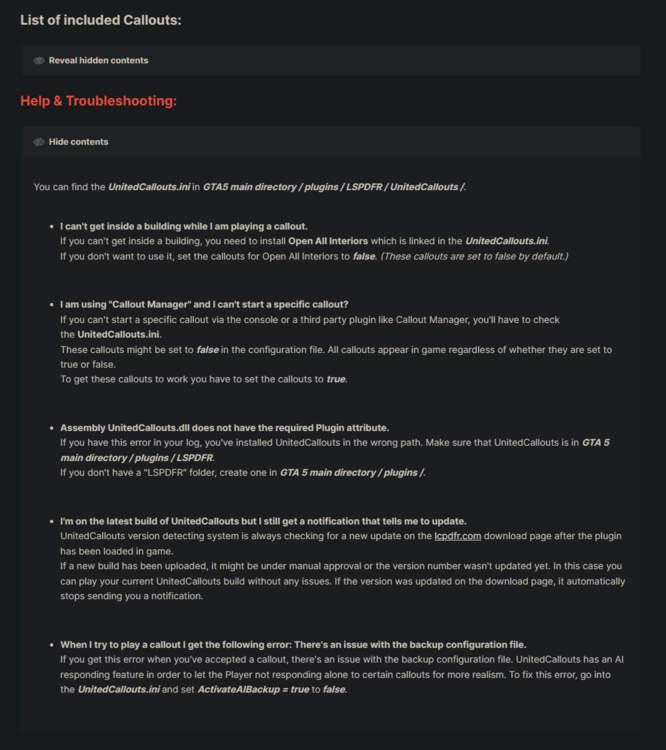
Hi, you can find some general help & troubleshooting on the UnitedCallouts download page. This is the fix for your problem: When I try to play a callout I get the following error: There's an issue with the backup configuration file. If you get this error when you've accepted a callout, there's an issue with the backup configuration file. UnitedCallouts has an AI responding feature in order to let the Player not responding alone to certain callouts for more realism. To fix this error, go into the UnitedCallouts.ini and set ActivateAIBackup = true to false. This issue has been fixed already for an upcoming UnitedCallouts update.
- 643 comments
- 55 reviews
-
Hi, you can find some general help & troubleshooting on the UnitedCallouts download page. This is the fix for your problem: I can't get inside a building while I am playing a callout. If you can't get inside a building, you need to install Open All Interiors which is linked in the UnitedCallouts.ini. If you don't want to use it, set the callouts for Open All Interiors to false. (These callouts are set to false by default.)
-
Hi, there's an issue with your backup configuration file. Go into the UnitedCallouts.ini ( GTA5 / plugins / LSPDFR / UnitedCallouts / UnitedCallouts.ini ) and set "ActivateAIBackup" to "false".
- 643 comments
- 55 reviews
-
-

- 1
-
-
Hi, thanks for letting me know. I'll change the the positions of the Peds at this location for the next update. Thanks, I'll take a look into it! For now you can disable the callout in the config. I test all the callouts multiple times without any other mods installed and it works without any crashes. Everytime someone reports that kind of crash with invalid Peds, I can see they have STP installed. I mean, to be fair, I could be wrong but STP is taking control of the Peds and that would make sense to me. I'll take a look into it and see what I can do. Can you tell me if you only get this issue with UC or with other callout plugins as well? Thanks for reporting it! Looks like it couldn't spawn the ambulance. This issue is not related to UnitedCallouts. It's a known bug of ELS.
- 643 comments
- 55 reviews
-
Hi, the notification you get after you've accepted the callout is just saying that you'll get the information about the suspect from the LSPD database shortly. After a few seconds later, you'll get another notification with the information and the wanted status.
- 643 comments
- 55 reviews
-
The callout is giving you the information about the suspect after you've accepted it. You can always look up the notifications in the pause menu.
- 643 comments
- 55 reviews
-
-
- 1
-
-
Hi, you have to send me a log of your crash. Otherwise I can't help you out.
- 643 comments
- 55 reviews
-
-
Thanks for letting me know 👍 This error seems not to be related to UC. Can you please try again the callout?
- 643 comments
- 55 reviews
-
Yes, you can still use UC without "Open All Interiors" but then you can't play the callouts which needs the third party mod. If you install UC, the callouts which require the third party mod are set to false by default in the config. That means you won't get them in game unless you change it in the config.
- 643 comments
- 55 reviews
-
-
- 1
-
-
I'm glad to hear you've solved the problem. Some callouts are set to false in the UnitedCallouts.ini because they need a third party mod called "Open All Interiors". If you want to play them, just have a look into the config and set them all to true.
- 643 comments
- 55 reviews
-
Hi, there's an issue with spawning the "POLICE" car. Did you replace that car? If yes, is the car working? Hi, can you please reinstall UnitedCallouts and try again? This issue should be fixed with the latest UC build.
- 643 comments
- 55 reviews
-
-
Hi, I'm glad to hear you enjoy UC. I've already been working on the build (1.5.7.9) but haven't had time to test it yet. If you want you can join my discord server and drop me a DM and I'll send you the version to test 🙂
- 643 comments
- 55 reviews
-
-
- 1
-
-
Hi, the bank heist callout is part of the AssortedCallouts plugin and not UnitedCallouts.
- 643 comments
- 55 reviews
-
-
- 1
-
-
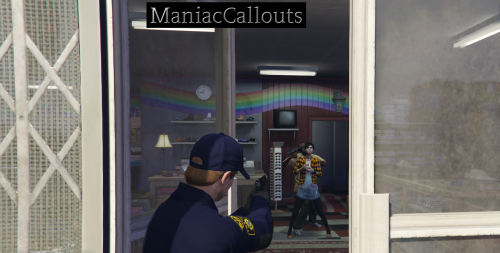 Hi, I don't think he used anything of the UnitedCallouts source code in his plugin. The callout names are quiet similar to UC but they have different outcomes and possibilities. In addition, the procedure of these callouts are different to UC.
 -
 Hi, there's no extra menu for spawning your DLC cars but you should be able to spawn them by name with the menu.
- 69 comments
- 6 reviews
-
-
- 1
-
-
Thanks! I'll take a look into it. I have already planned to add new locations in the next update. This callout was made for any K9 mods out there.
- 643 comments
- 55 reviews
-
-
Hi, can you start the callout another time and then send me your latest RPH log, so I can take a look into it? Can you post the full update notification here, so I know which one you mean? I don't have a lot of time currently to work on UC. If I have some time again, I'll update UC asap. Thanks for your suggestions! You can just drag and drop the file to attach it. I can't look into it without a log.
- 643 comments
- 55 reviews
-
Thanks for reporting all the issues. I'll take a look into it. This plugin won't crash your game. Can you please send me your latest RPH log?
- 643 comments
- 55 reviews
-
Hi, the Murder Investigation callout is set to false by default in the UnitedCallouts.ini . You can find it under the "Open All Interiors" supported callouts. (Above the settings)
- 643 comments
- 55 reviews



