PorkSoda
Members
-
Joined
Everything posted by PorkSoda
-
 Hey just a heads up, in your Fabe's LSPD files, the Tahoe's ytd is missing the 6. Also, do you plan on adding his other vehicles in the pack?
- 380 comments
- 31 reviews
-
 The first reviews are from before this developer restarted his project, since then he has completely restarted and it's 10x better. Good on you @Abel Software for the progress you've already made at bettering the plugin!
- 200 comments
- 27 reviews
-
-

- 1
-
-
What's your list of plugins, and where'd you install EUP?
-
Yes it has recently changed and gotten harder for some reason. Now it's nearly impossible to PIT from straight behind, you have to get big speed and hit the back very hard, and then they'll just push you outta the way and keep going. Definitely is annoying
-
-
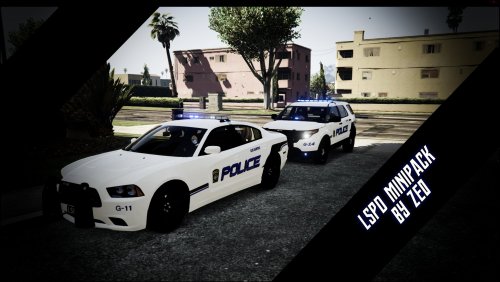 I had posted some unnecessary files in the last one given my noobness and it was hidden, so it was reuploaded in the correct section. Also, because I wanted the blue/blues to be available at first choice as I like it better with the texture and is like the cars I was going for. :)
- 6 comments
- 1 review
-
Hi! Thanks for taking the time to check these out, these are the first skins I've ever made, so feedback would be very much appreciated. I do not own these cars, their respective links from where I got them can be found here: 2013 FPIU 2014 Charger
- 6 comments
- 1 review
-
-
- 3
-
-
Tried this too, didn't work lol
-
Tried putting them in there, doesn't work. :/ Gonna try a clean install for the 3rd time and try again.
-
Tried this, no luck. :/
-
So, I've been trying to install freakin' car mods like I always have. I've always been successful, and for some reason this time they're not working. I've literally changed every single police and other police files under the whole mods directory to the model i want, it's STILL spawning vanilla cars, except for police1. I used the OpenIV Search to go under every police2 etc. file under the whole mods directory which i've got the update backup in, and changed all of them and like i said still spawning vanilla cars. It's almost like the game isn't using my mods directory for the update file, but the weird thing is, the police1 car loads, however ELS doesn't work on the car still.
-
Lol that one would've been pretty funny too.
-
@Abz Well it'd be for sheriff, police, police2, and police3... How would I go about it?
-
Yes I may have to give it a try, I've yet to just for that reason. I can only imagine the annoyance, but idk. I can't seem to decide whether or not it's more annoying to burn out everytime I pull out or if it would be more annoying to like you said pick it up and put it down everytime.
-
I had to update my RAGENativeUI.dll just like yesterday.
-
So when playing with a keyboard, every time I pull out of somewhere I burn out because all I can do is press the 'w' key, so I find myself repeatedly and quickly tapping the 'w' key so i dont burn out to pull out, and it's rather annoying especially with a mechanical keyboard. Also when trying to come to a stop, and I press the 's' key, and it locks my breaks up. I just didn't know if there was anyway I could edit a handling file or something of that nature to turn down something so that didn't happen as it's really really annoying and super un-realistic. I also am aware that a controller could be a possible solution but with a controller, I still have a lot of functions I'd need to use my keyboard for.... If there's not, this could also be a suggestion, to fix the burning out/locking breaks up..
-
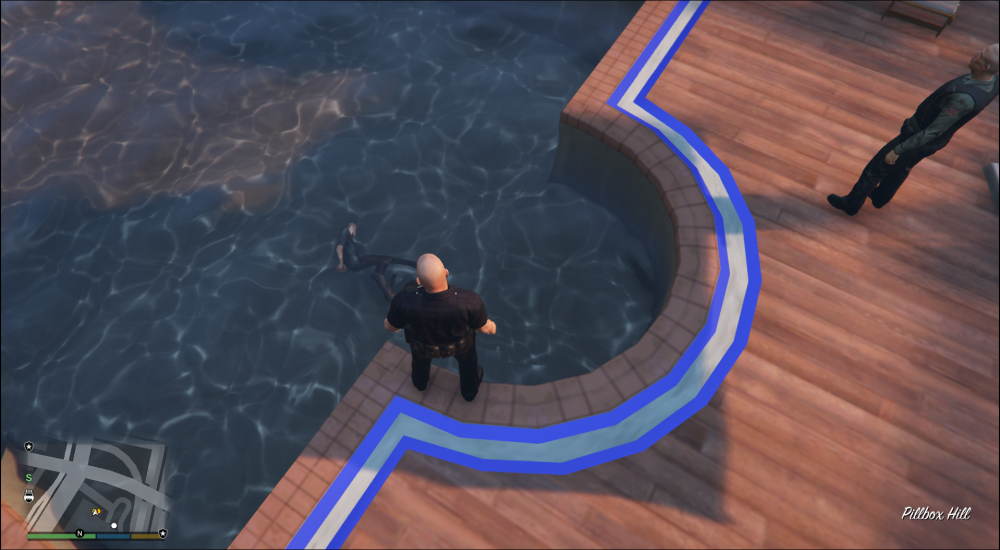
Thought you guys would get a kick outta this one, he's a bit distorted due to the water moving and messing with the image of his body, but I got called out onto a call that a Security guard needed assistance, upon arrival I determined he needed to be arrested. I put the man in cuffs, and we start to walk to my car, and plop he falls right into the pool. I was a bit shocked I didn't really know what to do, then I hopped in for whatever reason, and touched his body and saw that it was ragdolled, so he'd had drowned lol. I would've figured LSPDFR would've bugged and he'd have climbed out, but nope. Be it the drugs or handcuffs, that s.o.b drowned
-
Uhh that's his computer not mine and apparently it's doing him just fine ? Lol.
-
Thanks man!
-
Hi, I'm planning on ordering the parts list below within the next 2-3 weeks and planned on playing LSPDFR. My question to you guys is, how will my fps be looking with custom cars, a few mods (the cliche ones that almost every you tuber has) ? Heres the parts list: CPU: AMD Athlon X4 860K (3.7 ghz quad core) Motherboard: Asus A68HM-K Micro ATX FM2 RAM: Kingston HyperX fury blue 8 GB kit HD: Barracuda 1 TB HDD GPU: EVGA GTX 950 Power supply: EVGA 430w Thank you in advance! :)
-
Thank you! :)
-
Alright, what mods do you think I could run smoothly without upgrading? All I really want is ELS, LCPD:FR, custom car or two and Personal Trainer.
-
Okay
-
Thanks. I can boost my processor to 3.2Ghz, and I just mainly want Els, lcpdfr,custom car or two, and trainer. But systemrequirementslab is awful and is very in-accurate due to friends experiences and my own experiences.
-
I can't, I'm stuck with this one. I'm just wanting to know how this would run the mods I listed?