PorkSoda
Members
-
Joined
Everything posted by PorkSoda
-
I recommend just getting EUP. I believe it's an issue with LSPDFR not recognizing the ped model needed for a sheriff outfit. You could attempt to download only EUPFR basic configurations without EUP and see if it works. If not I recommend adding EUP Menu and then redoing the basic configurations file.
-
Try loading your game with no rage plugins loaded at startup and see if it persists. Also I would recommend removing AutomaticSirenCutout as it's outdated and I've seen many people have issues because of it. If neither fixes it you could add it back if you don't think it's causing any issues.
-
Open the game, go on duty, or whatever you need to do to see the textures change. After the textures change, close the game and attach your RPH log here.
-
So if you followed the names of the folders, those are what you replace. Check the file and make sure it's the same name of the one you're replacing. Once that's done or if you already did it, the FHP one includes a wardrobe file. So those outfits should be in your wardrobe if you replaced yours with the one provided, however it's a pretty old EUP setup and there might be issues with it. For the Miami one, looks like you will have to use EUP menu to create a new outfit and find the textures you added. After you find them all and have it setup, just save it and it will be in your wardrobe.
-
First off make sure you have the latest RageNativeUI by alexguirre, if you have any mods needing scripthook v and or scripthookvdotnet, make sure you have the latest of those. I recommend using a nightly release of SHVDN if you need it. If you have vehicles etc then install an updated gameconfig. Also try setting Main.DisableGameBlipHiding to true in your lspdfr.ini
-
You should drop your ragepluginhook.log from your main directory. I could see a HUD mod causing this, or maybe a graphical mod if you have one
-
Usually ped stuff is installed into mp_m_freemode_01 or the female model, but it really varies. There should be a readme included on the specific ones to replace. Some modders include the folders named as the ones that need to be replaced. Once they are added, you need to get the component and props values and then set them either in vanilla lspdfr xml files or UltimateBackup xml files-I recommend the latter-and that is how it will dictate which come where. Link the pack you installed so we can get a better idea of your situation.
-
I'm sorry! I misunderstood you into the post. What I originally told you to do is how you set ambient peds for lspdfr. I've attached the updated outfits.xml file that should fix your issue. outfits.xml
-
The LSPDFR configs need to be placed in GTA V > lspdfr > data > custom The improved handling lines included are police and police3, if you look near the top and bottoms you can see where each one ends. Follow the path listed at the top of the handling line readme, and then search for police and then police3. Replace what it has in the .txt for both. Do the same process for the vehicles.meta, follow the path, open your file and replace the ones he has listed.
-
Go into cop_presets_outfits.xml. Search for all LSSD outfits (Example: LSSD Class A, named preset_lssd_1_a), and replace the components and props section with the ones you have posted in your original post. The structure is the same, just compare.
-
What did you last do before the crashes started? Also I recommend if you have any plugins that rely on SHVdotNet to switch to the latest nightly release.
-
You need to edit the sheriff lines into your cop_presets_outfits.xml, it's in GTA V > lspdfr > data Vanilla LSPDFR pulls sheriff outfits from cop_presets which are pulled from cop_presets_outfits (I believe)
-
I ask because I've messed up my outfits and it caused loading hitches / crash issues. I would try replacing your modified xmls with lspdfr vanilla outfit xml files and seeing if crashes stop, if they do then go from there
-
Have you messed with your peds' outfits? Looks like maybe not being able to find the preset outfits caused a crash.
-
Check if GTA is open in the background or anywhere, close it if it is
-
-
Noticed I received my one year in badge the other day. I'm curious though, where is my 12 years in badge? 😉 Joking. Jokes aside it's so nice to see this community still around and cool to still see some names I recognize from the lcpdfr days. I can only imagine how many dreams this mod inspired and facilitated, and if you wanna go deeper how many lives the mod has saved? Here's to those that have been around since the olden days, one for the ones here now, one for the ones who didn't make it to today, and one for the future supporters. Godspeed fellow humans!
-
Are you using Stop the Ped realistic weapon system? It will delete the other guns and give you what you have set in there.
-
 Seems the engine key doesn't work for me, I don't think I have anything to conflict with it. Everything else works fine, I've tried rebinding the key to no avail.
- 447 comments
- 17 reviews
-
Try installing the newest nightly release for scripthookvdotnet.
-
Did you change it in GTA V > lspdfr > data > inventory.xml ?
-
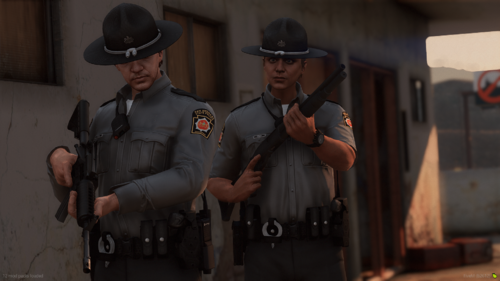 *chefs kiss*
 -
-
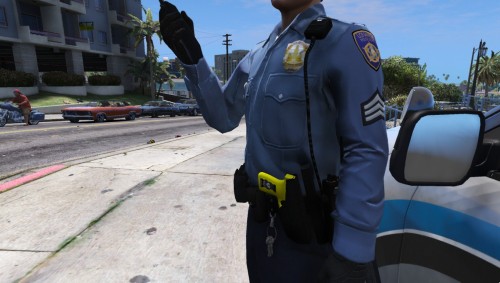 Tip for anyone installing these: the undershirt 1 is task_diff_011_a_uni and the undershirt 002 is task_diff_009_a_uni
- 1 comment
- 1 review
-
 I sound like a shill for you LOL, but man I'm so impressed by what this plugin started as and has now become, thank you for the hardwork on this man!
- 200 comments
- 27 reviews