


Jetty Bot
Members
-
Joined
-
Last visited
Everything posted by Jetty Bot
-
Please upload your RagePluginHook.log 🙂

-
Looks like you might have accidentally installed an old version of Rage Native UI again You'll need to update it again and make sure you don't accidentally replace it again if it comes with another plugin you install https://github.com/alexguirre/RAGENativeUI/releases/tag/1.9.2
-
Looks like you just need to update Rage Native UI https://github.com/alexguirre/RAGENativeUI/releases/tag/1.9.2
-
Can you please elaborate? Is it crashing or are you having difficulty installing it? Can you please attach your Ragepluginhook.log?

-
Can you please upload you Ragepluginhook.log and asiloader.log? They can both be found in the main directory.


-
Start by making sure you are able to launch the game without Rage. If you can great. Try loading all the way into the game, and once you've loaded in Alt+Tab out and launch Rage. If you can't then you need to make sure you've updated your mods folder (that includes updating the update.rpf and game config). You also need to make sure you've updated ScriptHookV if you use that. And if you use ELS this latest update broke that too so you will need to update the AdvancedHookV.dll This could also be an issue with needing to add the GTA folder and Ragepluginhook.exe to your antivirus exceptions list, so I would go ahead and do that as well.
-
Take a look at this forum post from Cyan that talks about the newest replacement vehicles
-
It looks like Bicycle On the Freeway from United Callouts crashed I would disable it in the ini found at Plugins/LSPDFR/UnitedCallouts
-
I would recommend reinstalling LSPDFR using the manual install to ensure you have all the files that are required by LSPDFR.
-
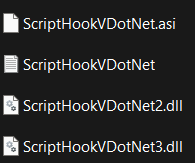
I would try removing ScriptHookVDotNet for the time being and try loading lspdfr again. If you don't have the most up to date version from GitHub it can cause issues when used with Rage/LSPDFR.
-
Please try loading the game with ELS installed. When it crashes upload your els.log and asiloader.log here. They can both be found in your main directory.
-
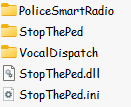
No you do not. I simply screenshot the files from STP. This does not negate the fact that your STP is not loading. Which most likely means you do not have the .dll. When installing plugins it is easiest to drag and drop the plugins folder directly into your main directory so that all of the files that need to be there are. If you want you can delete those two folders but it does not make a difference.
-
According to your log StopThePed did not load. Check Plugins/LSPDFR and ensure all these files are there. If they are not reinstall StopThePed.
-
Please upload your RagePluginHook.log

-
Rename your mods folder to _mods, this will disable your mods folder for trouble shooting purposes, and try launching your game again. If your game launches with the mods folder disabled it means something you've installed or edited in your mods folder is causing the game to crash. You will need to revert any changes you've made to your mods folder until it works while being named mods. If you've installed any addons ensure you have the newest versions of the game config, heap adjuster, and packfile limit adjuster installed. https://www.gta5-mods.com/misc/gta-5-gameconfig-300-cars https://www.gta5-mods.com/tools/heapadjuster https://www.gta5-mods.com/tools/packfile-limit-adjuster Alternatively you can restart your mods folder entirely.
-
-
When you install cars, replacement cars, you should always put them into your mods folder. If you do not have a mods folder I would look up a video on how to make one. From there you will want to place the vehicles you wish to install in mods\update\x64\dlcpacks\Patchday28g9ecng\dlc.rpf\x64\levels\gta5\vehicles.rpf regardless of what the instructions that came with the car say.
-
Please upload a log. But from what you described it sounds like it's going to be a mods folder issue. So you're gonna want to rename your mods folder to _mods, this is going to disable the mods folder, if the game launches when the mods folder is disabled then it tells you something you've done in the mods folder is causing the crashing. If that is the case you are going to have to revert the last changes you've made to the mods folder until it works again while being named mods.

-
Make sure you install vehicles to the newest patchday. Regardless of what the instructions of a replacement pack might say. mods/update/x64/dlcpacks/patchday28g9ecng/dlc.rpf/x64/levels/gta5/vehicles.rpf/ Go install the cars there and make sure you don't miss any files from the download.
-
I do not see a direct cause for the crash but I would remove Arrest Manager as it is outdated and see if that allows you to load
-
Please upload you RagePluginHook.log found in the main directory

-
Computer+, while being a very cool plugin, is horribly outdated. Therefore crashes are going to happen regardless of what you do if you keep it installed. An alterative you can check out is Compulite (Careful with the popup ad's) https://www.bejoijo.com/post/compulite
-
It looks like you simply need RageNativeUI https://github.com/alexguirre/RAGENativeUI/releases Just place the RAGENativeUI.dll in your main directory and launch your game again
-
First try loading the game without Rage, through Steam, and once you've loaded in Alt+Tab out and launch Rage. If you aren't able to launch the game even without Rage then rename your mods folder to _mods, this will disable it, and try launching without Rage again.
-
Hola friend. First try loading the game without Rage, through Steam, and once you've loaded in Alt+Tab out and launch Rage. If you aren't able to launch the game even without Rage then rename your mods folder to _mods, this will disable it, and try launching without Rage again.




