admirable
Members
-
Joined
-
Last visited
Everything posted by admirable
-
-
 Will think about developing a separate mod for it in future (in my spare time). It should work, the mod is mainly made for GTA5 core version. Tested with NexusMDT Lite without any trouble.
 -
I'll keep it in mind for future update.
-
Pleasure to hear ☺️ Indeed it is. I will remove few sections in my free time. 😃 Thanks though
-
Hell yeah!! Thanks
-
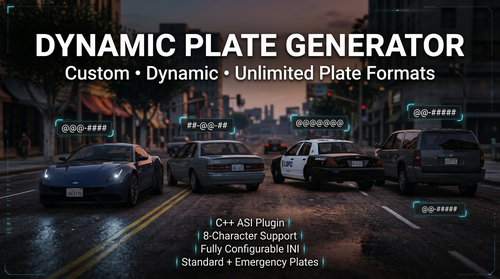
Dynamic Plate Generator is a lightweight C++ ASI mod for Grand Theft Auto V / LSPDFR that dynamically generates license plates using customizable formats defined in an .ini configuration file. Unlike mods that rely on a fixed set of predefined plate styles, Dynamic Plate Generator allows you to create as many custom plate formats as you want, with a maximum plate length of 8 characters. Whether you want realistic American-style plates, fictional state plates, European-inspired formats, police/government plates, or completely custom designs, you can define them yourself. Features🚗 Dynamic License Plate Generation 🔧 Fully configurable through an .ini file ♾️ Unlimited custom plate formats 🔤 Supports letters and numbers 🔢 Supports multiple custom combinations 🚓 Separate formats for Standard and Emergency / Government vehicles ⚡ Written in C++ as an ASI plugin 🪶 Lightweight and designed to run in the background 🎮 Designed for GTA V / LSPDFR environments 📄 No need to modify game files manually 🛠️ Easy-to-understand configuration How It WorksDynamic Plate Generator uses simple pattern characters to determine how license plates are generated. Each format is defined using: Character | Meaning @ | Random letter # | Random number - | Literal separator ExampleFormat_1 = @@@-#### This can generate plates such as: ABC-4821 KTR-9037 XPM-1745 The letters represented by @ and numbers represented by # are generated dynamically. ConfigurationThe configuration file contains separate sections for different vehicle categories. [Formats_Standard] ; Merged Standard & Vanity formats Format_1 = @@@-#### Format_2 = ##-@@-## Format_3 = @@@@@@@ Format_4 = #@@@### [Formats_Regional] ; Dedicated Emergency / Govt formats Format_1 = @@-##### Format_2 = ###-@@@@ Format_3 = @@-###-@ Format_4 = ####-@@@ Format Characters@ — LetterEach @ represents one randomly generated letter. Example: Format_1 = @@@ Possible results: ABC KPX MTR ZQW # — NumberEach # represents one randomly generated number. Example: Format_1 = #### Possible results: 4821 9037 1745 6208 - — SeparatorThe - character is treated as a literal separator. Example: Format_1 = ABC-#### Possible result: ABC 4821 You can use separators wherever you want, provided the resulting plate stays within GTA V's character limit. Creating Your Own FormatsYou are not limited to the four formats included in the default configuration. You can add as many formats as you want. For example: [Formats_Standard] Format_1 = @@@-#### Format_2 = ##-@@-## Format_3 = @@@@@@@ Format_4 = #@@@### Format_5 = @@-##### Format_6 = ####-@@ Format_7 = @#@-###@ Format_8 = ###-@@@ Format_9 = @@@@-## Format_10 = ##@-#### The mod will read the available formats from the configuration and use them accordingly. You can continue adding: Format_11 Format_12 Format_13 Format_14 ... There is no requirement to stop at four formats. InstallationRequirementsGrand Theft Auto V Script Hook V ASI Loader LSPDFR (Optional) Installation StepsDownload the latest release of Dynamic Plate Generator. Extract the downloaded archive. Copy the mod files (DynamicPlateGenerator.asi & DynamicPlateGenerator.ini) into your GTA V main directory. Make sure the .asi file is located in the GTA V root directory alongside your other ASI plugins. Launch GTA V. The mod will automatically load through the ASI loader. Open the included .ini file to customize your license plate formats. CreditsDynamic Plate Generator Developed by Admirable C++ ASI Plugin for Grand Theft Auto V. Special thanks to the GTA V and LSPDFR modding communities for their continued work, tools, documentation, testing, and support. Download & UpdatesThe latest versions and updates will be available through: LSPDFR: https://www.lcpdfr.com/profile/364065-admirable/ Patreon: https://www.patreon.com/cw/admirable The Patreon release is free. Supporting the project is completely optional but greatly appreciated. ChangelogVersion 1.0.0Initial release Dynamic license plate generation Configurable standard plate formats Configurable emergency/government plate formats Support for custom plate patterns Unlimited user-defined formats @ character support for letters character support for numbersMaximum 8-character GTA V plate format support LicenseThis mod is provided for use with Grand Theft Auto V. Please do not redistribute, re-upload, modify, or claim this mod as your own without permission from the original author. For permissions regarding modification, redistribution, or inclusion in mod packs, please contact the author. Enjoy Dynamic Plate Generator! Create your own plates. Build your own regions. Make your GTA V world more dynamic.
-
 Seems like, callout can't be accepted.
 -
-
I saw there was a update by JonJon for NexusMDT Lite version but now I can't find it on here. Is it taken down or some glitch?
-
You missed the contexts, since NPCAI is compatible with PR, you won't need to go through menu, just verbal conversation will pop suspect ID, License etc, so those random voice narration from character won't play.
-
NPCAI changed everything, you don't need to open menu to ask for ID or Koflem etc. Now it's more like talk with Microphone and get response from NPC with AI.
-
Should hyperlink the mods url on each header. Just a friendly suggestions so users can jump into those mods with ease.
-
I guess, STP had the ability for Partner to drive their own car and follow you while patrolling, I understand it wasn't perfect. But the suggestions are cool. I will defintely think about it in my future projects.
-
 Fantastic replacement for STP and UB. Finally switched into PR once for all.
- 744 comments
- 58 reviews
-
-
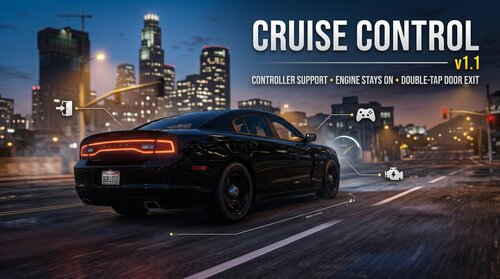 GtaCruiseControl is a lightweight, high-performance ScriptHookVDotNet3 script that brings a realistic, reliable cruise control system to Grand Theft Auto V. Unlike older cruise control scripts that trigger fatal exceptions or crash your game during entity reloads, this mod features strict defensive guard clauses. It has been built and tested to be completely stable alongside heavy total-conversion modifications like LSPDFR (RAGE Plugin Hook). Whether you are running code-3 to a scene or simply maintaining patrol speed limits on the highway, it integrates seamlessly into active gameplay. v1.1 Previewhttps://youtu.be/3F1EJQeVRpg Key Features: Full LSPDFR Stability: Built defensively to survive world reloads, player ped swaps, and sudden entity transitions without causing memory crashes or script failure. Modern API Input: Utilizes updated SHVDN3 input actions to ensure smooth responsiveness, avoiding old control-delay bottlenecks. Dynamic Config Pairing: The script automatically matches its .ini filename to whatever you name the .dll file, making installation clean and organized. Smart Brake Override: Seamlessly drops out of cruise control the exact millisecond you hit the manual accelerator or brake keys. Controls (Default): Y - Toggle Cruise Control (Locks to your current vehicle speed, including 0 MPH) I - Increase target speed (+2 MPH per press) K - Decrease target speed (-2 MPH per press / Applies manual vehicle brakes if held at a stop) PageUp - Rolls Down/Up Driver Side Window PageDown - Rolls Down/Up Front Passenger Window Double Tap F - Exit Vehicle while Door remains open Requirements: Grand Theft Auto V ScriptHookV (Latest Version) ScriptHookVDotNet3 Nightly Build v3.7.0.167(Compiled for .NET Framework 4.8) Installation: Copy GtaCruiseControl.dll and GtaCruiseControl.ini from the download. Drop both files directly into your main GTA V scripts\ directory. Edit the .ini file with Notepad to customize your keybinds at any time. Video Showcase: Note: The reason for building this mod was initially for personal use only. But decided to share with everyone as I have struggled to find a simple Cruise Control mod for my LSPDFR patrol. Thanks
 -
 Hello. Why does it say that "EUP Ultimate Backup Configurations require EUP 9.11 (9.10)."? If I am not using Ultimate Backup mod, do I still need EUP UB Config?
- 370 comments
- 17 reviews
-
So basically there is no way to secure mods folder. Everything should be done from the scratch for mods folder if file gets update from Rockstar.
-
GTA update is always pain in the ass when it comes to the user who plays LSPDFR instead of GTA itself. Every single Rockstar update just ruin my gaming joy. I want to ask the fellow forum users that is there a way to get mods folder update after Rockstar Title Update of the game. Since I don't remember what mods I have installed through update.rpf. Is there a way to backup things up without messing around?
-
 Hello, I am using License Plate Changer with my LSPDFR (https://www.gta5-mods.com/scripts/license-plate-changer) but it seems like ExternalPoliceComputer is not finding the plate in Search while CompuLite is doing fine. Is there any fix? Thanks
- 221 comments
- 22 reviews
-
-
 Yes, I think the original modder has left the forum. I am going to try his this pack, https://www.gta5-mods.com/vehicles/san-andreas-policing-overhaul-vehicle-pack-lspd-lssd-more-add-on-replace I think it should work with EUP Ultimate.
- 73 comments
- 1 review
-
 Tried new version but still Vespucci is not working. I think there is no interior by Enable All Interiors in Vespucci where you setup the scene for Barricade Suspect. You might be using a different Interior mod which made it enable for you. I would be great if you could adapt your callout with InteriorsV because EAI makes lots of FPS drops.
- 77 comments
- 5 reviews
-
@Vixloi Despite installing "Enable All Interiors" plugin smootly, the Barricade Callout are not working for me. Don't have entry point blip on Vespucci. I have already enabled Teleport and Blip in Interiors ini file. Any solution?
- 77 comments
- 5 reviews
-
I can confirm that this is not fully working with InteriorsV, the only thing I found working Trespassing at Office and Coroner Scene. The rest need Enable all Interior mod. Good callout and great idea. Will be looking forward to see more, like Stalker trespassing into a house.
- 77 comments
- 5 reviews
-
-

- 1
-