




GTAIVCode3
Friends of LSPDFR
-
Joined
-
Last visited
Everything posted by GTAIVCode3
-
Will be in my prayers
-
Yes you can but it will be like a manual siren
-
I was watching college basketball + eating
-
I wish their was but no
-
I want 6 seconds of my life back + the 20 i used to type and post this
-
I mean the lightbar
-
As CP said it is apart of els and DAS
-
Depends on what car and what the setup is but i usually use c-4 for primary and then c-8 for secondary
-
That's nice! Will be looking forward to it!
-
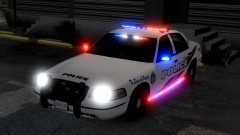 That's one nice cop car
 -
If someone has it unlocked they can
-
That's a good thing to hear
-
-
Take a look at this video
-
What version script hook are you using?
-
-
-
Are you running 1.0.7.0 patch? Happy easter
-
whoops sorry. Then i can not find one
-
Here you go http://gtapolicemods.com/downloads.php?do=file&id=38
-
I can't do that. I need permission form bugs to do that. Post in the right section on GPM and say these links are not working for me
-
It works fine for me. You might have better luck asking for support on their website rather than here
-
Tahoe: http://gtapolicemods.com/downloads.php?do=file&id=1656 Charger: http://www.gta4-mods.com/vehicles/nypd-2012-dodge-charger-els-f12337 The textures i think are just taken off of other cars.
-
sounds like SAMP but not as bad
-
I don't think their is a mod out their at the moment but that could be a suggestion. I did suggest that we could choose which side of the window we could go on and they said they put it in. That might makes thing a lot easier

