




Mags
Community Team
-
Joined
-
Last visited
Everything posted by Mags
-
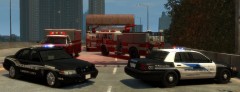 Who's Crown Vic model is that on the left?
 -
No It shouldn't have anything to do with it. But you could always try putting the default models in again seeing if that fixes the problem.
-
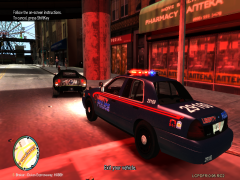
From the album: Mag's Album
LCSD adds a new vehicle to their fleet. -
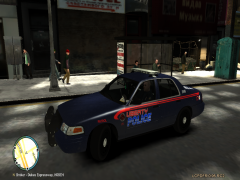
From the album: Mag's Album
LCSD adds a new vehicle to their fleet. -
Nice Job.
-
Actually you can speed up your Lightbar flash. Just go to your GTA IV Root Folder 1. Find ELS.ini 2. Find "FlashDelaySP" 3. Change the number to a lower value For Example mine is set to FlashDelaySP = .05 Which for me is a nice fast flash. Yes it will flash at different speeds on different computers, but doing this will speed it up in one way or another.
-
The Game Pause Menu. Go To Graphics and just play with the settings within that screen until you don't get any lag.
-
I am pretty sure that the developers want to keep this mod as close to the game as possible. Meaning the voices/dispatches are originally from GTA IV.
-
wow this has went way off topic... Well lets just see if any more information comes out with this bill. Then we can judge. It is still in the early stages.
-
I mean I do like the wording especially the way RC3 words kind of slide on the screen. But sounds would also be cool too it just adds more realism to the game.
-
This looks pretty cool.
-
you can just use gimp. That works just fine. 1. Just open the template in gimp. 2. Create a new layer. 3.Paint over the windows in black. 4. Adjust the Opacity slider to what ever you like the lower you go the less the window will be "tinted" 5. Delete the template layer 6. Then save.
-
your just going to have to fiddle with your settings. Everybody's computer is different.
-
That is pretty awesome. Can't wait to see some pictures in game.
-
I realize that. This model was the closest to match my WPD vehicle. The lighting setup is pretty darn close.
-
Bugs made one DODGE_CHARGER_LCPD_V3.2F
-
I don't mind at all. Anyone can take a stab at it.
-
Looks pretty good. The only thing is I would use a different font and font color than the bright blue. talking about the 2nd image btw..
-
Yea its a tough one
-
Children are so cruel to each other now a days.
-
Hello, I have been wanting a Woodstock Police Department Skin In GTA IV for over a year now. I would say that I am an average skin creator, but this one just has me beat. So I was thinking maybe someone here has better skills than I do and would like to try and create it for me. Image of the Crusier: CAR PATCH: CHARGER TEMPLATE: It would be much appreciated.
-
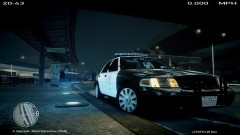 No It is EVI's LAPD Model. Its in the the downloads section.
 -
That was pretty funny. I always thought of doing something like that having a button out in public and you know there are people who can't resist to hit it.
-
I am looking forward to this build to fix alot of the bugs. And the pursuits give you a little more control over your gameplay.
-
Yea no. Wait till rock * releases a new trailer.

