
Sergeant Nighthawk
Members
-
Joined
Everything posted by Sergeant Nighthawk
-
 READ THE FOLLOWING BELOW BEFORE PROCEEDING TO DOWNLOAD (NEW) DECEMBER 16, 2024 (Grand Theft Auto V Update v3411) Update Rockstar Games has released an update for Grand Theft Auto V (build 3411.0). While no issues or any incompatibilities are expected, I have NOT tested this plugin with the new update yet. This section will be updated as soon as I get a chance to test the new plugin with the new update and if any reports from users come in. No guarantees that the plugin will work flawlessly with the new update just yet. ✅: Compatible ❌: Not compatible 🔎: Currently testing Compatibility status: ✅ NOTE # 1: I am NOT affiliated with Axon Enterprise, Inc. or TASER International, Inc. NOTE #2: Please READ EVERYTHING outlined in the description below, the included README file and the INI file, it will save you time before reporting a bug or asking a question that's already been answered. Reported bugs and issues are outlined in the description below. NOTE #3: Exercise caution to anyone blindly telling you (especially on Discord) to remove callout X or plugin Y or to disable antivirus without a proper reason why, there's a 99% chance they don't know what they are doing. If you are having a specific issue with my plugin, please do NOT seek support from third-party discord servers as they will not be of any useful assistance and I will NEVER have any clue that you're having an issue to begin with. NOTE #4: While I appreciate suggestions and feedback, I will not accept all of them especially if it is not grounded in realism. Understand that I try to do research on this project with the limited available material online, if you have any credible sources as to the operations of these things, please provide them alongside your suggestions. NOTE #5: Keep this in mind before using any kind of colorful language to describe any frustrations you may have with this plugin, and this can apply to any developer here on this website: I am alone, I do this in my free time voluntarily, Maintaining and updating a plugin can be stressful NOTE #6: This plugin does not record any videos. This plugin only simulates the operation of an Axon Body and Axon Fleet with Axon Signal functionality. Any inquiries about this on Discord or the comments section below will be disregarded or closed as this has been addressed multiple times previously. FEATURE UPDATE v1.2 COORDINATED UNIVERSAL TIME FORMAT (UTC) (shoutout to jmwfilms/their video editor for stealing this, nothing serious, just absolutely hilarious the number of people who steal this GIF) Want to use the legacy overlay format from older generation body-worn cameras? You can configure the body camera and dash cam overlay to display the time in UTC format as well as selecting a desired offset from your local time of choice. DASHCAM PANORAMIC LETTERBOX (includes 4:3 aspect ratio letterbox for interior camera) courtesy of Ohio State Highway Patrol, reference photo for comparison Get more immersed into an already unique patrol perspective. Starting with the AXON FLEET 3 generation of dashcams, depending on an agency's configuration on video resolution and aspect ratio, panoramic aspect ratios were introduced to compensate for the wide field-of-view on the newest generation dashcam. BODY CAMERA ACTIVATION ANIMATION New animation when activating or deactivating the body camera. THE AXON FLEET DASHCAM UPDATE Get a unique perspective of your patrols with the new Axon Fleet Dashcam System, featuring both a front and interior camera, whether you want to keep an eye on the action upfront or keep an eye on the cuffed offender behind your back. REAL-TIME DASHCAM OFFSET, POSITION, and FOV EDITOR (type AxonSignalOffsetMenu in the RAGE console to access this menu) REAL-TIME OVERLAY EDITOR (type AxonSignalOverlayConfigMenu in the RAGE console to access this menu) BODY CAMERA TIMESTAMP OVERLAY *(requires font installation, font included) Axon Signal is a standalone RagePluginHook plugin that simulates the operation of an Axon body worn camera and in-car dash camera. Alongside that is the ability for the body camera to automatically start recording if you unholster your weapon (list of weapons that will trigger the body camera can be defined in the AxonSignal.ini file) or activate your emergency lights (stage 3 ELS lighting or activating lights on a NON-ELS vehicle). The following parameters can be changed in the plugin's ini file: The key to start/stop the recording of the body camera. If the body camera will start recording if you unholster your weapon List of weapons that will trigger the body camera recording function (WEAPON_PISTOL, WEAPON_STUNGUN, etc.) If the body camera will start recording if you activate your emergency lights (supports both ELS and NON-ELS vehicles, must be a valid police vehicle) If the plugin will display notifications on the bottom-left of your screen regarding the operation and activity of the plugin The amount of time in seconds between reminder beeps on the body camera (Default: 120 seconds) Body camera timestamp overlay parameters such as the model number, serial number, UTC offset, and if visible in third person or not Rockstar Editor integration (disabled by default, keep in mind of the following limitations) Recording time: this is dependent on the number of entities around you and how many polygons those entities have (e.g. if you and 20 backup officers are in a shootout with 20 gang members with 10 addon cars exploding in the background, you will not have a lot of recording time) Addendum to the above, recordings are in clips, assuming you run out of recording time, rockstar editor will record another seperate clip, they may not be fused together perfectly, and this will be more apparent the shorter your recording time Rockstar editor usage is restricted in some areas (e.g. Fort Zancudo and the surrounding area, due to GTA Online protections) Your own storage space and hardware Speed threshold parameter to trigger the Axon Signal Vehicle while emergency lights are activated Delay between the trigger and the activation of the body camera Body camera overlay real-time editor to customize text and logo size, spacing, and position (accessible by RAGE console command AxonSignalOverlayConfigMenu) Several dashcam parameters, whether it is accessible on foot, overlay, toggling the dashcam effect, the serial of both the dashcam and the interior camera, and the dashcam model that appears on the timestamp, offset, position, and FOV (configurable in the real-time editor accessible by RAGE console command AxonSignalOffsetMenu) Hide minimap when viewing dashcam (enabling letterboxing of either the dashcam or interior camera will hide the minimap, regardless of the setting) Whether dashcam or bodycam overlay displays local time with offset or UTC time Enable or disable bodycam animations Enable or disable body camera button sounds Enable or disable dashcam or interior camera letterboxing NEW Enable or disable overlay help messages You may also change the supplied body camera sounds and logo inside the provided AxonSignalSound folder, provided the filenames match and file size is within a reasonable level. REQUIREMENTS A legal copy of Grand Theft Auto V An up-to-date version of RagePluginHook RAGENativeUI (minimum v.1.9.2) INSTALLATION 1. Unzip the files using WinZip, WinRAR, 7-zip, or any other archive utility. 2. Drag the files inside the AxonSignal/Grand Theft Auto V/Plugins/ folder to the Grand Theft Auto V/Plugins folder and replace when prompted. - FOR ADVANCED USERS: If you're upgrading from an older version, check to make sure all new assets, files and parameters in the ini are included so you don't have to replace files such as the ini and reconfigure settings, otherwise just replace everything. 3. Read the README.text and configure the AxonSignal.ini settings to your preferences before seeking support or complaining of a missing feature (SERIOUSLY), I have put my best effort in including all details. 4. You can load the plugin in two different ways: - When in-game and RPH is running, open the console pressing F4 and type "LoadPlugin AxonSignal.dll" without the quotes OR - Go the Grand Theft Auto V root folder and edit your startup.rphs file and add AxonSignal.dll 5. RECOMMENDED BUT OPTIONAL: Install the font included in the zip file by simply double clicking it. This will make your bodycam overlay look closer to the real thing. USER OPERATION DOUBLE PRESS your assigned keybinding (Default: O key) to start the recording operation of the bodycam. While the recording is in progress, a reminder tone will play at a specified interval (Default: 120 seconds). The recording operation of the bodycam can also automatically start by either unholstering any of your selected weapons or activating emergency lights. (parameters customizable in the .ini file) To stop the recording operation, regardless of how the body camera started recording, HOLD DOWN your assigned keybinding for approximately 3 seconds until a prolonged tone sounds signifying that the recording operation of the body camera has stopped. If you want to toggle the plugin functionality, type 'AxonSignalToggleSystems' in the RAGE console. To customize the size and position of the text and logo of the overlay, type 'AxonSignalOverlayConfigMenu' in the RAGE console. To access the dash camera and interior camera, simply cycle through your player views (Default: V key). To view the interior camera, press your look back key (Default: C key) while in dashcam view The dash camera and interior camera are accessible regardless if you are in a police vehicle or on foot (configurable in the INI). To customize the positioning, direction, and offset of these cameras, type 'AxonSignalOffsetMenu' in the RAGE console. AXON SIGNAL OVERLAY STUCK ON SCREEN? Type 'AxonSignalResetScreen' to clear any stubborn elements that may be stuck on screen. These plugins may potentially conflict or cause side effects with Axon Signal: Automatic Siren Cutout by Rich* You may still use these plugins, however, it is highly recommended to disable or alter some of the parameters of the plugin. Automatic Siren Cutout cycles through ELS Stage lighting to turn off the siren upon getting out of the car which may cause an inadvertent activation of the body camera. *this can be mitigated by utilizing the new speed threshold feature to prevent inadvertent body camera activation while getting out of the car (assuming the car is not moving at speed while getting out) KNOWN AND REPORTED ISSUES While browsing through the LSPDFR garage vehicle selection menu, switching vehicles will cause the camera angle set by LSPDFR when viewing vehicles to be reset, allowing camera mouse movement while in the garage which is not intended. Root cause unknown and currently under investigation. Fairly difficult to reproduce. This is a minor bug since it is neither game-breaking nor causing major issues or side effects. No emergency patch release needed. (thanks to @unitedOrange66 for reporting, thanks to @Godalph Games for testing) On rare instances, hiding the minimap when switching to dashcam view may fail or minimap may render on screen anytime while in dashcam view even if enabled, attempting to investigate and reproduce the bug. Minor bug, no emergency patch release needed. (thanks to @Godalph Games for reporting) Emergency lights or other bright light sources in-game can cause the screen to significantly darken, or in the case of rapidly flashing emergency lights: "flickering occurs". Cause and frequency of occurrence unknown. Investigating. Some graphics mods (reportedly NaturalVision Evolved or NVE) can cause the dashcam effect even if enabled not to render. It is suspected that some graphics mods disable some or all timecycle effects. Considering an alternate solution of rendering a transparent image file on screen instead to replace dashcam effect. Not tested as I personally do not use or have NaturalVision Evolved. FIXED ISSUES If you are having issues with this plugin specifically, please do NOT seek support in your usual LSPDFR support Discord servers as they do not know anything and will not be able to effectively help you. I highly encourage you to join my Discord below or post your issue in the comments section. I need feedback and bug reports to continually improve this plugin. If you need support, you may do so in the comments or join my Discord: https://discord.gg/e2qX6aW. Please do NOT seek for support in the reviews or give it a 1-star rating simply because something doesn't work. Feedback is also appreciated as to what I can do to improve this plugin. This initial version of this plugin, as hinted by the build number, was programmed in the span of only 2 days. There may be issues or bugs that I may not be aware of although I can assure you this plugin has been tested fairly thoroughly. INSTALLATION AND SHOWCASE VIDEO BY @Gameboyeg, @OfficerBenzo, and yours truly. THANK YOU!
- 292 comments
- 28 reviews
-
-

-

-

- 77
-
-
 This is by far, a holy grail to what I've been dealing with for nearly 4 years. I've been running the game on normal textures until now to prevent these issues and while it did stop the texture loss and pop-ins, the normal textures look anything but pleasing. I have yet to test it on a longer run consisting of more than an hour of playtime, but so far I've been pleased. I was able to call in multiple EUP SWAT units which would normally cause the game's textures to start crapping out from just even calling one. I do have a fairly beefy PC with 8GB of VRAM (RTX 3070) so do keep that in mind, mileage may vary with GPUs with lower VRAM. This mod seems to require a lot of VRAM which can be adjusted in the ini. Edit: I've been able to get up to 5 hours of playtime before some inevitable texture loss occurred. Pretty good.
- 107 comments
- 33 reviews
-
-
-
- 2
-
-
Apologies if I'm bumping this thread but I have this problem as well. I've tried re-arragning dlclist lines, and verifying files but to no avail. Were you able to determine the cause of the problem?
-
G'day folks. I'm having an occasional crash everytime something called "deleting torch" appears in the log/console. This seems to happen only exclusively during pursuits. I'm not exactly sure what torch-related feature is integrated in LSPDFR since I have Ambient.DisablePlayerFlashlightOverride = True since I use Stop The Ped. I've found a few other people on the forums and on Discord with this issue but it doesn't seem to be investigated by anyone that much and I can't find any other useful info about this. If anyone has any idea as to what causes this or even has this issue as well, we can probably share some info here to figure it out. Here's my log, just scroll down to the end or look for "deleting torch": RagePluginHook.log
-
-
-
-
Hopefully I'm not invading this thread inappropriately but since the OP is from the Philippines, I have a feeling we have the same problem. Basically I and believe him get an error message that says "www.lcpdfr.com took too long to respond." I also have to make use of a VPN to access the website. I've ran a tracert from my location to the website and it times out at some point near NYC. @davesabando What ISP are you on? This seems to be a problem only with Globe ISP.
-
 Was getting tired of the police calling in a guy named Ralph stealing a TV. This mod adds more real-world immersive calls, just routine and mundane, the way I like it. Nice work man.
- 28 comments
- 5 reviews
-
-
- 2
-
-
Already tried that actually. But I was never able to reproduce it. The crash randomly occurs. On some sessions with my modded vehicles, I can play for hours without the issue above. And it is not specific to one vehicle. It happens regardless of what police vehicle and civilian vehicle is spawned on the fake traffic stop.
-
Absolutely. Here you go. Crash happens at line 3815. I got a couple other logs too saved ending with those crashes as well but this just my most recent one. Just happens at random without warning. RagePluginHook.log
-
Apologies for bumping a fairly old thread but I'm getting this crash as well in relation to fake traffic stop in ScenarioManager. Been getting this for months actually. 😅
-
 Please keep working on this mod. I see potential for this. It's about time someone released a refreshed and updated dispatcher voice. Your voice acting is great. Can't wait to see this evolve further.
- 30 comments
- 5 reviews
-
Sorry for bringing up a 2-month dead thread but after several weeks of testing, I found that increasing the values of ELSMaxRangePL and ELSMaxRangeAI seemed to have stopped all my crash related issues mentioned above. I did try renaming disabling the mods folder and it did work, but I had to find a solution with my addons installed. For testing, reducing the values of the variables above caused crashes. I will continue to keep playing and see if I get any crashes but it has been a couple weeks and I haven't gotten any ambient traffic stop related crash. Thanks for the input everyone. 🙂 TLDR: Vehicles spawning at a certain distance beyond the ELS maximum range specified in the .ini appears to cause crashes. Solution was to increase the spawn distance to 10000 meters. UPDATE: Just as I was convinced that I wouldn't have any further crashes like this, I just got another ambient traffic stop crash, though it has been a couple of weeks since the last one.
-
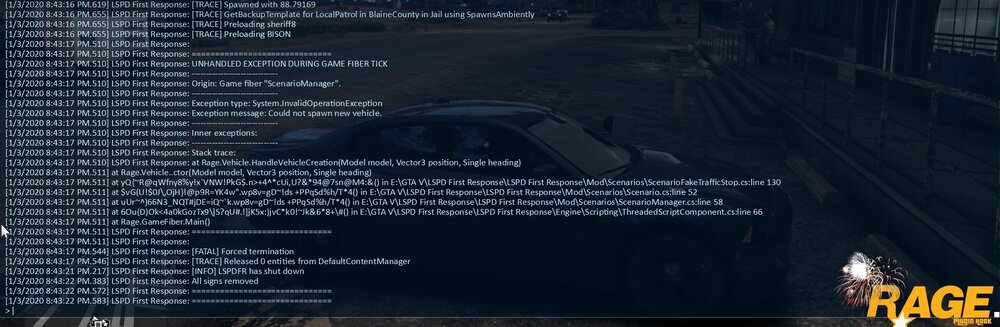
So I tried the second option (which was a bit easier to do), which was to disable ambient spawn random units. The game still seems to load these ambient traffic stops regardless if it is enabled or disabled so the game did eventually crash. I did however get a good playtime of about an hour and a half or so before it crashed. I also noticed that sheriff8 MAY be a culprit since this is exactly the same model that was in the log when it crashed in the log I attached earlier but as far as I remember, the crash seems to happen regardless of the vehicle used. I'll try to examine the properties of sheriff8 and do some testing on it. I have not tried disabling the mods folder yet as my Ultimate Backup and native LSPDFR backup have been set to reference the addon cars in the first place. So I'll try to get to that when I have the time. Attached below is a screenshot of the log:
-
Alright I'll try. But the last time I did this, it still crashed with the default models. I'll also try to disable ambient spawn random units and shall report back. 😀 It seems to happen randomly and is difficult to reproduce. I can see in the log from time to time that it successfully spawns the ambient traffic stop without issue.
-
Sorry, but, this is going to disable the mods folder, correct? Just clarifying. 😂
-
Hey y'all. Happy new year. Haven't been playing LSPDFR for a while but just got back into it a few months ago. It's perfectly stable for the most part in my experience as long as I don't do anything "stupid" but I still keep getting this crash whenever if I'm not mistaken, the game attempts to spawn an ambient traffic stop. I am aware that this was supposedly fixed a few LSPDFR versions back but it still seems to occur on my end and I can't exactly figure out why. I do not have problems spawning in vehicles via the trainer just for additional information. I hope someone could give some insight on this. Thanks. 🙂
-
 I can confirm this issue as well. Haven't attempted to fix it myself tho. Make sure you are on the latest version of PeterUCallouts. It should fix that issue in particular.
- 546 comments
- 103 reviews
-
Just follow the instructions in that link and you'll be fine. If there's anything that's corrupted, the installer will just redownload the files. 🙂 If you're confused about something, you can just ask.
-
-
Yup that's the one.
-
Alright. There should be a guide online, one from Rockstar if I'm not mistaken on how to verify your installation. Just Google around and you'll find it. 🙂
-
If your game is crashing without RPH, try verifying your GTA V installation. There are guides online on how to verify your GTA V installation. This will depend on whether you have the Steam version or the Rockstar Warehouse version.
-
Okay so the game crashed without RagePluginHook? If that's the case, can you go over to your Doucments\Rockstar Games\GTA V folder and attach your launcher.log file? UNRELATED QUESTION: I see in the picture above a YouTube tab of my video. Are you watching my videos? 😂😂😂