




Sergeant Nighthawk
Members
-
Joined
Everything posted by Sergeant Nighthawk
-
 Hello. Is it possible to provide more in-depth documentation as to how the naming of the files and folders in PursuitMusic works specifically and how the plugin looks for these files? Deleting any of the WANTED folders randomly causes a full LSPDFR crash simply because the plugin could not find a folder it's decided to look for for that certain pursuit despite the plugin advertising that: Hopefully this can be clarified as I could not find anything in the README about how to structure and name these files and folders. I'm confused if the folders can be removed or if only the files can be removed but the folder structure should remain. Thanks and hope you look into this.
- 184 comments
- 4 reviews
-
 I'm assuming it is being blocked or hidden by the letterbox view. You can disable the letterbox view in the .ini settings. Unfortunately there is no other way to do this while keeping the letterbox enabled due to technical limitations. ;Determines whether a letterbox is displayed when viewing the dashcam, Axon Fleet 3 dashcams have a letterbox/panoramic appearance when viewing footage from it in real life ;NOTE: The top portion of the letterbox will automatically increase in transparency if a help message is dispalyed to prevent any possible help messages from being obstructed ;WARNING: This will cover some HUD elements on the screen such as help messages, etc. ;WARNING: This will automatically hide the minimap, regardless of the HideMinimapInDashcamView setting below ;WARNING: If you have an ultrawide monitor, it is highly recommended to turn this setting off EnableDashcamLetterBox = true ;Determines whether a letterbox is displayed when viewing the interior camera, Axon Fleet 3 interior cameras have a 4:3 aspect ratio when viewing footage from it in real life ;NOTE: The left portion of the letterbox will automatically increase in transparency if a help message is dispalyed to prevent any possible help messages from being obstructed ;WARNING: This will cover some HUD elements on the screen such as help messages, etc. ;WARNING: This will automatically hide the minimap, regardless of the HideMinimapInDashcamView setting below ;WARNING: If you have a 4:3 aspect ratio monitor, it is highly recommended to turn this setting off EnableInteriorCamLetterBox = true
- 294 comments
- 29 reviews
-
Oh so this is what it looks like. Okay. I was thinking of a different kind of flickering where the entire thing flickers on an off. So this is likely caused by whatever script you are using that controls the time in-game. I can't really do anything about this as all my plugin does is simply display the time in-game. I can suggest trying to disable any scripts that control in-game time or use a different script. I personally use Menyoo. Hope this helps.
- 294 comments
- 29 reviews
-
Hello. This will sound very basic but are you on the latest version of the plugin? I fixed this exact problem supposedly not too many versions ago back in 2023.
- 294 comments
- 29 reviews
-
Check this plugin out, should help. Also don't forget to turn off the option to preload models in lspdfr.ini
-
Not possible. ViewPointV is made by another developer. You can only pick one. I am also not planning to add POVs to the bodycam at this time.
- 294 comments
- 29 reviews
-
-
Unfortunately no. Not planning to change this anytime soon as I do not want the plugin to rely on multiple keybindings given how LSPDFR, RPH and SHV in unison with default GTA V controls already taking up several keybindings.
- 294 comments
- 29 reviews
-
ini file. Read. Please. ;Determines if the overlay is only visible in first person, if not, overlay will be visible regardless of camera mode OverlayFirstPersonOnly = true
- 294 comments
- 29 reviews
-
-

- 1
-
-
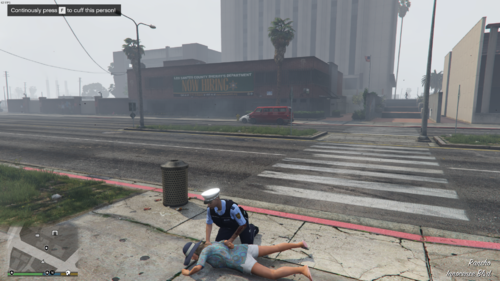 Is it normal for the suspect to get up and walk away temporarily and then be cuffed? This seems to happen 9 out of 10 when I try to "ground arrest" someone during a foot pursuit.
- 87 comments
- 10 reviews
-
 Hello there. 🙂 Getting the following unhandled missing method exception when going on duty as of the latest update so I had to unfortunately roll back. I have updated both the callout DLL and the Pyro Common DLL.
- 1,034 comments
- 66 reviews
-
The minimap will hide itself regardless of setting if you have letterbox mode enabled, as stated by the ini.
- 294 comments
- 29 reviews
-
I really cannot guarantee compatibility between these plugins. You cannot change the dashcam key because it is supposed to be part of the cameras you cycle through in GTA V by default and I really do not want to add another keybinding for this plugin to utilize given how keybinding heavy LSPDFR is.
- 294 comments
- 29 reviews
-
I used the old version of Viewpoint V at some point. It used to work with my plugin just fine. I do not have the new update of Viewpoint V so I don't know what has been changed or added other than the Axon overlay and ton of features, not sure if I'll get it just yet. Unfortunately I'm not planning to collaborate with the developer anytime soon. Maybe there is a way to disable the dashcam on their plugin because you surely can disable the dashcam plugin on mine. This is not an LSPDFR plugin so it is not possible to detect the player going Code 4 or ending a callout. I intend to keep this plugin grounded in realism for the most part so I will not be implementing this unfortunately. Apologies. Can you expound on the problem? I just want to make sure I'm getting this correctly.
- 294 comments
- 29 reviews
-
-
Hello. Regarding the help notifications being disabled they WILL be added in the next update. I've just been slowly pooling feedback from the last year or so to see if there's anything that needs to be done and removing the help messages is definitely at the top so rest assured I am working on it. As usual, no promises as to when this update will come. It's been a year since the last update and my coding skills might have become rusty. As for @Double Doppler's little request on the animation, I'm afraid it might not be so little as finding an animation that suits the animation already included in the current version was difficult enough as it is. This may or may not be implemented due to the difficulty of finding a suitable animation. However if anyone else has a good animation set which meets @Double Doppler's criteria, feel free to put it here. Next up is the request of a custom overlay. This one is also being considered, however it could be potentially fairly complex to implement. I was thinking of adding a way for users to load third party overlays, but this might be a bit ambitious on my end. So this one is also a 50-50. I hope I answered your question gentlemen and I'm glad to hear your feedback. 🙂 It is in the .ini. Please read all configuration settings carefully.
- 294 comments
- 29 reviews
-
-

- 2
-
-
This is a common misconception that's already been addressed multiple times. The plugin does not actually record videos. Hope this clears up your inquiry.
- 294 comments
- 29 reviews
-
-
- 1
-
-
Are you referring to the texture on the coil bodycams by EUP? I never noticed if they had different textures for it being on or off.
- 294 comments
- 29 reviews
-
Hello, unfortunately there is no way at this time to adjust the volume. The only workaround I can suggest is to customize/edit the sound files yourself through Audacity or any program of choice and reduce the volume from there.
- 294 comments
- 29 reviews
-
-
Some people have suggested that the use of certain graphics mods does interfere with the dashcam effect. Unfortunately I am personally not able to test it at this time as I do not have access/own NVE. I'd recommend temporarily trying to remove NVE, just temporarily to rule out the issue.
- 294 comments
- 29 reviews
-
I'm gonna need you to run that by me again. Thanks to the clarification of my aide, no, there is no editor similar to that for the dashcam for the bodycam at this time.
- 294 comments
- 29 reviews
-
-
-
I'll investigate further once I decide if I will add any additional updates to the plugin. Timecycle is eyeINtheSKY.
- 294 comments
- 29 reviews
-
-
- 1
-

