


macky1878
Members
-
Joined
-
Last visited
Everything posted by macky1878
-
As the title says really. I've tried doing _mods but it still crashes, so I know it isn't my mods folder. Here's my RPH.log, too. Help would be greatly appreciated! RagePluginHook.log Oh, another thing. My base game loads up fine!
-
Well, I have a fix...delete the update folder each time the game crashes and verify the files. The only fix I can find unfortunately, thanks for your help though, I wasted too much of your time!
-
Damn really? Thought I put it in LSPDFR support to begin with. Anyways, it isn't the blood mod (it was updated a few days ago anyway), what I said is that ANY new addition be it game files in the Mods folder or new plugins, even the recently updated ones, crash the game.Most recent update is that I can get it to work with limited files in Plugins -> LSPDFR, and removed the ones that crashed the game when added, but now I can't add any more callouts, as the game crashes... EDIT: Any change to the game files, in fact. Installed a blood mod and bam, crash!Also, fyi, I renamed my mods folder to _mods and LSPDFR still crashed on startup.Just loaded into story mode perfectly fine, once again. That's what frustrates me.I'll update it now and include the xml. Still crashing.Did everything, updated the drivers, common.rpf, updated RageNativeUI (didn't include the xml file however) and still the same problem. launcher.logWell, i've gotten it all working now. I can get everything working, no crashes in GTAV.exe, however, and I did start another thread for this if you don't want to answer, RPH/LSPDFR is crashing on startup, right as the police siren bit comes up as you load in. The error is 'Exit code 0xc0000005 indicates a fatal game exit (reason: STATUS_ACCESS_VIOLATION)'. launcher.logI got help from someone that worked for a bit, but now it just isn't. RPH crashes on startup, just as the game loads up, with the white 'GTA V HAS CRASHED, LOADING LOG' thing popping up right away each time. Gtav.exe works perfectly fine, I load in fine and play fine with no crashes, but RPH is just...disaster. This is the error 'Exit code 0xc0000005 indicates a fatal game exit (reason: STATUS_ACCESS_VIOLATION)' launcher.logYeah man it's strange. In the old Update.rpf, I have all my gun sounds, weapons and blood mod, but if I transfer the updated one to the mod folder (through the OpenIV green prompt at the top) I lose them all! Complete mystery to me...Quick reply after the first attempt, crashed on startup, white box saying it crashed came up. I'll do a few more. launcher.log After it finally stop crashing on startup, it didn't crash on duty. Guess that's wittled that down, so I'll just do trial and error here. One final thing, and I'm sorry so for this, but I've noticed my gun sounds, blood mod and weapons aren't loaded in the game, yet replaced vehicles are, this isn't even after the update as I was playing it this morning, it's been as I've brought back LSPDFR. Any clue why?Didn't work. Did all that you said, deleted Policetape, unticked all the plugins in the RPH program and only loaded LSPDFR in the game, which didn't crash until I forced duty. launcher.log FYI, the game loads perfectly when I launch through the GTAV.exe/Steam application, no crashes there.Long story short, whenever I go on duty, be it either through the console or at the station/character customization, LSPDFR crashes but the game does not. Fully updated game, RPH and LSPDFR. Any help would be greatly appreciated! RagePluginHook.logThank you very much, managed to have a few hours of a crash-free experience before I went back off. I'm an idiot, haha! This worked.Right, as the title says, my LSPDFR is crashing at various points, be it as I load in, or about 10 mins in. I've recently returned to modding, and GTA V as a whole, after deleting it. The previous time was about October 2020. I've installed everything accordingly and correctly, yet it seems to crash a lot. Here's my log: RagePluginHook.logLSPD First Response: Exception message: Operation is not valid because the specified Rage.Ped is invalid. RagePluginHook.log Any fix for this?
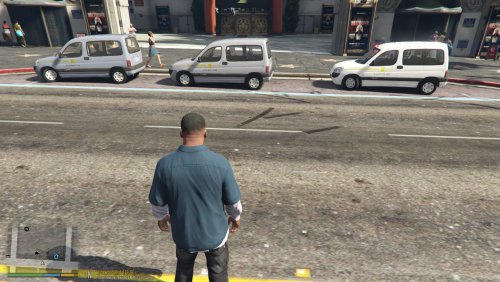 This is the first vehicle in a pack that i will be making. It will involve taxis from all across the country! Uber Addison Lee ComCabs Alpha Taxis Delta Taxis Dial-a-cab And many more to come! For the linked vehicle, you can either install it in the slot that has been chosen already, or install it into the taxi slot. The Livery can work on yellow, but you'd really only be able to see the letters. I will fix this in a future update and make fixed colours for it. The colours pictured above are the best fitting, but you can experiment with it. IF YOU HAVE ANY PROBLEMS WITH THE VEHICLE, DONT COMPLAIN TO ME AS IT IS NOT MINE! All credit to the author of this vehicle! All credit to the author of this vehicle! MODEL: Skybh TEXTURES: Skybh CONVERSION: Skybh https://www.gta5-mods.com/vehicles/citroen-berlingo-replace-add-on-template
.thumb.png.8ecbfbf534c7bd238414cceea9d16a1a.png) This was on a special request of my favourite lspdfr YOUTUBER, Double Doppler https://www.youtube.com/user/TheDoubledoppler Its amazing to have the honour to this for him and i hope he loves it! Don't be fazed by this, though. It is free for people to use! Original File: Credits: Base model & accesoiries: Rockstar games Model adjustments: MOHaalsmeer Template and skin: MOHaalsmeer Round light: MOHaalsmeer (IDE) Hope you all enjoy it !!THIS IS A SKIN AND NOT THE ORIGINAL MODEL!! JUST SWITCH THE "SKIN" IN THE FOLDER WITH THE ONE IN THE OPEN IV YTD. Instructions: Download the original file and place it into your open IV (most preferably Patchday18). Place the "SKIN" involved in this and place it onto your desktop. Then double click the TOWTRUCK.YTD (after you have turned on edit mode) and replace it with my "SKIN" folder which is on your desktop. Then click save. I WILL INCLUDE LICENSE PLATES TOMORROW 3/07/18!!!!!
This was on a special request of my favourite lspdfr YOUTUBER, Double Doppler https://www.youtube.com/user/TheDoubledoppler Its amazing to have the honour to this for him and i hope he loves it! Don't be fazed by this, though. It is free for people to use! Original File: Credits: Base model & accesoiries: Rockstar games Model adjustments: MOHaalsmeer Template and skin: MOHaalsmeer Round light: MOHaalsmeer (IDE) Hope you all enjoy it !!THIS IS A SKIN AND NOT THE ORIGINAL MODEL!! JUST SWITCH THE "SKIN" IN THE FOLDER WITH THE ONE IN THE OPEN IV YTD. Instructions: Download the original file and place it into your open IV (most preferably Patchday18). Place the "SKIN" involved in this and place it onto your desktop. Then double click the TOWTRUCK.YTD (after you have turned on edit mode) and replace it with my "SKIN" folder which is on your desktop. Then click save. I WILL INCLUDE LICENSE PLATES TOMORROW 3/07/18!!!!! Hi, thanks for that! I don't know why the ParksTools wasnt changed in the OIV.
- 299 comments
- 25 reviews
Well, there's been a lot of knife crime here!
When i load the plugin, it crashes. (Not the game, only the plugin). I checked in the desc and downloaded the game config but it still crashes! Please i need help!- 299 comments
- 25 reviews



.thumb.png.8ecbfbf534c7bd238414cceea9d16a1a.png)

