


kevmscotland
Members
-
Joined
-
Last visited
Everything posted by kevmscotland
-
A sheriff themed one I quite liked... NYPD set New York State Fairly varied custom set If none of them work, let me know a colour preference and I'll try and find a set thats more inkeeping.
-
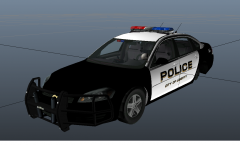 non-ELS.... awesome!!
 -
Any particular car models you use that you want skins to match? And are you looking for something like a real life counterpart or fictional. 'The best livery' is a matter of personal opinion is all.
-
Done : Just uploaded so may take a couple hours to get approved. Enjoy
-
-
Good skin. Just purely as feedback... I would suggest if you update this, to look at your red/blue stripes on the side compared to the real photo youve posted. It runs from the wing mirror down backwards to around about the end of the front doors. Yours are a little too vertical, and thus don't stretch back far enough. Great effort tho. :)
- 9 comments
- 2 reviews
-
I keep a log of when i make changes to the install (like new car models etc) and put a note beside them to note any bugs/stability issues. So then if I have a regular crash, i go back to when I last noted it was completely stable , and remove anything installed there after. And just play test each new mod added a little longer as i go through the list to establish which is responsible. Was the way I caught a Charger mod I had that caused draw distance/load problems.
-
Made my own CVPI based on your skin. Just for private use ofcourse. Hope you dont mind :) http://imgur.com/a/3cfZg
- 12 comments
- 4 reviews
-
Any chance of a CVPI with this skin also? :) Edit: I noticed the livery doesnt connect properly at the back of the vehicle. It could be the templates fault, but the white body with the blue line meets at different places on the rear of the car. I noticed it while making my own copies of this livery for having 4 different versions. You can sort of see it in your 3rd screenshot of the rear of the car.
- 12 comments
- 4 reviews
-
iCEhancer also recommends this... http://www33.zippyshare.com/v/64239231/file.html Plus, I assume you have your commandline.txt setup in your GTA folder with commands to enable full use of memory etc. Mine : -norestrictions -availablevidmem 2.0 ( <<< This basically means 2GB video card ) -noprecache -nomemrestrict
-
-
-
Yup, very nice. Hoping to see some lightbar versions very soon =D How are you getting along with the charger you had to take down to fix? I really liked that version and hoping to see it return soon.
- 13 comments
- 6 reviews
-
Ah, so your problem isnt SPARKIV, its that TBoGT doesnt work at all?
-
You dont have the EFLC.exe because you dont own the standalone EFLC. The addon version is designed to work alongside your standard GTA install, thus you launch SparkIV using the standard GTA4 launch/shortcut and look for the TBoGT/TLAD folders therein. I showed you that earlier :)
-
Excuse the picture. I just find it less misleading if you actually show what you mean rather than describing it.
-
Ah right, I'm fairly sure i see the problem. Its the Expansion version, not the standalone. You have to pickup the TBoGT folder and pop it in your GTA 4 folder, then you should be able to run it by launching GTA 4 and using the 'play episodes' menu option (assuming your patched to 1.0.7.0)
-
While I have not used it myself, I found the following article to be a fairly complete step by step explanation of the process. I hope you find it useful. http://www.gtaforums.com/index.php?showtopic=401577
-
When you say downloaded, do you mean via steam or another party? if its steam, right click on the list, and verify files. Also, whats the folder size of your EFLC install? What my directory looks like. Ignore the ones with the red dots.
-
I would suggest, if its been a fault since youve got it, its probably a hardware issue. However, you can do a couple things to narrow it down. Try disabling background applications ( run>msconfig>startup and disable everything windows doesnt absolutely need to run on startup. http://www.netsquirrel.com/msconfig/msconfig_win7.html ) Try finding out what your motherboard is and going to the motherboard website and download the latest drivers for it, you'll probably find your audio card drivers there also (As I notice its onboard) I've had problems with realtek cards in the past causing me crashes without the proper driver set. Do the same for your GFX card. Are you using a standard hard-drive? I had a SSD that was giving me blue screens until I updated the firmware. beyond that, your really getting into the likelyness of it being hardware related.
-
or use this... http://www.gta4-mods.com/tools/gta-override-12-f15452 gives you a new vehicles image file that GTA 4 uses to load vehicles from first then ignore the original games installed vehicles. saves messing about with the default vehicle.img file and keeping all your modded vehicles in one place. (note: Doesnt over-ride the TBoGT or TLAD vehiles, that requires some further changes that Ive made personally and can explain if required.)
-
Has this been happening since you got it, and also, have you made any hardware changes lately? New GFX or Audio cards in particular can cause issues if there's incompatable driver sets installed, or old drivers interfering with new ones. Also, is there any particular activity your doing that you can see narrows it down, like a certain application, a certain time after launch of windows, etc.
-
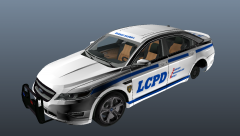 What about the Escallade vehicle? Theres a version out there, but its bugged and has a terrible skin job. :) (Its here : http://www.gta4-mods.com/videos/cadillac-escalade-police-non-els-v20-final-v6744)
 -
Sad to hear this is your last. im loving the DSF models being converted over, and your doing a great job with them. please continue :)
-
http://openiv.com/


