

Drifty349
Members
-
Joined
-
Last visited
Everything posted by Drifty349
-
Hi I'm actually facing same difficulty with LSPDFRsync as it does not register my new chars expect for old once if anyone knows the solution we all would appreciate it.
-
It's probably AI being debugged as ELS is hard for a AI to manage you can use Non ELS vehicles to avoid this kind of misery xD.
-
Go to Context menu from where you call in tow trucks and coroner there you see a option in red disable realistic weapon option just disable that and you'II be good to go.
-
Please update your rage plugin hook as it is outdated 1.74 and the latest is 1.78 https://ragepluginhook.net/Downloads.aspx?Category=1 please follow the link it will redirect you to latest version, I hope this helps.
-
It's cause of OTB callouts as there is a callout where random wanted criminals spawn in their cars and run from you which initiates the pursuit. I think you can disable them from ini file but I'm not sure as I've not checked that OTBcallout but I check it out for you soon and let you know how can it be disabled or not. I hope this helps.
-
Go in game lspdfr press N (Interaction Menu) then there u see a spawn location option you can do the starting location to a fix house which will spawn your char. Off Duty everytime you load in hope this helps.
-
Remove all albos mods as they cause crashes. Use the new plugins which are continued by someone else Remove police radio as it is the main cause of crashes. Matteov is right about traffic policer to, thank you Matteov.
-
It does happens sometimes the ped doesn't know what to do exactly I recommend you to download menyoos menu: https://www.gta5-mods.com/scripts/menyoo-pc-sp and use the spooner mod to del the ped whoever is causing trouble or something. And no you don't have to contact GTA V support as this is not a problem from their side. If it still causes trouble try restarting your game, If anything doesn't work lemme know.
-
please press the stop the ped context menu and disable realistic weapon option, that way you can get and pickup weapons. Hope this helps
-
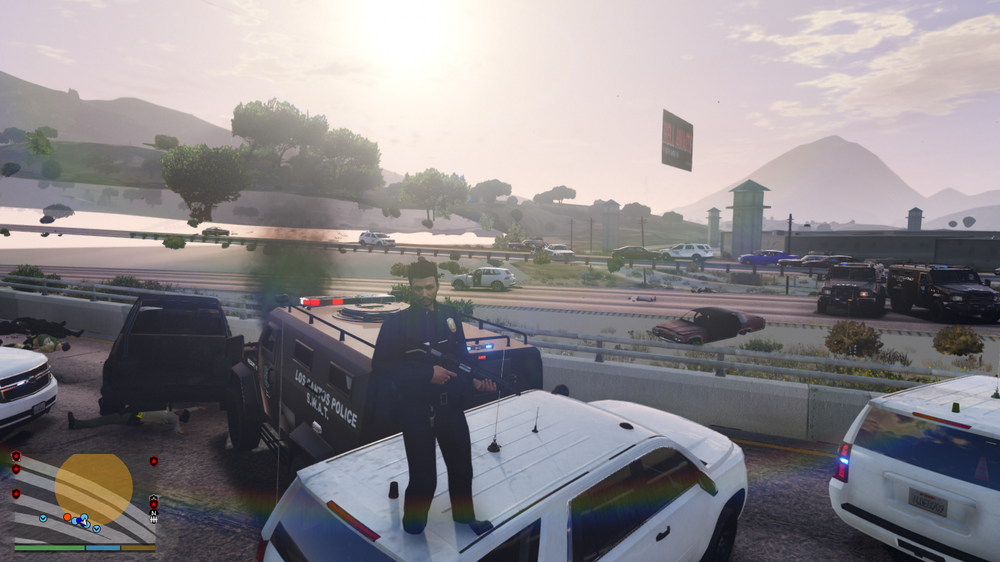
Hi thank you for taking a moment of your time to help me out. Recently I've been facing this texture glitch from the game and it happens specifically when I run the game from LSPDFR, I'm not sure what's causing this it happened before I even installed MVGA. I Installed MVGA so It could have been fixed but turns out It did not help me out sad being me :(. Anyways as you can see on the SS there is a texture disappearance like xD I was on the biggest shootout of this entire callout. I know I can just del my mods or del stuff to try this out but I'm looking for a potential method which can be fixed without messing with my 3hrs of modding 🙂 If anyone got any good suggestions lemme know, If not It's all good. After all game is basically for fun and I'm glad this mod exists.
-
It's all good, as a part of a community it's just good to help each other out.
-
Try to run the game as usual then try to run the mod without any plugins, if it still doesn't work try to run the mod on directX 11. if it still creats problems lemme know 🙂
-
Um, may you please detail a bit I'm kinda confused 🙂 please PM me cause the topic is getting a bit to um not good hehe
-
Please specify like when you're loading your game?
-
Please follow the instructions in the spoiler box, if it still causes problem lemme know.
-
Oh, my please nono It's all good, if you have a respect for me. Then I shall respect you back hehe, It's really not a big deal just doing what I learned from my experience. 🙂 If you need help the LSPDFR community is awaiting right behind ya 👍
-
Your callouts are making crashes and so do plugins, I recommend to reinstall them properly also the youtube video will help you out with the Installation and remember there is also a link to what plugins work in lspdfr 0.4, If you need help lemme know.
-
Not sure about this but you can make a different backup folder for the callouts and move them there until you need them again, usually this is what I do when I don't need a certain callout or just don't respond to the callout rest depends on you. If you need any help lemme know
-
are you using police radio on your first launch. If so I recommend to remove your plugins folder and reinstall your plugins with fresh copy and this time make sure to add first Stop the ped, ultimate backup, LSPDFR+, Arrest manager, Traffic policer with police radio and make sure to remove all callout plugins at such as united callout and all just add those what I mentioned and run your game,(this is kinda tricky method: after that go on duty as there will be a police radio setting up buttons will comeup just enable them, it will force the lspdfr plugin to crash. you can reload the plugin by restarting your game or by ragehookplugin just keep on doing the method until the police radio stops giving you the enabling button option and doesn't force crash you or off duty. Then you be all good to download and install more plugins.
-
Please sent us your ragepluginhook logs with is available in your game directory. I'II would recommend you to watch this video on the Installation of LSPDFR As for plugins please use this to know what mods actually work on LSPDFR 0.4 Feel free to reply back or message me if you're still facing difficulties with the mod. 🙂
-
I'II recommend you use plugins as it makes it much easier and good realism about the pursuit I'm not sure about that cause it happens to me too for some reason only 4 cars chases the suspect rest somehow get stopped by AI keep on break checking other cops, So I guess Just enjoy the mod after all we all should appreciate that we even have this kind of mod. (No offense really)
-
I mean the new log file as you said now it crashes due to backup menu send me that log file.
-
Could you send a pic of your plugins. If possible send your logs too
-
Please sent your ragehookplugin.logs it should be in your game directory.
-
Use this link to know which plugins work on 0.4 If you need any help lemme know.