



Legion672
Members
-
Joined
-
Last visited
Everything posted by Legion672
-
 I'm having a hard time figuring out what exactly I'm supposed to do to create a custom config with altered frequencies and zones. I've already read through the readme files but it's not clicking. Any help would be appreciated.
- 297 comments
- 17 reviews
-
 The phone stuff is great but I can barely get text messages to appear and on the off chance I can see them, I don't get anything telling me where I'm supposed to go. Is this something on my end or are other people having the same problem?
- 202 comments
- 18 reviews
-
- rph
- lspdfr callout
- legacy
- rph
-
Tagged with:
-
 Various, most of em you'll recognize if you go to their profile. Some are not available to the public.
 -
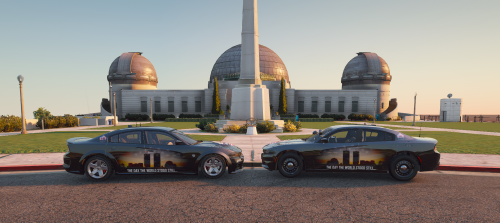
Halloween is upon us and you know what that means? Yep! Another special project by yours truly! The decals are made for the following: * 2018 Dodge Charger * 2020 Dodge Charger Hellcat * 2021 Chevy Tahoe As of right now I have not plans to expand this pack but stranger things have happened. Please make sure to read the credits and terms of service included in the download before asking questions. Don't be surprised if your comment is ignored because you didn't take thirty seconds to read. Do your due diligence, youtube is a great resource. All that being said, I hope y'all enjoy!
-
 Glad you like em!
 -
21 years ago we were knocked down, but we were not defeated. Lives would forever be changed by the events of September 11th, and today we honor those who would never make it home. Today we remember the Twin Towers in New York. Today we remember the Pentagon in Virginia. Today we remember United Flight 93 in Pennsylvania. God Bless the USA. Events Timeline: *8:50 a.m.* U.S. President George W. Bush, visiting an elementary school in Sarasota, Florida, is notified that a plane has hit the World Trade Center’s North Tower. 8:59 a.m. Port Authority Police Department Sergeant Al DeVona issues orders to evacuate the Twin Towers. One minute later, evacuation orders are extended for all civilians in the World Trade Center Complex. *9:03 a.m.* The second plane crashes. United Flight 175 strikes the South Tower on floors 77-85. Two of the three emergency stairwells are rendered impassible and most elevator cables in the area are severed by the crash, trapping many on floors above the impact and in elevators. 9:05 a.m. President George W. Bush is alerted to the second crash into the South Tower of the World Trade Center. 9:08 a.m. FAA bans all takeoffs for flights nationwide which were either going to or passing through its New York Center airspace. 9:12 a.m. Flight attendant Renee A. May and passenger Barbara K. Olson aboard Flight 77 call family members and alert them to the hijacking. Their family members alert American Airlines and federal officials. 9:21 a.m. All bridges and tunnels into Manhattan are closed. 9:24 a.m. FAA notifies NORAD of suspected hijacking of American Airlines Flight 77.9:26 a.m.FAA bans takeoffs of all civilian aircraft. 9:31 a.m. From Florida, President George Bush calls the crashes an “apparent terrorist attack on our country.” He and his staff leave the elementary school and begin traveling back to Washington. *9:37 a.m.* The third plane crashes. American Airlines Flight 77 crashes into the western face of the Pentagon in Arlington, Virginia. 9:45 a.m. FAA grounds all flights, ordering all aircraft to land at nearest airport as soon as practical. More than 4,500 aircraft are in air at the time. 9:45 a.m. The U.S. Capitol and White House’s West Wing begin evacuating. The U.S. House of Representatives and Senate are in session. 9:58 a.m. Flight 93 passenger Edward P. Felt is able to hide in a bathroom and make a phone call to 911. *9:59 a.m.* After burning for 56 minutes, the South Tower of the World Trade Center collapses. The collapse takes a shocking 10 seconds. More than 800 civilians and first responders are killed. *10:03 a.m. (approximately)* The fourth plane crashes. Heroic crew members and passengers of United Flight 93 storm the cockpit, forcing the hijackers to crash the plane into a field near Shanksville, Pennsylvania, at a location just 20 minutes’ flying time from Washington D.C. The 9/11 Commission Report determined that this plane was likely headed for Washington D.C. or the White House. *10:15 a.m.* A damaged section of the Pentagon E Ring, a west-facing outer ring, collapses. *10:28 a.m.* After burning for 102 minutes, the North Tower of the World Trade Center collapses. More than 1,600 civilians and first responders are killed. 11:02 a.m. New York Mayor Rudolph Giuliani orders evacuation of lower Manhattan. 1:04 p.m. President George W. Bush, at Barksdale Air Force base in Louisiana, announces that the U.S. military is on high alert worldwide. 2:51 p.m. The U.S. Navy dispatches missile destroyers to New York and Washington. 3:07 p.m. President George W. Bush arrives at Strategic Command at Offutt Air Force Base in Nebraska. *5:25 p.m.* After burning for hours, the empty 47-story 7 World Trade Center collapses. 8:30 p.m. President George Bush addresses the Nation from the White House
-
 Not sure if anyone else has been having this issue but when I used this config it got rid of a bunch of special units like air ambulance, supervisor, etc. Did I install it wrong or is that a bug that's going to be worked out?
- 367 comments
- 17 reviews
-
 That's what I did but still had the issue. I only wanted to use the one car so I put it in my DLC folder and copied your meta from your DLC to mine. Am I missing something else maybe?
- 200 comments
- 16 reviews
-
I tried doing that with the 2020 FPIU but the push bar and all those extra's don't appear. You know how to fix that or if it's even fixable?
- 200 comments
- 16 reviews
-
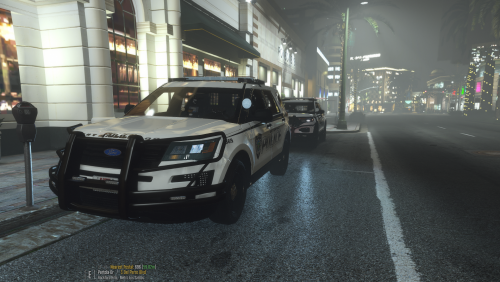 Here's another release by request from a couple people, loosely based off my department with a couple personal touches. I am really proud of how well these turned out, I hope y'all enjoy! These decals were outfitted for: * 2020 FPIU * 2016 FPIU These are the cars my department uses, this pack will likely not be expanded upon unless I chose do recreate our decals that are currently on our new cars. They are pretty different from the current ones so I make no promises that it will happen but stranger things have happened. Credits and TOS are INCLUDED IN THE DOWNLOAD. Please read them before commenting for support or permission as everything is explained there. If you comment for support, do not be surprised if your comment is ignored. As always I really hope you guys enjoy these decals, I take pride in my work so it means a lot to see people requesting to have some of my projects released. With that said, I am always trying to improve so if you notice any issues or have any suggestions please feel free to voice that in the comments.
 -
.thumb.png.ac5e151e3c3c230722ea5da8840829f1.png) Hello again and welcome to one of my latest creations! I am especially happy with how these turned out and received several requests to release them so ask and you shall receive! This pack contains decals for the following two vehicles: * 2018 Dodge Charger * 2021 Chevy Tahoe There are no plans to expand this pack at this time. To save y'all a little bit of time, the disclaimer has been included in the download along with the credits and terms of use to make sure to read that. As always, I hope you guys enjoy. I do not take commissions nor do I accept donations so if you feel so inclined to show your support, please leave a review as it helps me get a sense of how people are liking my content as well as gives me the ability to improve.
Hello again and welcome to one of my latest creations! I am especially happy with how these turned out and received several requests to release them so ask and you shall receive! This pack contains decals for the following two vehicles: * 2018 Dodge Charger * 2021 Chevy Tahoe There are no plans to expand this pack at this time. To save y'all a little bit of time, the disclaimer has been included in the download along with the credits and terms of use to make sure to read that. As always, I hope you guys enjoy. I do not take commissions nor do I accept donations so if you feel so inclined to show your support, please leave a review as it helps me get a sense of how people are liking my content as well as gives me the ability to improve.- 1 comment
- 1 review
-
-

- 1
-
-
 I think using his plugin is a good idea, I wasn't suggesting that you don't use them. I was just saying it might be good to give the player a prompt or some sort of guidance on what they need to do to handle the scene. This could be as simple as adding a little text that prompts the player to complete certain steps in the process (call EMS, get ID's, request tow) and it'll be up to the player to decide if they want to go more in depth (grabbing plate #'s, running the info, issuing citations). I've really enjoyed what you've got so far, I only see this plugin getting better! Keep up the good work!
- 160 comments
- 20 reviews
-
When I take the accident involving pedestrian callout I'm not given a prompt for anything? Is there supposed to be something attached to it or is there nothing else at the moment? I just wanna make sure I'm not missing anything. **UPDATE** I've noticed with all of the accident callouts I don't get any sort of prompt for things like gathering ID's, getting statements, calling EMS, things that you would normally do at an accident scene. Are these things that are gonna be added in the future or are they already included and I'm missing something? If they aren't yet included, I think you might be able to scrape by with Bejoljo's stuff to get the ID and call EMS but I'd like to see more included such as statements given by victims and possible offenders, maybe observations (message appears describing observations), things of that nature. Overall though I think you got a pretty good foundation with a lot of potential!
- 160 comments
- 20 reviews
-
I just installed the speed gun from the traffic tool mod but when I go to try and clock somebody it shoots? How do I fix this issue, I'd love to use the radar gun but obviously not if it's gonna be shooting at people in the process.
-
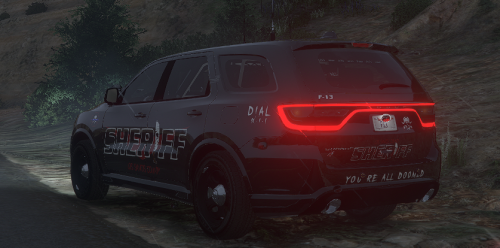
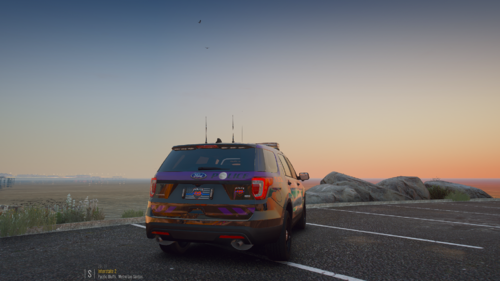 With Halloween being my favorite holiday I decided to make something cool so here it is! This small pack was designed for the three vehicles that I use in game and I really like how they turned out. Included: - 2014 Charger - 2018 Charger - 2016 FPIU I don't plan on making any more of these unless I decide to put some new cars in, what you see is what you get. ***DISCLAIMER*** These were created based off of the templates I had that fit the vehicles in my game, they don't fit every variant so if you have something you don't want to lose then back it up. I'm not going to help you when you replace something you have only to find out it doesn't fit your specific car so use common sense, back up your decals. Terms of use and credits ARE INCLUDED IN THE DOWNLOAD so do not ask for them. As a side note: The decals are supposed to be a darker purple, this will be fixed when I have the time and patience to do so. Hope y'all like 'em!
 -
-
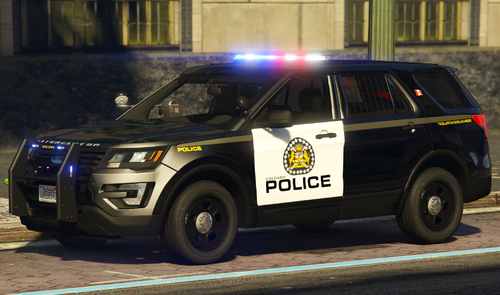 Gotcha, sweet! Cars look great, I'm looking forward to seeing what else you come up with!
- 15 comments
- 1 review
-
-

- 1
-
-
This may just be an issue with the base model but the HL and TL on the 2020 FPIU don't work. Also just a suggestion but binding the components in the rear lightbar with the ones in the visor lights to free up some of your extras while also giving you more flash patterns in the back. Other than that the vehicles and lights look great!
- 15 comments
- 1 review
-
-
- 1
-
-
Alright so I've tried that, same problem. Any other suggestions?
-
-
Thanks, I'll try giving it a shot. I don't know that Nvidia is the issue though as it only gives me the error when GTA is already open.
-
I recently installed NVE and in order to get ENB to work, I need to go through a specific process to get it to work. In order to get it to work, I need to start GTA through steam, then after it reaches the main menu I need to go back to my main windows screen and launch rage. I've gotten it to hook into the game a couple times but a vast majority of the time it doesn't work. I keep getting the error "slow system or insufficient permissions". Does anyone have a possible solution?
-
 Are the vehicles listed under "coming soon" available on the patreon now or are they still being worked on?
- 159 comments
- 10 reviews
-
-
- 1
-
-
 lol appreciated!
 -
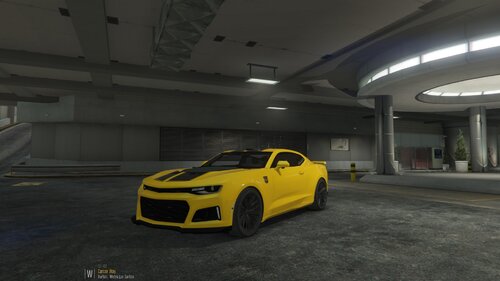
I'll just get right to the point: This is a little project that I thought might be kinda cool so introducing the Bumblebee themed ZL1 Camaro. The car was specifically created to fit Van's 2018 Unmarked ZL1 Camaro. Terms of Use and Credits are included in the download. If you enjoy please feel free to leave a review, I'd greatly appreciate it! Quick little video of the car:

.thumb.png.ac5e151e3c3c230722ea5da8840829f1.png)

