




Zenitae
Members
-
Joined
-
Last visited
Everything posted by Zenitae
-
Hi Viper, Have you installed EUP by itself or have you installed the EUP Menu and Law and Order too? Have you also installed LSPDFR correctly? I'd recommend double checking installation instructions or even using the automatic installer if you have already. It's a good idea to install LSPDFR on its own first and testing it before continuing to install further plugins 🙂 Any further questions or queries, feel free to ask!
-
In case anybody is reading with a similar issue, I was helping Sicacho in Discord and we found that reloading LSPDFR seemed to fix the issue. The shield kept crashing when equipped after first-time loading but there were no issues after a plugin reload. Hopefully this serves as a useful workaround until something more permanent is discovered! 😀
-
 Incredible callout pack! I particularly enjoyed the Evacuation Order callout, it was extremely refreshing and something different from the usual bar fights and pursuits. I'm not sure if this was intentional, but the Evac Order came through as a storm rolled in, which set the THE PERFECT scenario. It was dark, the rain was heavy, the wind was howling and lighting pierced the sky to the sound of rolling thunder. It was almost like a huge storm was on the way and that's why the evacuation order was issued. Regardless of whether it was all just a fortunate coincidence or not, the callout experience was fantastic. I've included a screenshot of my officer taking those who refused to evacuate to jail 😁 Amazing work PeterU, please keep up the good work! No crashes or bugs and everything flows nicely - very impressive! 100% recommended!
- 546 comments
- 103 reviews
-
-

- 1
-
-
The 0xc0000005 error is usually means there's a missing or corrupt file somewhere in your system. This has happened to me a few times and I've fixed it by doing the following: Run the Command Prompt as an administrator - This can be done by searching 'cmd' in the Windows search (alternatively press the Windows key and just type 'cmd'), then right clicking it and selecting 'Run as Administrator'. Next, type in 'sfc /scannow' - EXACTLY like I have, without the quotes. Wait for the verification process to finish, it should only take a minute or two. Retry launching LSPDFR. If you'd prefer a link to the official Microsoft explanation and guide (though it's identical to the one I've posted), you can find that here. Let me know if that doesn't work and we can go from there. Best of luck! EDIT: I've also found that disconnecting any controllers until you load into the game can also work. I have the Xbox One wireless controller and I use the Wireless Adapter. Every time I turn on the controller before I load, RPH crashes during the load screen. Turning it on only when I spawn in seems to be the workaround. It could be coincidental and unrelated, but it's a pattern I've noticed.
-
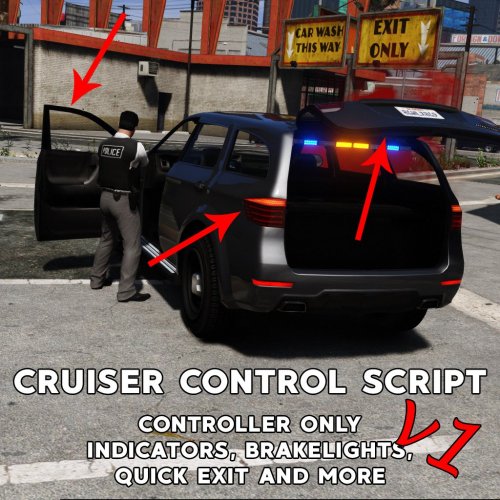 Works perfect in every way. I don't like using too many car functions and this has just the right amount for me. Basic indicators and hazards are all I really need. No complaints here.
 -
Oh okay, so it's entirely down to the user and there's no correct way 😄 Thanks for moving my thread and apologies for posting in the wrong place. Thanks for your answer Giordano 🙂
-
Hmm, there's not much else I can suggest, sorry 😞 Hopefully you can come across a solution at some point. I'm sorry I couldn't help fix the issue.
-
I think the closest thing I've seen is the Red Dawn mod for GTA V. From what I know, it just changes Los Santos into a open war between the US and China. I haven't used it myself, I just remember seeing it somewhere.
-
Hi everyone! So I've recently installed ELS (after some small teething problems) and I'm loving how in-depth it is. As you know, there's a few different buttons and settings, which are all nicely explained in the PDF's that come with ELS. However, I'm wondering if there's some sort of list or guidebook about what types of sirens/lights to use when in different situations? For example, while in a pursuit, do I need to use different lights and sirens? If I've pulled someone over, what colour lights and patterns should I use? The list goes on and on! 😄 I'm still relatively new to the policing RP world here and I'd appreciate it if anyone could help who has the extra knowledge 🙂 Many thanks in advance! Zen
-
Just to clarify and double check everything: In your GTA V root directory you should have the ELS.asi, the ELS.ini, possibly a ELS.log file and a folder named "ELS". In the folder named "ELS", you should have another folder named "pack_default" and a text file called "@ INFO.txt". Inside of the "pack_default" folder, you should have another folder called "@ UNUSED", a text file called "@ INFO.txt" and then finally all of your .xml files. You should have nothing else inside of the folders mentioned. The .ini must stay inside your GTA V root folder. Make sure the .xml files have the same name as the ELS car models found in your game. I've personally replaced the core-game cars with new models, so mine are in a mods folder and called police.ytd and so on. Once you're confident all of those are correct, check the ELS.ini file to make sure the option called "VcfContainerFolder" is pack_default. Let me know if that works, good luck 🙂
-
Hi, I'm going to copy and paste what I posted on the comments section on ELS. I had a similar issue to you and this fixed it. For those of you having issues with ELS lights not working or the panel not showing, make sure you have put any .xml files inside of the of the pack_default folder, found inside the ELS folder in your GTA V root directory. You can do this by following these steps: 1. Check the files that came with the ELS cars you have downloaded, and look for the .xml files. They should be called police.xml, police1.xml and so on. Keep these handy because we'll be using them soon. 2. Install ELS following the basic installation instructions, found at the top of this page. 3. Open your GTA V root directory. 4. Look for a folder called ELS. Open it. 5. Open the folder named pack_default. Think of these packs as presets for the ELS cars. 6. Drag the .xml files you found in step 1 into the pack_default folder. Replace files if prompted. 7. Load your game! I hope that's fixed some of (if not all) the problems that people were having 🙂
-
 For those of you having issues with ELS lights not working or the panel not showing, make sure you have put any .xml files inside of the of the pack_default folder, found inside the ELS folder in your GTA V root directory. You can do this by following these steps: 1. Check the files that came with the ELS cars you have downloaded, and look for the .xml files. They should be called police.xml, police1.xml and so on. Keep these handy because we'll be using them soon. 2. Install ELS following the basic installation instructions, found at the top of this page. 3. Open your GTA V root directory. 4. Look for a folder called ELS. Open it. 5. Open the folder named pack_default. Think of these packs as presets for the ELS cars. 6. Drag the .xml files you found in step 1 into the pack_default folder. Replace files if prompted. 7. Load your game! I hope that's fixed some of (if not all) the problems that people were having 🙂
- 2,686 comments
- 236 reviews
-
Sorry for the late reply, I’ve been working 🙂 Already tried reinstalling and nothing changed. I think I’ll take a look at the .meta files and see if anything looks out of place.
-
Sorry, when I wrote that I was distracted. Apologies! 😕 What I meant to say was I’ve checked the .ini files on the other plugins and there’s no conflict as far as I can tell. The only thing the right stick is used for is the core backup menu. Also, it’s worth noting the click itself isn’t the issue, it seems to be axis movement that’s the issue.
-
Pretty sure, I've checked the .ini files and it's still configured to the controller B button and DPad. The DPad functions work fine as indicators, but for some reason the sticks are making them work too.
-
I've been using a plugin (see below) to allow me to use my indicators, hazard lights and other car functions. Using a controller, the controls were to hold down B then either left/right on the DPad. I've had no issues with the plugin and I've been using it since I started playing almost a year ago. A couple of days ago I changed a few .ini's to make my life easier controls-wise. For some reason, the indicators turn on/off when I rotate my camera using the right analogue stick, i.e looking left indicates left and looking right indicates right. Furthermore, they only turn on when I push the analogue to a certain threshold. I can push the stick a small amount to rotate the camera without activating the indicators, but it's painfully slow. The analogue can be used again to turn them off. .The DPad functions are working fine and can be used normally. None of my plugins use the right stick, I've already checked through all the .ini's and nothing is configured to it. Does anyone have any suggestions to fix or theories as to why this is happening? Thank you!
-
Little late to the scene. 100% agree, that's the one I use and I honestly can't fault it. Don't think I've ever noticed an FPS drop and it functions like it should.
-
 The lightbar shape is fine and the car itself looks great... but the siren lights themselves are very dim (I also have Radiance enabled and Visual V). Could anyone lend a helping hand?
- 563 comments
- 116 reviews

