



PenOkOh
Members
-
Joined
-
Last visited
Everything posted by PenOkOh
-
Nice one, I use the same for every type but I can see how the immersion goes to a whole new level with different ones!
-
Thanks, makes senss I suppose! Seen that game, looks super good. Although I've never gotten to the point where I've bought it, a little bit weird...
-
There you go, but what does Cpl stand for though? Sorry, still learning the robes here... 😄
-
That's it, man you learn so much from playing a mod for a video game. Then again I'm not an american citizen so that's why but still 😄 Cheers
-
I did not know that, I picked it because I thought that was the only one that sounded good in my head. So call names actually have a purpose other than sounding cool 😄
-
There you go, close to mine. Why KING though? 😄
-
Well there you go, I guess if that works for you then you're solid. For me personally it just wouldn't work at all, since my mind knows where I am LoL 😄
-
I wish, that'd break my mind since I live for realism and immersion. Good it's working out for you I suppose 😄
-
Oh very complex, I like it very much. I just use one since San Andreas is the US but very nice still 🙂
-
Alright, sounds legit to me. Yeah I like the default look of the cars which is why I grabbed a look a like pack, but the default cars have been seen by my eyes for too many hours unfortunately... At the same time I wanna stick to the lore or some sense of realism, but it's still very much a journey!
-
I currently roll with Wilderness Callouts and I do have ambient events on and my game is fine, I've had tons of issues with the game in the past and kind of left the LSPDFR scene because of it. I recently came back and so far it's been a smooth sail. Except for lag issues with Police Search and crash issues with Traffic Control, Police Search wasn't needed since I have Stop the Ped and Search Warrant. Traffic Control is no point since every car didn't bother to stop when using it. But like I said, so far it's been a joyride, and I'm kind of happy where I am now in the game. As long as it works right! I noticed you play with the default cars, why not use ELS vehicles? 🙂
-
Alright, I feel you on that one. I do the same, I have the more popular callouts and scripts but yet to lower the time for them so they happen more often. I also roll with Callout Manager so I can manually request a job. Other than that I try to play as realistic as possible but I still have a long way to go I suppose. I clicked through your video a little and it looks cool, I might get that script to have more ambient event happening. Makes it easier to be a cop if there's a chance you can attend a scene without dispatch giving it to you! Cheers!
-
That's very true! 😁
-
Yeah I suppose that would be the downside, I really do like to play as realistic as possible and I believe doing it your way might ruin it for me. I do enjoy LSPDFR and all the callouts so far so hopefully that'll stay that way in a while. But eventually I might have to do your way since I would've seen every callout after a while. Appreciate the tip to be a dirty cop 😉
-
Yeah I did do the same with my folder, I changed it in every script/plugin available so it will say my details when ever it's supposed to be mentioned. I think it's pretty immersive that the dispatch even say your beat number with an audio file. Makes it more fun to patrol and gets you hyped in a way! I really need to roleplay more now that I can finally play LSPDFR without any crashes for over 2 hours, mostly. Any suggestions to roleplay in a more realistic way?
-
 That is very true, but Gio did say it was currently at -8035 and it was barely on the screen making it cut off. So he must play at a bigger resolution, right?
- 220 comments
- 55 reviews
-
Well, the closer to zero you go, the closer to the center on the screen you go. So short answer, go towards 7000 and eventually you'll hit the sweet spot!
- 220 comments
- 55 reviews
-
Well since 1026 is in line with the map, I suppose somewhere close to 0 would make it higher up on the screen. Can't really say what though since my goal was to add it in line with the map, but try to put it on 100 and go from there. I don't even know if you can go below 0, perhaps by adding - before the number like you suggested, I am not sure though. But the worst thing that could happen is that it doesn't work, then you can always revert back to the number it was. Let me know how it goes!
- 220 comments
- 55 reviews
-
Just out of curiosity, what's your beat number or unit number (correct me if it's actual called something else, I'm not close to LEO profession, at all) when you patrol the streets of San Andreas? I personally call myself 'E Hall. 1K-11', I know it's not genuine but I don't try to. And have you set it up properly through various scripts and plugins or do you just roleplay that in your head.
-
Yeah I'm aware of that, it's a shame though. I've tried to disable things I just don't want but there's only so much I can do. Was hoping there's something that could help, appreciate it though!
-
That sick, wish I had a 1080! But I currently have a 1060 6GB, I have lowered some things and it improved FPS by 5 or something. But it still feels to stuttery for me, I wish I could max it out but I can't unfortunately..
-
I really hope this is okey to post here, seems like it since it's not really related to LSPDFR and/or mods in a support kind of manner. We all know LSPDFR and plugins for it runs very heavy on pretty much 90% of people's system. And of course mine does the same, I lay around 25-45 fps in Los Santos so it's not too bad. But I was wondering if there's anything I can do to improve performance in both LSPDFR and vanilla GTA, but where I wont loose too much graphics in the process? There are so many options in the settings so some of them must improve things right. I don't really know much about all the different graphical settings and advanced settings so I can't tell what every single option will do. But like I said I am hoping to get more performance without making it look like a potato if it's even possible at all. Thanks in advance!
-
Alright, let's solve the positioning. If you wanna change where the PLD plugin is located at you need to change the following lines under [GENERAL] LocTextPosX = ??? and LocTextPosY = ???. I am currently playing at 1920x1080 on windowed borderless, technically speaking it should be the same for fullscreen. Anyhow if you run the game like I do and want the PLD to be in line with the map then insert the following numbers where I previously told you. If this still isn't fine with you increase or decrease one number at a time, Y is for up and down and X is for right and left to explain it easier. NOTE: This is for 1920x1080 windowed borderless! - LocTextPosX = 310 - LocTextPosY = 1026 My PLD Location: https://imgur.com/a/J2reeeP
- 220 comments
- 55 reviews
-
Did you transfer the XML file(s) into your pack_default folder? And do these XML document match the name of each vehicle?
-
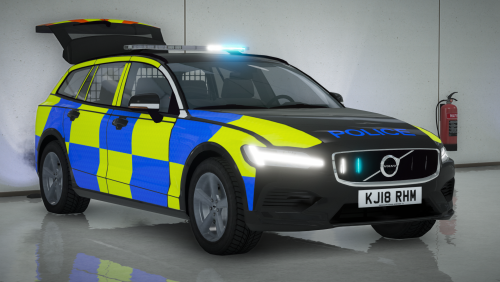 This is really good, I really like it. But I do seem to have an issue with the handling, I replace the handling with the actuall slot but when in game the car feels like driving a truck. I'm a bit confused as to why it would do that aspecially when it should work. And yes I'm serious, the handling is exactly like driving one of the transport trucks... What could be the problem? Another question as well, is there any way to replace the british blues with the standard red & blue?
- 9 comments
- 2 reviews


