




LtBronco
Members
-
Joined
-
Last visited
Everything posted by LtBronco
-
If you're lucky enough to still have Stop the Ped, it works in 0.4. Since Smart Police Radio doesn't work yet, you just have to use the built in menu..."G" i think...to get the coroner and tow trucks.
-
Is there a way to actually aim the flashlight anymore? I like the animation in 0.4, but moving the entire ped around seems silly. Also, if you stop moving he will look around himself with the flashlight. 😕
-
I'm very impressed with traffic stops. The AI traffic is awesome. No more long lines of cars stopped behind you or trying to run you over. Lots of police cars driving around...
-
-
I noticed this too. I thought I had messed something up in my trainer or something at first. I chased a car through the city for about 5min and passed maybe one other car. Once they crashed and it ended in a shoot out, there were AI cars all over the place again...
-
1. Is there a way to change the keybindings? I see the menu, but cant seem to change anything. 2. The old menu in 3.1 to show whether you're available for calls, keeping the car running etc. is that still a thing?(figured that out) So I found the LSPDFR 0.4 wiki and it answered these and all the other questions I had. It's like the creators posted that on purpose... 😲
-
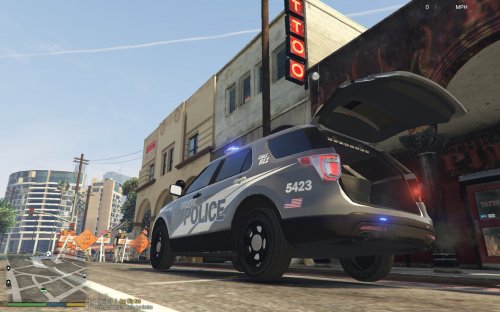 Such a simple idea, yet so perfect.
 -
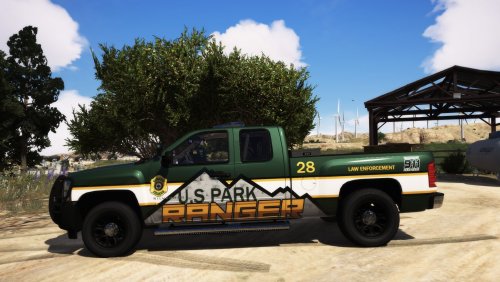 This is awesome. Great work!
 -
.thumb.jpg.182dedb1a55dea252c1853d35d4d1e3c.jpg) I like these uniforms. The replacement for the sheriff peds was very easy to install. The EUP install was a little more difficult, but after repeating the process a few times I think I got it going. The included wardrobe file was great too!
I like these uniforms. The replacement for the sheriff peds was very easy to install. The EUP install was a little more difficult, but after repeating the process a few times I think I got it going. The included wardrobe file was great too!- 256 comments
- 29 reviews
-
-

- 1
-
-
 I love this plugin. It adds so much more realism to the game. Constantly updated and improved. Keep up the good work!
- 1,005 comments
- 68 reviews
-
That was it. Thanks!
-
I'm using Simple Trainer and I noticed I can't change the liveries on a few of my add-on cars. They're installed with Albo's DLC Installer. Some cars work fine, but a few won't let me change them. I made sure the files are in the .ytd and spelled correctly, but still can't seem to get it to work. Any ideas?
-
 I actually go it. I reset the x,y coordinates in the .ini file and started again. It popped up. I guess it was way off the screen...
- 1,196 comments
- 127 reviews
-
Anyone ever have a problem with the radio not showing up on the screen? I push "c" and nothing comes up, but I can hear the beeps when I use the arrows on my controller like I'm selecting buttons. Since I know the plate checker is the first button I tired it and it ran the plate. So it works, I just can't see it. Any ideas. I just started happening yesterday out of the blue.
- 1,196 comments
- 127 reviews
-
 Personally I'd prefer a little more front lighting, but otherwise a good pack
- 66 comments
- 26 reviews
-
-
- 1
-
-
That did the trick. I installed FiveM yesterday too and for some reason I think that screwed with a lot of my settings (or I clicked something wrong). Everything looked out of wack. I think I got it all figured out now. Thanks!
-
So, I have a custom visualsettings.dat file that I installed a long time ago. I've never had a problem with it, but yesterday all of a sudden, all my police lights are dim again. I tried reloading the visualsettings file, uninstalling and reinstalling the stuff in the ASI manager (I know reinstalling one of those fixed an ELS thing way back when, but I couldn't remember which one, so I reinstalled them all...) Anyway, nothing I do works. I tried other visualsettings files too. Any ideas?
-
 I've been waiting for something like this for a long time. The magazines look a little large, but everything else looks great!
- 124 comments
- 37 reviews
-
-
- 1
-
-
I noticed this too. Only when the gun is out. Otherwise I haven't noticed any other issues. I'm so happy to see this replacement belt. I've wanted one for so long. One day I'll learn to make these things myself, but until then...you rock!
- 124 comments
- 37 reviews
-
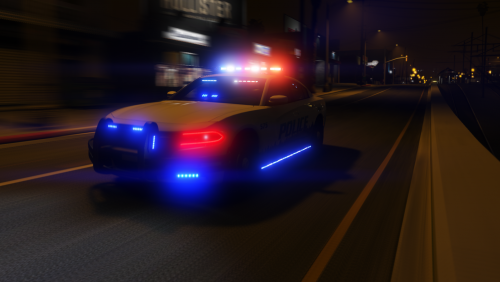 Great car. Any word on a template to make liveries? Also, any plans on making a slick top model? There are a few unmarked chargers out there, but this light setup without the light bar would be awesome.
- 28 comments
- 8 reviews
-
I had the same problem. Try this. Go to the Search Warrant folder in your Plug Ins Folder. Open the "general.xml" and go to line 49. Should look like this: <SearchItem> <item>Milk & Cookies</item> <size>small</size> <status>mundane</status> Delete the "&" symbol in the <item> line. LSPDFR doens't like that. I changed it to "MilkCookies" and there was no more crash.
- 1,005 comments
- 68 reviews
-
GTAV Directory -> Plugins -> LSPDFR -> Search Warrant FOLDER -> general.xml
- 1,005 comments
- 68 reviews
-
OK, I finally found it! The error wasn't in the narcotics.xml, it was in the general.xml. <SearchItem> <item>Milk & Cookies</item> <size>small</size> <status>mundane</status> It didn't like the "&" in the item line. I changed it to "MilkCookies" and everything works just fine now. Awesome plugin!
- 1,005 comments
- 68 reviews
-
-
- 3
-
-
I removed Traffic Control. (I can't remember the last time I even used it...). Anyway, I tried again and it still crashes. Log attached... RagePluginHook.log
- 1,005 comments
- 68 reviews
-


.thumb.jpg.182dedb1a55dea252c1853d35d4d1e3c.jpg)
