
Kreemerz
Members
-
Joined
-
Last visited
Everything posted by Kreemerz
-
Strange. I have done 2 clean installs of GTAV. I installed all LCPDFR files (manually), latest RagePluginHook file, WITHOUT any plugins. But when I go to launch the game via the Rage icon, it goes through the usual loading page but it's missing the white text that displays all the files being loaded. When it enters the game, F4 doesn't work and it never says LCPDFR is installed. But I'm not getting any error messages. What happened?
-
Where are all the users in this forum these days?
-
Always wondered if this was possible. Do I need a mod to do this?
-
When I click my radio for 'panic' or for 'Code 3' backup response, the units respond beautifully. But they leave very quickly. I would rather they leave when I get into my car to leave. Or perhaps I can set a 'stick-around' time for them to leave.
-
Darn. I like the cruise lights. Our units in this area use them a lot to run at Code 3.
-
Currently, the default settings are that you have to press the [ key to turn the Cruise Lights on. And you activate all the lights by pressing the controller keys 3 times. Is it possible to customize the activation of the 'Cruise Lights' so that I can turn them on when I press the controller button 4 times?
-
OMG! That's exactly what the issue is. I can't believe I didn't catch that. I thought the issue was that I didn't type it in all caps. Thanks for pointing that out.
-
Why would that happen? It's just a simple extra_10 change. <requiredExtras /> EXTRA_10<requiredExtras /> Seems so simple but every time I remove it, there's no crash whatsoever. Puzzled.
-
I assume I would do this in Photoshop. But what folders do those files end up after EUP is installed?
-
No. I have never logged in. Unless it uses my login from Steam?
-
-
No one having this issue? Weird. I tried launching this game this morning and it signed me in with no problem. WTF?
-
Can't play GTAV because this damn login screen keeps popping up wanting me to login. Anyone else getting that? I've never logged on. Why the heck is it asking now for credentials?!
-
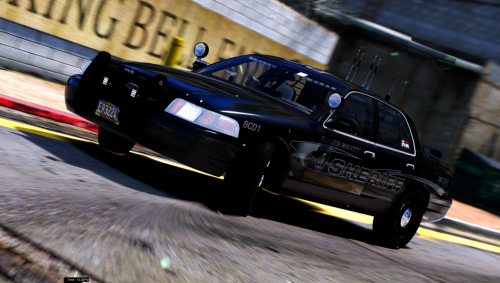 This is a perfect slicktop that I've been looking for. It has the correct pushbars, working spotlights, plenty of warning lights (not overkill), and side mirror LEDs. But..... those 4 thick antennas on the roof look horrible. Are they that big on the real thing? Gotta change those 4 big antennas.
- 26 comments
- 17 reviews
-
All is well. Fixed the problem with trying to keep the pushbars on the vehicle; plus was also able to fix the problem with the black lightbars too. Gosh, that took too many weekends. Ugh. But I appreciate your help.
-
Okay. Thanks.
-
Do I search the same meta.vehicle file to find out what the pushbars are referred to as? I assume it won't always be 'extra_10'.
-
Seems like I keep having this problem with an addon vehicle that I keep changing. So I have found a few cars that are perfect for my uses. They're always from very simple packs or standalones where there is NO meta file or carvariations file. When I take the 'sheriff' car and rename it to 'police', then drag it into the latest patchday folder, it looks perfect (pushbars included, etc). But when I start the game, and spawn it in the game, the pushbars are missing. I know I can add the pushbars later from the Trainer Menu but would rather have the car spawn with them instead. What am I doing wrong by renaming the file?
-
The Blaine County Sheriff Pack did not come with a 'vehicles.meta' file.
-
Flags? What are flags? This vehicle came with no meta files. It only came with the models and the ELS files.
-
No, the models were built with pushbars. But what I am discovering is that the issue only exists with the 'police' and 'police2' files. When I rename the file to "sheriff", using the exact same model which has pushbars, the issue doesn't occur. The pushbars are present while in the game. But after renaming it to either 'police' or 'police2' and spawning it in the game, suddenly there are no pushbars. Not sure what the heck is happening. The vehicle has no other problems: lights work, handling is spot on. Here's the vehicle I'm using:
-
-
 But the user will have to do that each time which is a drag. How can we make it so that it spawns with the pushbars?
- 283 comments
- 95 reviews
-
Great design. Only problem is that it doesn't spawn with pushbars. Wished the pushbars were on the vehicle.
- 283 comments
- 95 reviews
-
Gosh, this is very difficult. I have added the line in the file and the pushbars are still not showing up. I'm using this pack but only the crown vic from that pack. He said he included 'in depth' instructions but I don't see anything that is very in depth.