




bong
Members
-
Joined
-
Last visited
Everything posted by bong
-
Managed to fix this on my own. Turns out that this was an issue with Lenny's Mod Loader, despite having updated to the newest patch version which supposedly corrected this same issue that some were having. This could be an issue with Menyoo being used alongside LML, but this is unconfirmed so far. I do use Menyoo. Glad I was able to connect the dots, and I hope this helps @MostlyPalone and others. For reference, removing the following files/directories and their subdirectories from your GTA V root directory should resolve this issue:
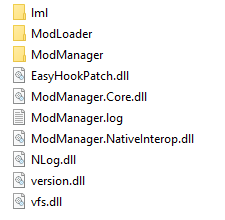
-
Please run the .NET framework installer and see if this fixes your problem: https://dotnet.microsoft.com/download/dotnet-framework/thank-you/net472-web-installer
-
Sounds like you now have an out of date plugin crashing during the loading process. Try uploading your RagePluginHook.log file here and we'll help troubleshoot.
-
Multiple reports of this issue. Could you upload a copy of your launcher.log from \Documents\Rockstar Games\Launcher\launcher.log?
-
Hi there! Could you please open Windows Explorer and navigate to the following location?: C:\Documents\Rockstar Games\Launcher\launcher.log Scroll to the bottom and look for any errors, or simply reply here and upload your launcher.log file and we'll do our best to help troubleshoot 🙂
-
Hi everyone - I'm losing patience with this, so I'm reaching out here to see if anyone is experiencing this issue with the latest GTA V release... When I launch RPH or vanilla GTA V via the Launcher the launcher will begin loading the game but suddenly closes (if loading via RPH it will also close that window). No error messages are received, however I do find the following in my launcher.log: [2021-07-24 11:36:46.499] [DISPLAY] [ 632] [gamelaunch] Game exited with code 0xc0000005 (3221225477) [2021-07-24 11:36:46.505] [DISPLAY] [ 632] [crashdetection] Game left no exit file. [2021-07-24 11:36:46.505] [ ERROR ] [ 632] [crashdetection] Exit code 0xc0000005 indicates a fatal game exit (reason: STATUS_ACCESS_VIOLATION) If you'd like to check these logs for yourself, they're located at \Documents\Rockstar Games\Launcher\launcher.log No other log files are generated aside from RPH's logs attempting to load some mods, when enabled. I've tried disabling my mods, updating my GFX card drivers (and disabling the Nvidia overlay which caused this issue for a few folks), re-installing my gameconfig, heap/pack limit overrides and multiple other things, however the issue persists. My installation has been otherwise untouched since the last update. All of this is giving me flashbacks to the Casino update, so I wanted to see if anyone else is experiencing this specific issue, and whether anyone has had any luck in fixing it. Thanks!
-
I'm starting to get a sneaking suspicion that there's an issue with this latest update, as I've seen quite a few similar issues being reported; I'm also experiencing these issues myself. Open up your Rockstar Launcher log file by opening Windows Explorer and going to \Documents\Rockstar Games\Launcher\launcher.log and look towards the bottom of the file. Do you see an error being reported? For example, this is the error I'm receiving: [2021-07-24 11:36:46.499] [DISPLAY] [ 632] [gamelaunch] Game exited with code 0xc0000005 (3221225477) [2021-07-24 11:36:46.505] [DISPLAY] [ 632] [crashdetection] Game left no exit file. [2021-07-24 11:36:46.505] [ ERROR ] [ 632] [crashdetection] Exit code 0xc0000005 indicates a fatal game exit (reason: STATUS_ACCESS_VIOLATION Let us know what you find!
-
As far as I know, StopThePed's functionality is now built into the core of LSPDFR 0.4 and can actually be removed. 😄
-
Have you also modified your graphics settings using the settings.xml file included with RadienceV?
-
Could you post your PC specs to allow us to see if this is a PC performance issue or a game issue? A dxdiag would be best. Let me know if you need some instructions on how to do this. 🙂
-
Try opening your RPH settings (hold shift while double-clicking the RPH.exe icon) and increasing the "Plugin timeout threshold" to 60000. Let us know if this works for you.
-
There are some known issues with this plugin that the developer has yet to fix. Unfortunately your best option is to remove the plugin until a new version is released. 😞
-
You have the ability to configure which police peds/vehicles spawn for each department (and many other options) for AI officers by modifying the "agency.xml" file located in Grand Theft Auto V\lspdfr\data. Specific to HIGHWAY patrols, please be sure to read lines 32-35 within backup.xml for some important info/config changes. You can also modify which agency (Police/Sheriff/State) is associated with a specific police station within the map by editing the "stations.xml" file located in the same folder provided above. I hope this helps!
-
Have you installed all of the plugin's dependencies including TrafficPolicer? If so, please post your RPH crash log to allow us to further troubleshoot this issue. 🙂
-
This is likely your issue. For example, TrainerV includes a specific keybind to spawn enemies (usually in red sports cars). Please check for any keybind conflicts and let us know if this solves your issue. 🙂
-
Try opening your RPH settings (hold shift while double-clicking the RPH.exe icon) and increasing the "Plugin timeout threshold" to 60000. Let us know if this works for you.
-
Glad this solved your issue! Hopefully the developer comes out with an updated version soon, as I had to remove this plugin as well although it's one of my favorites.
-
You can always customize your prisoner transport vehicles with Arrest Manager 🙂
-
You may want to try posting your request(s) in the Suggestions & Requests section to see if someone is interested in creating it and sharing it with the community 🙂
-
You'll need to post the contents of your RagePluginHook.log file, which can be found in your main GTA V directory underneath RagePluginHook.exe (if sorted alphabetically):
-
You can always adjust your graphics settings from within the game. Additionally you can use a custom gameconfig.xml file to modify the population/traffic density. What's the specs on your PC? It's only common if your machine can't handle GTA V. If you have a decent machine and you still experience FPS drops, your mods/plugins may be incorrectly installed or your graphics settings may be misconfigured. Those PC specs should be more than enough to run GTA smoothly.
-
These are likely just warning notifications and not the plugins actually crashing. Please post a RPH log here just to be sure.
-
Please try removing the "ComputerPlus" plugin and let us know if you're still experiencing this issue 🙂
-
Please post a list of the plugins you're using when experiencing this issue to allow us to troubleshoot further.
-
Albo's Modding DLC Pack V can be used to add both vehicles and peds to the game without changing your default files. I highly recommend it for everyone.


