


GeneralFord1
Members
-
Joined
-
Last visited
Everything posted by GeneralFord1
-
 I'm really happy to see you getting into modeling. That makes me very excited for packs yet to come! 👍
- 89 comments
- 63 reviews
-
What he said
-
Interesting. You did rename it back to Grand Theft Auto V right?
-
Alright, well here is the Rage archive so you can go through and make sure you don't have any of the rage files. https://gyazo.com/1d76a1b6644b26dd06b2410b623f92a1
-
@Blue Lives Matter Was it lspdfr and rage that you're trying to get rid of?
-
 @Solidefiance I reviewed the pack and it seems that they aren't mixed up. Thank you for pointing out potential problems though.
- 380 comments
- 31 reviews
-
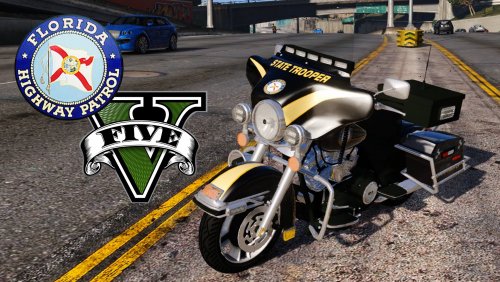 Phenomenal work! I've been waiting for a good motorcycle for a while now and this is definitely the one!
- 34 comments
- 27 reviews
-
-

- 1
-
-
-
Yessssssss finally!!!!! Ugh I've been waiting for an up to date motorcycle for so long. Thanks so much, you are the main man!!! I'll be sure to review it once I do a patrol with it!
- 34 comments
- 27 reviews
-
-
- 1
-
-
In the first section of the xml file, you should see a paragraph of the els enabled lights and then the color of the lights, you can just delete red and put blue. If there are lights inside the vehicle's back taillights, you'll see another section further down that you'll have to change from red and blue to blue and blue. I can show you some screenshots tmr when I get back to my computer and I'll explain it better.
- 380 comments
- 31 reviews
-
@Solidefiance Thanks for pointing that out. I'll take a look at it. You change it in the vehicle's xml file.
- 380 comments
- 31 reviews
-
-
Could you leave the links for them please? I will probably get them done for the update after this coming one because I'm currently working on this one and this update is already going to be big.
- 380 comments
- 31 reviews
-
-
.thumb.png.1725285dd85eea6e5b44124588de4d3d.png) It's simple and to the point but not too simple. I hope to see more textures from you! Maybe you could teach me someday...Lol
It's simple and to the point but not too simple. I hope to see more textures from you! Maybe you could teach me someday...Lol- 7 comments
- 3 reviews
-
-
- 1
-
-
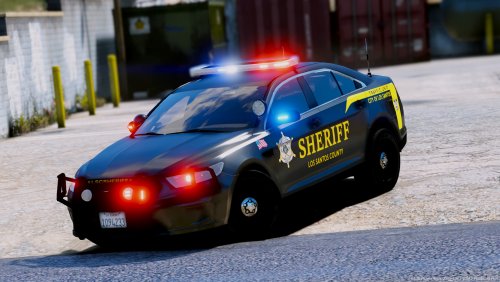 These are great looking textures and I love the option for traffic units or K9 units.
- 20 comments
- 9 reviews
-
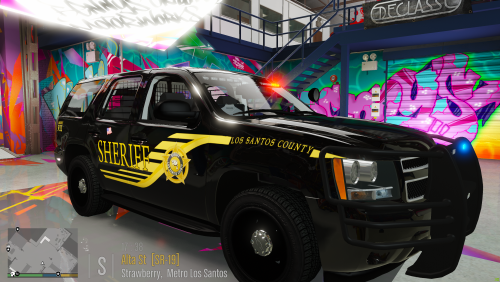 They're part of this mega pack: http://www.lcpdfr.com/files/file/15979-los-santos-county-sheriffs
- 4 comments
- 2 reviews
-
-
I personally prefer blue lighting on any police vehicle. It's what I've grown up around and I'm used to seeing so it's what I use.
- 380 comments
- 31 reviews
-
-
- 1
-
-
Yes I'll check it out. Will do. The next update will probably be early next week!
- 380 comments
- 31 reviews
-
-
- 1
-
-
Hey, I was trying to figure out how to get rid of the windows that pop up when you link models in the description of a mod. Thanks ahead of time!
-
Is there any reason Lcpdfr.com isn't letting me upload? I keep getting this error: https://gyazo.com/da559e60ca7f3242d590522bab21119b
-
Sorry about that mate, that's why I asked for a link to the model but that's my fault because I didn't realize you said srt. I'll correct it tomorrow. Sorry again. Bxbuggs' CVPI comes with an all blue option.
- 380 comments
- 31 reviews
-
Yeah, when you go to the light options it has the option for all blue, all red, or the default red and blue. Anyway, here's the ytd for the all blues: fbi.ytd
- 380 comments
- 31 reviews
-
He included the Blue light textures with the model. If you don't know how to replace the textures, I can make it into a ytd file for you if you want.
- 380 comments
- 31 reviews
-
-
- 1
-


.thumb.png.1725285dd85eea6e5b44124588de4d3d.png)
