1Fugitive
Members
-
Joined
-
Last visited
Everything posted by 1Fugitive
-
God dude, u don't make this easy... what have you changed/added/removed/done? anything? it just started NOT working? did you check box for load all plugins in the settings for RAGEHook? ( click the little gear at bottom when it starts up) did you add any plugins?, like callouts, or any cars/mods? its usually the last thing you did- think
-
Id like to try RDE, looks good, but I've had bad experiences with a cars that said oiv install but there was still a lot of folders an stuff to put in god-knows-where, this is all too complex for me, an Im scert to fok up my game. I d/l'd RDE and I was going to make a copy of the whole GTAV folder in steam/common. Then I rename my good working copy with LSPDFR so when I click the install for RDE it should go to the '-copy' right? of course I'll renamed the 'copy' just plain old GTA, no -copy on the end. Q: Will that work? will steam know its a copy? worth the effort?
-
well, whats changed? add a mod or plugin? remove something? are you clicking on the ragehook inside GTA game folder, pls answer that
-
took me 2-3 days get this mod to run. first of all the included RAGEhook in their download is like v31 or somthin. get the latest RAGEhook .50. and use that RAGEHook exe inside your GTAV folder to launch game. It will launch the mod thru steam/GTAV, thats normal, it will say launching game, waiting for game window.., don't be alarmed. you have to be signed in to steam before you click the RAGEHook exe in your game folder. sounds like RAGEHook is crashing..start with getting the latest version
-
OK, so you've fixed the save game file an you played LSPDFR before? it worked? its LSPDFR now, not LCPDFR
-
OOOoooo K, Have you played it before and it worked then? -^^-
-
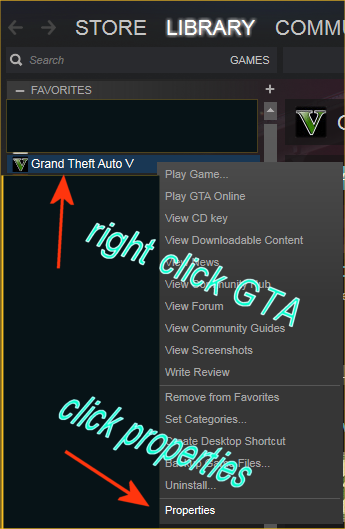
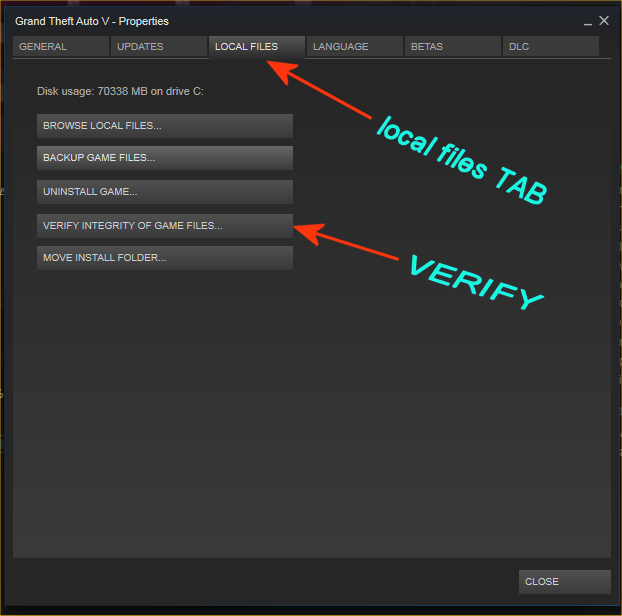
(EXCEPTION_ACCESS_VIOLATION) - that's an error we get sometimes playing V online. Id suggest a verify install thru steam: right-click GTAV/properties/local files/verify integrity of game files. what does this mean?-> ' I get into the game, and right onto the lights and sirens part' /you mean you've been to the station, come out as a cop, in a cop car, an hit the lights an siren?? an it crashes?
-
you say youre trying to play GTAV, which is confusing. you use RAGEHook to play LSPDFR. If you want to play GTAV story mode w/out the LSPDFR Mod, or online don't use the RAGEHook exe. use normal GTA shortcuts IF you mean youre trying to play LSPDFR, do you have the new .50 version of RAGEHook in your game directory? and your clicking on it in there? when did you last have it working? and then what did you add/do/remove before this problem?
-
Pim??? theeeee great PimDSLR??, maker of cars n stuff?? whaaaaaaa? I have some cars of yurs! excellent they are. props dude- social club? Oh, did it sign you out? sometimes you get signed out of social club they want to make sure youre you. go to rockstarsocialclub online an sign in, then go back an try steam. what 'stuff' did you remove? and why?
-
both LSPDFR and GTAV say this? where when is this error appearing? can u screenshot it please what it looks like. VERIFY STEAM GTAV INSTALL: Open Steam, right click on GTAV in column on the left, click Properties, on the LOCAL FILES Tab, click VERIFY files. and wait. if found it will automatically fix them. takes a little time-
-
yeah a lot of peeps had probs with that one it was removed too, so.. Now I put back in Wilderness callouts with my old version of RAGENativeUI.dll an played some of it..the demonstration, and illegal camping, transport officers, its fine...wth, that's the version of RAGENativeUI.dll I had in before when the 'sniper' call crashed LSPDFR!!??. this is whack man, whack to get everything working- and oh yeah- DONT alt/tab game, and always start it from in the game folder RAGE exe icon. and keep doin a F4 'cleanworld' after every few calls
-
have you ever noticed how different plugins have different versions of RAGENativeUI.dll? different sizes in Kb?. for example- the one in wilderness callouts 0.5.63 says in rar folder when opened its 94.720, when I add it to game folder its says its 92.5. anyways its different from the one I had in there from last plugin I added. Soooo.. if I use the one from wilderness callouts will my other callouts still work? or some of them will and some of them wont? well see. but Ive had a hell of a time getting all plugins to work, and have swapped out different versions of this RAGENativeUI.dll till the ones I like all work an not have crashes. But when I crash LSPDFR (I can 'reloadallplugins' and 'forceduty' in game and go on) it just says LSPDFR has stopped working, and Im not a cop anymore, the RAGE log will list out the reason. the callout usually that's causing it. I DIDNT use the RAGENativeUI.dll in wilderness callouts folder cause my callouts and game are all working fine together with a version that's 94.5Kb. from what plugin I don't remember. maybe 'assorted callouts'?. not sure, but it seems youll have to swap plugins an callouts in/out of game, that not all of them will work with only one version/size RAGENativeUI.dll., ooorr live with crashes here an there. in other words as I have had to do, is pick an choose some I like and all work with a certain ver/Kb RAGENativeUI.dll. OMG!! I put the RAGENativeUI.dll from wilderness callouts v0.5.3 in game folder, and when I loaded LSPDFR I got all kind a messages about it from albo an PeterU, an all said they will not work with that version of RAGENativeUI.dll!!! that I had to get v1.5? good thing I saved it before adding the one from wilderness callouts, I re added wilderness callouts and the RAGENativeUI.dll I was using that worked for all my callouts an game, and Im gonna wilderness callouts again-
-
lol, live crashes- ILL SUBSCRIBE TO YAAAA, yaaaa! Is it just crashing LSPDFR? I mean u can 'reloadallplugins' and then 'forceduty'., OR is it crashing GTA? u go to desktop or screen freezes.
-
geez, OOOOKkk, did you remove ALL plugins?, what is the one with "Khorio.xml" in it? I had probs with that one and removed it. It had an xml in main game folder and the plugins/lspdfr folder.. LSPDFR was conflicting with older plugins an I didn't really care for the new car stop menu- they took away arrest with E when they get out of the car. Also Wilderness callouts just crashed LSPDFR when I accepted 'sniper' call. That's getting removed now- that was also the one with stupid 'disturbance' calls theres nothing there-
-
its LSPDFR+. Remove it an try it-
-
eyup- that's bout right u got it
-
orrrrr....Don't Make Crap. and you don't be a condescending defender of CRAP asshole.
-
I can read a rage log dude- its highpriority. ITS CRAP. don't make CRAP! last thing I did- an I hate dumbass talk to people callouts. we want ACTION. if I do them Ill stun the perp mfer arrest his ass send em to jail an drive off. or just shoot him in the head. CRAP its more CRAAAAP.
-
this is going nowhere man... I tried all that- its a crapjob callout- that's all. and YESSssss, also tried reload all plugins. I could have reloaded Game Save, I know that, but why should I have to for a crap callout package. Don't Make Crap!
-
dude if yur sure game folder has all the updated an right shit, then remove all callouts an and mods an re-add them one at a time. can u remember what the last thing you added before experiencing crashes every single second? with all this stuff added, I get crashes too occasionally, and I don't have nearly all the shit you've added, some conflicts an occasional crashes are to be expected here- you could just play it w/out any mods or plugins. I can tell you I removed crazy callouts that shits buggy crap don't work an crashes game-the vicious dog call is a a disaster , and Code 3- more crap, you can see PeterUcallouts is good, and albo's assorted callouts-both good. other good ones I can vouche for are HeroCop, and calloutsV. not much after those, remove an retry one at a time.
-
" or simply installed it correctly" <--what does this mean? lol. orrrrr.... how bout- Don't Make Crap, how bout that huh? The G-I-A-N-T red circle remained after force generating another call (X), and delete, and end, AND 'cleanworld'...what else is there for me to do to try an end a Crappy Call?? why don't they make it properly in the first place an test it. AAAgain-Im sick a this shit. un-install/re-install LSPDFR?? that's yur suggestion?? cos a Crap callout? lol. good man. good advice thx. next time Ill re-install windows, then GTAV, then LSPDFR, then reload a Crap callout pack an try it again, gimme a couple days...Ill let ya know-
-
duu- uuuuhhhhh
-
don't make crap callouts. I just had to quit the game--AAAAAGAIN----- Becos a crap callout- 'disturbance', nothing there, changes to red circle about 16 blocks diameter wasted time driving around nuthin there- FOOOooook man, wheres the disturbance??. Cant quit it, or end it, theres a fkin giant red circle FOR evaaa on my map now. dude? wtf? I donno who made this pos callout but dudes...Don't Make Crap, and pls test it, tired a this shit. Before u throw some piece a crap callouts on the net, do us a favor an like..try check it first. an always have an 'end call' option. aight? thx
-
 well fkin done man!. best partner mod out there, and dog is even better. sniffs for drugs, takes down OR Kills depends on you. last pic RIP Mr Peanuts run over on the job.
- 542 comments
- 98 reviews
-
try this guys 2016_CHP_megapack_1.1.0. I belive I got it here, u could search it- theres several people make liveries for it too, one I like is called LS_LA Highway Patrol Skin Pack, but there is at least 2 others-