
Kifflommer
Members
-
Joined
-
Last visited
Everything posted by Kifflommer
-
I am crashing due to some type of interaction with either LSPDFR's License Plate system and Traffic Policer, and or ALPR Lite. I'm not the best at reading the RagePluginHook logs but from what I read that is the issue. Also seems to occur when the ALPR is on and scanning.
-
 Once again, thanks for the update. I look forward to any further updated old plugins and or fresh new files!. 🙏
- 1,196 comments
- 127 reviews
-
 Just here to sing my praises for you updating this plugin, about to test it out now!. I missed the mimic feature so much!. Without it Highway Patrol is almost impossible as traffic stops result in you constantly getting run over!. With Mimic and reduce nearby speed Highway Patrol is now possible again!. So many features to be happy to have back!. Thanks again!.
- 3,646 comments
- 306 reviews
-
Thank Gio for this recommendation,he gave it to me and I shall recommend it to you. Use " Police Partner " by Darkmyre. He has a series of great GTA V mods and LSPDFR plugins and even call out packs. Not to mention you can use it to spawn and dismiss a custom outfitted partner and then use a trainer like ineseri stated above and then use the " recruit nearest ped as bodyguard" feature to easily forge your own SWAT/NOOSE teams or FIB or Gang Unit squad.
-
NOT WORKING Arrest Manager LPCallouts LSPDFR+ Police SmartRadio Traffic Policer Albo Just Updated Traffic Policer and Police Smart Radio, now 0.4 compatible!.
-
Yeah lmao my favorite and most cringe worthy part too. In the United States that dance is known as " twerking ". And usually it's done in clubs and bars, not on the street to encourage an armed man to continue eluding police hahahha.
-
Alright I have both of those, among some others. I have only taken an assortment of random call outs so far last night. What I'm gonna do is use callout manager and force individual callouts from each pack, top to bottom. I'll report results back here. Clearly some packs and plugins are " working " but some callouts are conflicting or causing crashes. Only way to narrow it down is to test each callout. If anyone wants to help just use callout manager plugin, hit F12 in game and use the menu to force each of your callouts from your various packs. Play through them in full and if you encounter any crashes or issues report back with them in some detail. I'm starting with - Assorted Callouts - Callouts V - Code 3 Callouts - Code Red Callouts - Common Callouts - United Callouts I checked in game under new " call outs " tab and that is like 40 or so call outs right there. I'll go through those and then continue with a new list of untested plugins/call out packs.
-
DarkMyre's Police Partner mod also works fine, testing the rest of his now as well.
-
Figured this much after troubleshooting it for a bit, thank you!.
-
Thank you, said it was not synced but the space bar thing was never a thought to me. I figured it would display a message saying that or something!. Resolved Via Mags
-
First line of the thread " Synced my account in game " , so yeah. I logged in and it synced but no characters have been added it says. Because I cannot see or access the characters tab that is meant to be there. 😐
-
Search Warrant by DarkMyre works, as well as PersuitOnTheFly, however it no longer puts a star/icon on the ped on the minimap. Makes it harder for sure, heh. Testing more plugins as we speak!. Not having a coroner, or tow unit really is forcing me to play 0.3 for now however.
-
Synced my account in game but not seeing my characters tab when I look for it on here. What I see Below What I SHOULD be seeing....
-
Albo has a series of mods that are going to require updating, all we can do is hope for the best and wait.
- 1,196 comments
- 127 reviews
-
-

- 1
-
-
Yeah, sadly we are going to have to wait for Police Smart Radio to be updated for Coroner and Tow. At this point when EMS fails to revive you just have to leave bodies laying wherever they are and vehicles from arrested or shot suspect just sit there as well. 😐 , would be really nice to have a coroner and tow truck in the code two section of the built in backup menu.
-
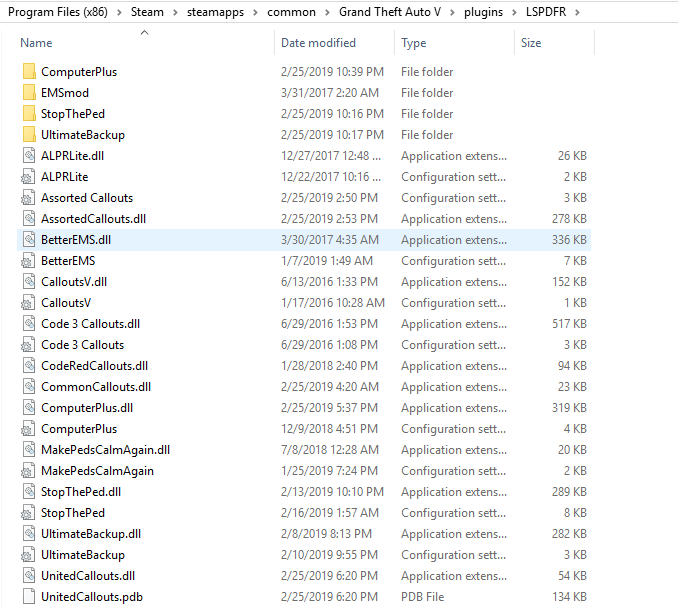
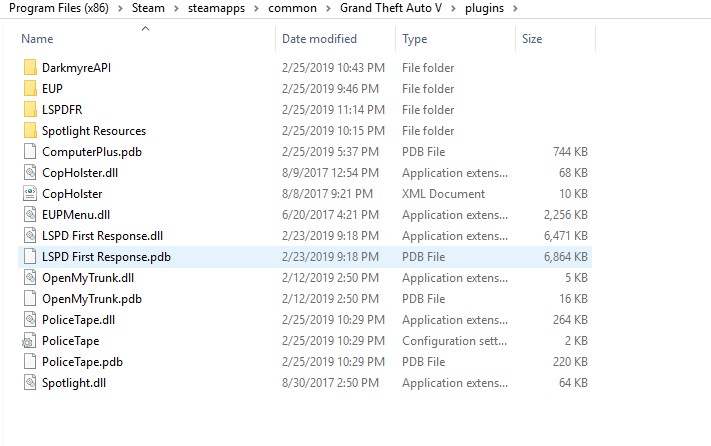
All working so far, also with all of the mods and scripts I listed in my earlier post. I'm actually going to FINNALLY be playing 0.4 and testing all the keys and call outs and the plugins. So far it has been almost two days of installation and backing up and testing lol. This is how my 0.4 is looking so far!. Not much but hoping more plugins will be created and released and many will be updated!.
-
Do you have the added images and computer assets downloaded and installed as well?. Also, can confirm Rageuphoria works.
-
Okay so in 0.3 within the " Plugins " folder was a LSPDFR folder where you would put your call out plugins and some others. Now with LSPDFR loading on start up the LSPDFR folder within the plugins folder is gone. Just the plugins folder itself. So do I dump all my call out plugin DLL's and files and folders in there now?. Thank you in advance!.
-
 So do we have to wait for LSPDFR+ to be updated because it's required for Computer+?. Or will it work without it?. Thanks either way!, I hope to see the Radio mod updated soon and greatly appreciate all the work you do for this community!.
- 1,742 comments
- 172 reviews
-
Sorry for double post, Computer+ Was just updated and works for 0.4 everyone. Please be sure to check the downloads section regularly. A lot of plugins and call out packs being updated and created. Edit : Good Question anyone got an idea?.
-
I don't know how to remove spoilers and it's automatically doing it when I copy/paste and I'm in no way going to re-type this so sorry. Look below to see what I have tested and am about to test, will report back after.
-
I'm in the process of testing so much stuff I have barely actually played 0.4 itself to test the new features and such. I am very excited and grateful for a LSPDFR update and can only hope that the pathway to 0.5 is already being worked on. I can only dream maybe in some years we can achieve near perfection with a 1.0 release and by then the downloadable plugins and call outs from the community will be in the HUNDREDS. LSPDFR could have a bright future if development is still continuing down the road. However a little funny thing happened to me playing after a little while just goofing around. Anyone else getting an odd issue with random pursuit vehicles exploding lol?. Just random and puts " X " on the map where red suspect dot was and legend just says " Dead ". Have to force end the callout after it happens. I may document it and create a support thread if I continue to see it occurring.
-
Ty Sam!, hopefully the community can help some of the new guys out because there is a huge influx of not only new members but those who are unfamiliar with modding and all that.
-
Back up your game before trying any mod, follow the instructions to the fullest extend and assure you have no other mods that will lead to compatibility issues. Script Hook V works fine for running my scripts, I don't use ELS vehicles but I don't see why they would not work if Script Hook V is functioning and running fine.
-
What happened to the support forum section for LSPDFR?, it's like sub-sectioned now and it just has stickied informational support posts. Can nobody post threads for specific support requests anymore?. Because probably 1/2 if not 3/4ths of the people posting here are posting issues, bugs, glitches or support requests. Lol https://www.lcpdfr.com/forums/forum/907-lspdfr-support/ https://www.lcpdfr.com/forums/forum/920-lspdfr-04-support/ Cannot make any threads there anymore 😞 , so this thread is going to continue to get spammed with this kinda stuff lol.