



JBuzz826
Members
-
Joined
-
Last visited
Everything posted by JBuzz826
-
 No problem. Definitely keep up the great work. I’m glad it wasn’t a conflict either. I ruled yours out yesterday only because it was thennewest i installed. Apologies for the confusion.
 -
Well so I found out the issue actually. Ran a test today. Anytime a commercial vehicle is stopped interactions+ menu doesn’t work. Not sure why? I reinstalled your Callout Pack and it definitely doesn’t conflict with interactions plus. Weird. I’ll test it some more
-
I too have been seeing this as well. Ambient spawn. Do you have world events disabled by chance in lspdfr ini? I’m testing something right now to see if world events is causing this? I had it disabled and I re enabled it just now. I don’t know what model name Vector3 is?
-
I will say. Very well thought out. 😉 Good callouts. I do however have a minor issue. So I went to perform a traffic stop and I use interactions+ to obtain license and insurance info. Well after i installed this Callout Pack I couldn’t use interactions+ especially on traffic stops. So I’m unsure if it has issues or what? It conflicted. After I removed your Callout Pack it went back to normal. I definitely like the callouts and look forward to more.
-
Yeah I wasn’t too impressed with 8.0 just the graphical quality of the K9 uniforms wasn’t up to par. I do hope Alex can update it and make it look like 7.5 quality. 🙂 Luckily today after updating a game config file and adding some memory performance enhancers I was able to play lspdfr for 5 hours no crash.
-
Already did. Pretty sure it’s an lspdfr glitch. 😉 I’ve downgraded eup to 7.5 and have the appropriate menu. Which trainer do you recommend?
-
I don’t have a trainer
-
I have three LSPDFR characters.
-
I have for rage Plugin Hook plugins, Holdmygun, spotlight 1.2 by Alex guire realtime sync reborn with weather (I don’t use weather so I turned it off) rageshow my location. For lspdfr plugins and callouts, computer plus Stop the ped and , ultimate backup PeterU Callouts pack police smart radio by Albo updated for lspdfr 0.4 traffic policer by Albo updated for 4 oh and eup menu optimized for 7.5 i have eup 7.5 installed. I attempted to try out EUP 8. But I wasn’t too impressed with the quality of the uniforms. The K9 graphics on LSSD was of low quality and after tuning graphics it didnt make much difference so I reverted to 7.5. Thats it. I’ve updated a lot of plugins yesterday as I’ve been out of commission for two weeks due to a real life surgery I had. I thought about adding more callouts. I think I’m going to add Assorted Callouts by Albo and Tacco and that’s about it. I haven’t added those yet.
-
So I have a little bit of an issue. So I switch character during switch it’ll move my character to my apartment but my chosen character is frozen in place. Can’t walk anywhere. I tried spawning at PD and same thing. I’ve updated to 0.41. Any ideas or help would be appreciated.
-
 Ben, computer plus lush will create a court case for arrests. There is a checkbox on computer plus for citation that says notice to appear. If you check the box it’ll create a court case for lspdfr+
- 1,178 comments
- 137 reviews
-
@Flashback if you need a beta beta tester for this project let me know. I’d be happy to lend a hand. I quite enjoyed LCPDFRHQ. I’ve since transitioned to gta v now and am loving LSPDFR.
-
Hmmm that’s odd. Try a few more. It took about three for mine to synch
-
Hmmm take a selfie in game. Mine synced to my character. It works.
-
@Ghnty5 press X and it’ll sync to the website. X on the controller. There should be a prompt on the bottom right on the screen that says what to push for sync. Then you’ll have to login and then you’ll be synced. 😉
-
So I figured a workaround on the traffic stop thing. Say no in the ini file for stp take over all arrests. It works. Wish STP counted for stats here though.
-
It occurs during a regular traffic stop. I ask the id from the driver. I recalled there was a plugin that used to take over default questioning on traffic stops. I thought it was STP. Anyways I tried the edit profile on the page. No bueno. 😕
-
Is it possible to edit our lspdfr characters birthdays. I don’t know many 19 year old police officers. Lol. Also good work on 0.4 needs some work on traffic stops though. Been having crashes
-
I'm attaching the log. Ive had multiple issues since upgrading to .4. I thought the bugs were worked out. I am only using two callouts Albos and PeterU along with computer plus. Attached is my log. RagePluginHook.log
-
I know and it makes sense. I tried and tried to have a police car in a SP garage but it gets impounded each time. Btw Officer Benzo, nice lspdfr vids. 😉
-
 Is this a file I can download? Thanks
 -
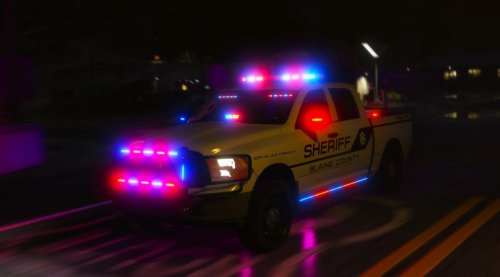 @Discarded2003 I don’t do FiveM. Just single player. Still having issues of not seeing out the windows and windshield.
- 61 comments
- 6 reviews
-
-
@Discarded2003 Okay, so I have the screenshots here. I was able to finally get the livery to work as you can see, but the windshield and windows look the same. Any ideas? Also I am using B.E.L Better Emergency Lighting if that helps. The light pattern isnt working either.
- 61 comments
- 6 reviews
-
For that reason ☝🏻


