NorthernLaw
Members
-
Joined
-
Last visited
Everything posted by NorthernLaw
-
.thumb.png.afd8d12560b81920aa69838b43301a86.png) PLEASE make a full pack out of this. I love the livery and lighting
PLEASE make a full pack out of this. I love the livery and lighting -
-
-
-
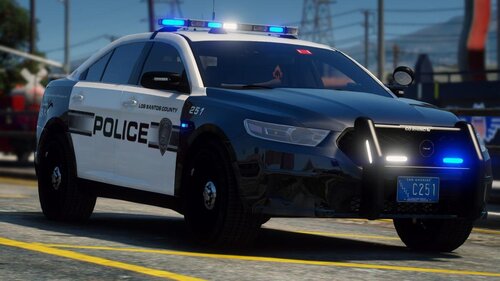 I've read it has something to do with the .asi files, so I uninstalled the ASI loaders in openIV and restarted my PC. After that, only one tail light and one headlight worked instead of both not working. None of my other packs have the issue, which is very strange. No.
- 37 comments
- 11 reviews
-
On the vic and tahoe the headlights and tail lights turn off when activating stage 3. Any fix? Havent touched the ELS files at all.
- 37 comments
- 11 reviews
-
My suggestion is download LML again, and look at what files are included. Delete EVERYTHING. All of those files will be in the root folder.
-
Just figured it out yesterday. Delete any filed that are related to lennys mod loader, then GTA should launch. Delete ANY file that came with lennys mod loader.
-
Nope, wont launch with rage or without. Tried renaming mods folder, didnt work
-
-
Have the same issue, can’t figure it out
-
So, my LSPDFR used to work just fine before the recent update. Updated the game, then got the new LSPDFR update, scripthook, gameconfig, rage etc GTA V will not open whatsoever. Even with the mods folder disabled it won’t launch. Here are the steps i’ve done: -Verified integrity of game files -Launched everything as administrator -Disabled antivirus -Re installed rage, LSPDFR etc with updated versions I can not figure out why the game won’t launch. I launch through steam, then it just closes. Don’t even get to a loading screen.
-
 Such a cool pack. Love the lighting setup, pretty sure it could blind someone across the map! Amazing job
- 261 comments
- 37 reviews
-
 https://www.lcpdfr.com/downloads/gta5mods/vehiclemodels/36310-dlc-els-lscs-office-pack/
- 269 comments
- 17 reviews
-
-

- 1
-
-
-
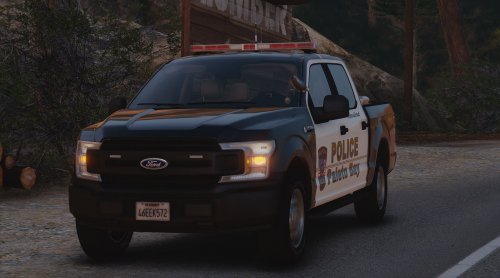 This is probably a no, but any chance youd add red and blue or blue and blue lighting for this?
- 19 comments
- 1 review
-
-
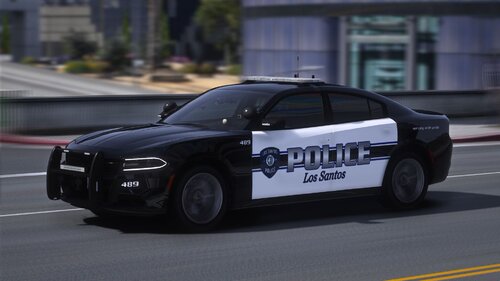 I replaced the files in the DLC pack with the blue and blue, but when I load into the game the cars are all messed up. The charger wheel is missing, lightbar is all screwed up, etc. But when I use red and blue, everything is fine.
- 85 comments
- 5 reviews
-
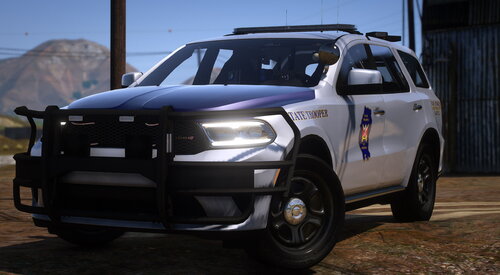 Will there be an update soon to fix the missing pusbars for the slicktops and incorrect ELS files for some models?
- 72 comments
- 11 reviews
-
-
- 1
-
-
Fantastic pack, just a few bugs and errors. On one of the FPIUs and the slicktop charger, the ELS is messed up. Also, the slicktop vehicles don't have rambars even though its shown in pictures. The pushbars aren't in the vehicle component menu either. Otherwise, it looks great and I love the lighting!
- 72 comments
- 11 reviews
-
-
- 1
-
-
why do the slicktop versions have pushbars in the pics but don't have them in game?
- 72 comments
- 11 reviews
-
-
-
 Will this be updated soon? I go in game and when it launches, its unstable and crashes frequently. LSPDFR is unplayable without this.
- 3,646 comments
- 306 reviews
-
 Ok, I don't have any words. 5 stars isnt enough. Make more packs just like this one!
- 207 comments
- 94 reviews
-
-
- 1
-

.thumb.png.afd8d12560b81920aa69838b43301a86.png)