officer 21
Members
-
Joined
-
Last visited
Everything posted by officer 21
-
do you use visual v to make the light bright you need to chasnge the visualsetting file
-
so put visual v in first then the visualsetting file in and then the advanced anti blur for the options if still dull turn post fx in the settings under graphics put to high or the highest setting for this one
-
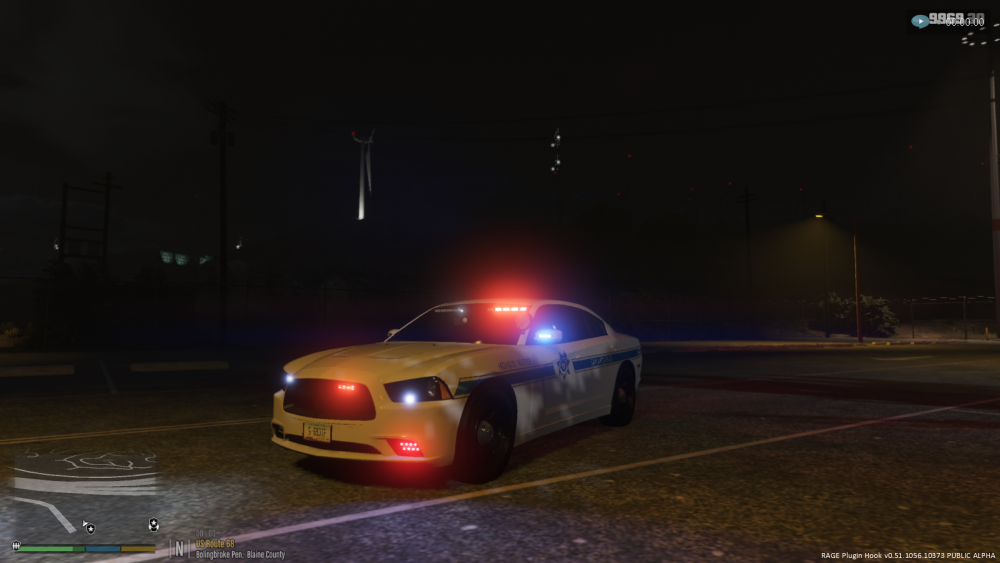
use this visualsetting file my own personal one mine looks like this use my visualsettings and visualv and anti blurr no radiance v visualsettings.dat
-
never ask if some one can access your computer for you that has its own dangers use all the lspdfr youtube vidoes to come to terms with how to add lspdfr and plugins use stream of rockstar login watch as many videos as you can of installing rage hook and lspdfr before you attenped it or do step by step what the video saids for each also make shore your laptop can run gta v before doing anything and wasting your money Type in your model number in to the web for specs of your computer if its higher than this your be fine OS: Windows 8.1 64 Bit, Windows 8 64 Bit, Windows 7 64 Bit Service Pack 1. Processor: Intel Core i5 3470 @ 3.2GHZ (4 CPUs) / AMD X8 FX-8350 @ 4GHZ (8 CPUs) Memory: 8GB. Video Card: NVIDIA GTX 660 2GB / AMD HD7870 2GB. Sound Card: 100% DirectX 10 compatible. HDD Space: 65GB.
-
change the visual setting folder with radiance v thats in visual V folder or the others that they mention if the lights after that are to full on theres a fix for that to just ask will talk you threw it
-
-
back up every thing first un sure then sorry ask the the maker of the file they might know Sorry
-
unsure maybe reinstall the visual v update and leave radiance v out and just change the visualsetting file that what i done i would say somethings gone wrong with installing visual v and radiance use the new update one and leave out radiance v and use my visualsetting file and then yours see the differents
-
il give you my file and try that if that dont work im unsure make aback up of old file visualsettings.dat
-
than in your visualsetting file go to this car.defaultlight.day.emissive.on 800.00 car.defaultlight.night.emissive.on 280.00 and change the day one up if nights fine thats what mines set to thats what it normal is um i can give you mine to see if that works
-
in your visualsetting file go to this car.defaultlight.day.emissive.on 800.00 car.defaultlight.night.emissive.on 280.00 and change the day one up if nights fine
-
is the lights still dim at night
-
change visualsettings file are you running visualv as well
-
 hi when i cal the noose air support it turns up like this its the only one that does it you can see the team in it and it shows up when the heilcopter on the ground any thoughts'
- 378 comments
- 23 reviews
-
 how to make it be used in lspdfr as when it turns up it saids it not a registered as a tow truck
- 38 comments
- 3 reviews
-
Have u tryed this one it always works with mine if it a add on https://www.gta5-mods.com/misc/gameconfig-for-patch-1-0-757-2-update-at-each-r-update
-
Download the new gameconfi. 1032 and try that it sounds like that. Now that u said that I was not crashing on 944 update the gameconfi useing one in gta 5 mods site Use the one that most downloaded with 1032 on it
-
yes check the dlclist aswell then you can crozz that off or the trainer your useing cant see it change trainer and try it
-
remove the last ones on the gta until you find that one that's installed wrong/corrupt it could be also the dlclist hasnt been typed in with the new line under update. common data
-
captain 14 light are els style lighting the cars not formated for els they just light up around the same as the els lighting system patterns i use the captain 14 slotsz then put els car in to it that way you can add 10 cars in lspd pack and three in sheriff pack
-
just block gta in the fire wall faster and safer you can convert back and upgrade back to 1032 once the update come out do it all threw ragehook just download the ragehook 51 block it in the firewall faster
-
convert back to 1011 and play lspd untill the mods are released block gta v in the firewall from going on to the social club click off line
-
-
 when i use this els stop working on the controller number #07 and #14 ive tried, but els is fine if i don't change the controls for the dpad, can you tell me why
- 161 comments
- 23 reviews
-