darkfusion666
Members
-
Joined
-
Last visited
Everything posted by darkfusion666
-
 It`s rare too find a good set of textures that`s constantly updated with a huge range of choices, these are them! Clean..on point and my goto set right now, i only hope @EchoWolf includes the policeb texture next for the 2013 BMW 1200RT from Hurks CHP mega pack 1, this will complete my fleet. 5 stars
- 65 comments
- 34 reviews
-
-

- 1
-
-
0.4.1 just installed, i have checked the lspdfr default keys ini and all entries are disabled accept for Q, TOGGLE_POLICECOMPUTER_Key=Q TOGGLE_POLICECOMPUTER_ModifierKey=None TOGGLE_POLICECOMPUTER_ControllerKey=None TOGGLE_POLICECOMPUTER_ControllerModifierKey=None however upon trying to activate sirens and stage 3 with my controller Dpadleft it opens up the computer and disables ELS completely? Anyone have a clue what`s going on...
-
Search Warrant works with the F10 key, and i use SW and stop the ped together because i use the K9 from police partner, which uses search warrant, just disable the F10 key in SW ini so it won`t conflict with STP if you are using the K9. Only search warrant opens everything!
-
You will need EUP Law and Order pack, EUP menu and Serve and rescue pack all found in the d/l`s if you want peds to match, also ultimate backup is another mod which enhances all these together including the custom xmls for each jurisdiction.
-
 @mkalash Your XML`s are on point man... Thank you so much for these, just setup my cars and uniforms and bang... Done... cheers
- 195 comments
- 24 reviews
-
Mine works fine! make sure you have set up the xml`s , or just use EUP with it, and load it manually using F4.
-
I`m lost as well, although my problem is the German Shepherd (Police K9 Shepherd V1.01) worked fine yesterday with police partner and search warrant, today the default rottweiler shows up, i`ve reinstalled the shepherd textures multiple times and now nothing..?
-
 Stolen plane at the airport actually climbs the perimeter fence and drives down the beach, Clown just glitches and creates another clown whilst arresting him, then runs away....?
- 642 comments
- 53 reviews
-
Love the flash light.
-
i7 8086K, 1080TI, 32 gig ram W10 64, and i have everything maxed out, the only place it lags is when i spawn in the apartment, there is something sucking fps when i look towards the fireplace, but otherwise it`s smooth and just the same as 0.3 for me!
-
40-50 when i spawn inside the apartment, and 80+ normal gameplay.. i`m happy 👍
-
Sounds like you don`t have ScriptHookV...?
-
Make sure you`ve installed EUPMenu_Release_2_2_0_2, and load it manually through the F4 console. it works fine for me.Check you have ScriptHookV installed, ELS works fine for me.AI TRAFFIC Fluidity Discipline V.3.0.0, It`s in the D/L`s, It`s just simple and works.I prefer the OIV, if others struggle with using OIV they should learn how to manually install and manipulate files, honestly it takes less than a month to learn GTA5 file structure.@Desmond98 Fantastic work... I love the CHP also.. can`t wait for this update...... Bravo...!https://www.darkmyre.net/files/file/17-agency-callouts/All things CHP.
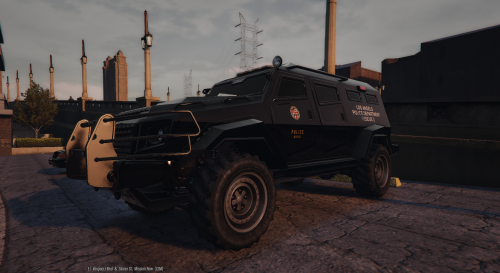 @POLICESCO I know it`s not your skin with the Los Angels error but will it be fixed, or can someone do a skin with the correct name, it`s kind of an immersion dieded for us goons who know nothing about skinning etc... :)
- 21 comments
- 5 reviews
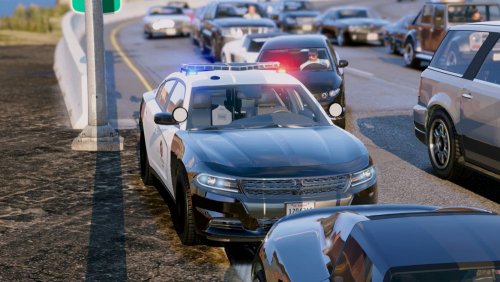 @0sc4r I just installed your car, nice job all round, however is this suppose to have LAPD or LSPD logo on the side, because i tried all 4 livery's and all they show is LSPD, and are the takedowns suppose to flash with the blue and reds. cheers.
- 38 comments
- 10 reviews
 About This File ???? there is no description of what this mod does, no features.. nothing?