Skip to content
View in the app

A better way to browse. Learn more.

LCPDFR.com

A full-screen app on your home screen with push notifications, badges and more.

To install this app on iOS and iPadOS
  1. Tap the Share icon in Safari
  2. Scroll the menu and tap Add to Home Screen.
  3. Tap Add in the top-right corner.
To install this app on Android
  1. Tap the 3-dot menu (⋮) in the top-right corner of the browser.
  2. Tap Add to Home screen or Install app.
  3. Confirm by tapping Install.

kahlandir

Members
  • Joined

  • Last visited

  1. You bet! Always happy to get feedback. I intend on reorganizing the files a bit. Having a BCSO download, an LSSD download. Also At the moment, the download only includes a BCSO k9. I'll get one for LSSD in the next update.
  2. I created a K9 texture for the Charger, as the vehicle model I used for testing was built for it. I plan to use it for the SUVs as well down the road.
  3. John Kahlandir Finished responding to a Dynamic Traffic Stop in Pacific Bluffs, Kortz Dr
  4. John Kahlandir Responded to a Dynamic Traffic Stop in Banham Canyon, Kortz Dr
  5. John Kahlandir Performed a traffic stop on a Black Schafter with registration 00XTZ214 in Banham Canyon, Kortz Dr
  6. Notice! Thanks to an awesome member here who has stood by me over the many years, I have figured out and resolved a blatant error in V2.0.0.... Empty folder >.< This has been corrected in 2.0.1. Thanks again to everyone who is trying these vehicles out :)
  7. Great idea. I'll see if they have one, but if not, I can always be creative with it ;) Just curious - do you prefer BCSO or LSSD?
  8. I haven't tried it, but from the screenshots... but I love the lighting setup on this!
    • 139 downloads
    • Version 2.1.0
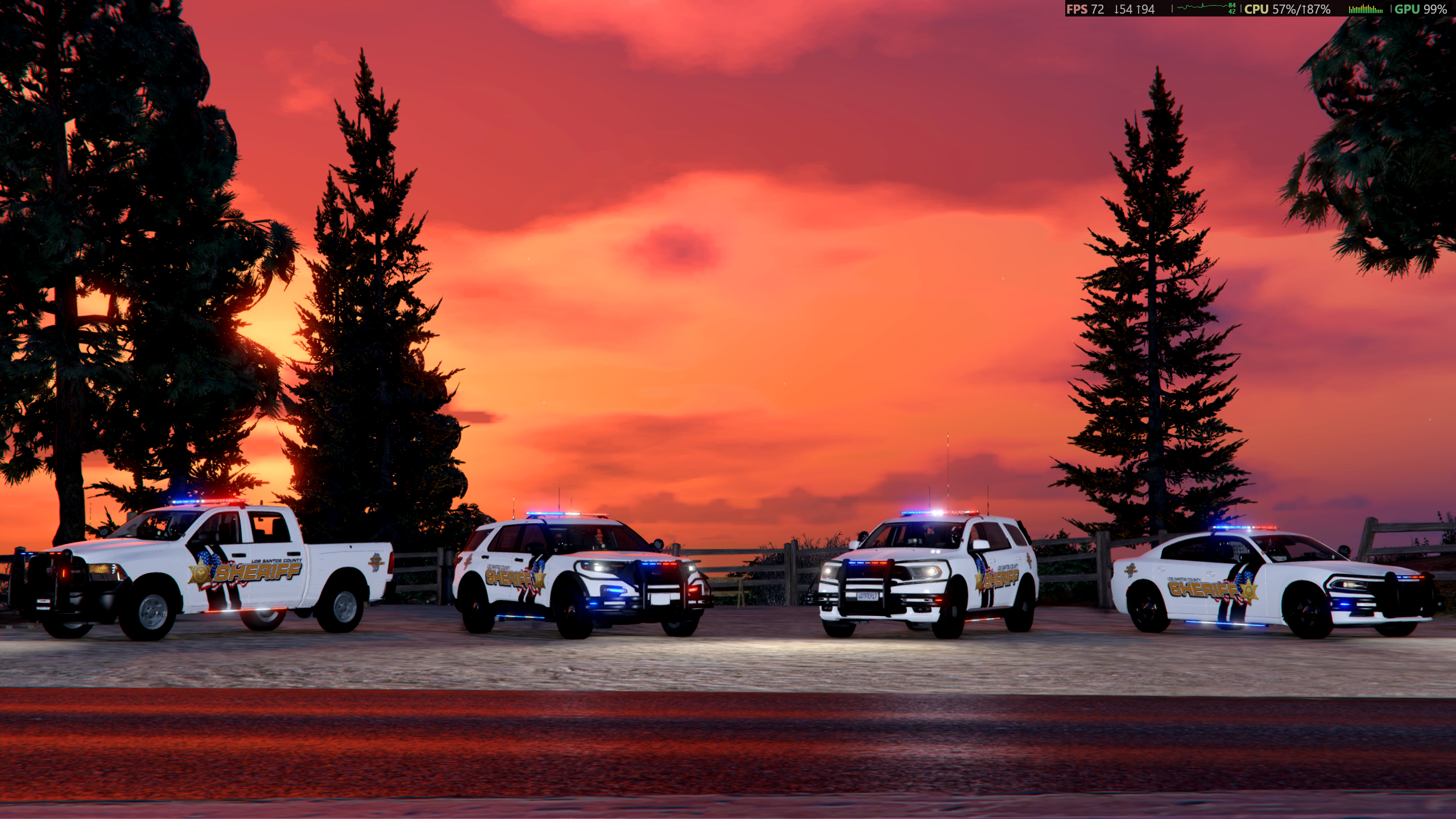
    I love to see how much this pack has caught your attention! Thank you for popping in and checking out the design! Looks like my last upload/update was from 2019! I’m excited to finally return to the community with a fresh release! This pack was crafted with details based on Nez Perce County, ID real-world design. If you've been around since my earlier releases, thanks for sticking around! If you're new here, welcome! I am considering making these into BCSO as well if there is an interest in this :) UPDATE:10/21/2026 - BCSO textures included! The vehicle pack I used for these vehicles is from Midwest Mods' (ELS) Blaine County Sheriff's Office MEGA Pack It will work with other vehicle models that use the same templates though! My current goal is to create NPSO inspired textures for all vehicles in this pack if the interest is out there for more! I will update this with a better showcase soon, but here are a couple shorts I had displaying the vehicles - The charger is in the LSSD design, the Durango is actually the real agency, which is not included. but I wanted to share the video for more reference. Since this is my first release back in about 7 years, your feedback means the world to me! Drop a comment, leave a rating, or post your in-game screenshots in the review section! I'd love to see these cruisers patrolling in your game! If you run into any texture alignment issues or have suggestions for future vehicles to add to this pack, let me know! Note: The only AI would be the thumbnails to the videos in the description. I wouldn't think this would count, but I checked the box just to be safe haha.
  9. John Kahlandir Finished responding to a TrafficStopBackup in Tongva Hills, Buen Vino Rd
  10. John Kahlandir Finished responding to a Holdup in Vespucci Canals, Vespucci Blvd
  11. John Kahlandir Responded to a Holdup in West Vinewood, Milton Rd
  12. John Kahlandir Finished responding to a Arrest Warrant in West Vinewood, Eclipse Blvd
  13. John Kahlandir Finished responding to a BackupRequired in West Vinewood, Eclipse Blvd
  14. John Kahlandir Responded to a BackupRequired in Great Chaparral, Zancudo Barranca
  15. John Kahlandir Finished responding to a AirAssist in Great Chaparral, Zancudo Barranca
  16. John Kahlandir Performed a traffic stop on a Silver Mesa with registration 40BDA971 in Tongva Valley, Tongva Dr
  17. John Kahlandir Responded to a AirAssist in Tongva Valley, Tongva Dr
  18. John Kahlandir Finished responding to a AirAssist in Tongva Hills, Tongva Dr
  19. John Kahlandir Responded to a AirAssist in Tongva Valley, Tongva Dr
  20. John Kahlandir Finished responding to a [SC] Stolen Construction Vehicle in Tongva Valley, Tongva Dr
  21. John Kahlandir Arrested Christopher Breaux in Baytree Canyon, Marlowe Dr
  22. John Kahlandir Responded to a [SC] Stolen Construction Vehicle in Vinewood Hills, Marlowe Dr
  23. John Kahlandir Finished responding to a [UC] Heavily Armed Terrorist Attack in Vinewood Hills, Lake Vinewood Dr
  24. John Kahlandir Responded to a [UC] Heavily Armed Terrorist Attack in Downtown Vinewood, Vinewood Blvd
  25. John Kahlandir Finished responding to a [SC] High Speed Pursuit in Little Seoul, La Puerta Fwy
  26. GTA 5 Jedi Master started following kahlandir
  27.    Floofy Badger reacted to a comment on a gallery album: Deschutes County, Oregon Textures.
  28. 415tater started following kahlandir
  29. Volvo2213 started following kahlandir
  30. SSG. Frosty started following kahlandir
  31. That explains everything! Well, being fairly local to the BPD jurisdiction, it's great to the the area so well represented 😁👍
  32.    GTAxB0SS reacted to a comment on a file: Whelen Pioneer Nano
  33. Thanks for releasing this. I've been looking at the Beaverton Police 2020 Tahoe setup recently and they use these exact lights on the bumper. Didn't expect to see anything similar. Can't wait to try them out!
  34.    opus49 reacted to a comment on a file: GrammarPolice
  35. I had the same thought a while back. While working on the right wording for things, opus49 answered somebody else with the right xml file to use. " If you have Forcforce_a_callout.xmle A Callout, you can now do this. Drop this into plugins/LSPDFR/GrammarPolice/<language>/custom/action" I use this all the time 😉 I customized it and usually say "Dispatch, do you have any calls holding?" If you need any assistance in installing it the way he showed above, check out his tutorial on modifying the xmls which you can find in his description 👍
  36.    TheMaybeast reacted to a comment on a file: Dynamic Lighting System
  37. This definitely has my interest. As I've been learning zmodeler this year, I've only experimented with ELS vehicles, but if non-els will have this kind of customization available... <.< I might have to dive into non-els lessons for a while! Not to mention try these out for patrols/streams. Looking forward to it!
  38.    kahlandir reacted to a comment on a file: Dynamic Lighting System
  39. WIFIOG started following kahlandir
  40. This is actually what I was searching for when I found this upload. I'll definitely be checking this one out, and I'd be very interested in the transitions if you're still considering the project :)
  41.    kahlandir reacted to a comment on a file: X26 Taser Sound Effect
  42.    kahlandir reacted to a comment on a file: 6.2 hemi (dev)
  43.    kahlandir reacted to a comment on a file: GrammarPolice
  44. Sounds good. Thanks for the clarification! 🙂
  45.    kahlandir reacted to a comment on a file: GrammarPolice
  46.    kahlandir reacted to a comment on a file: GrammarPolice
  47. Does the ini config file remain the same between the versions of the file? Since the manual review is still holding it up, I'd like to download the most recent available version and customize it while I wait.
  48.    opus49 reacted to a comment on a file: GrammarPolice
  49. Haha, I was just about to download, but I did the speech recognition through windows first. Then I went to download and it said the file was pending a manual review (last updated 8min ago) What timing! 😉
  50.    kahlandir reacted to a comment on a file: GrammarPolice
  51. viperwolf started following kahlandir
  52. Went to pretty exclusively live streams for a while but here is a WIP 2012 (2011-2014) Charger I've been working on both model and skin. We did a patrol with it and it went pretty well overall. Lemme know what you think 🙂

Account

Navigation

Search

Search

Configure browser push notifications

Chrome (Android)
  1. Tap the lock icon next to the address bar.
  2. Tap Permissions → Notifications.
  3. Adjust your preference.
Chrome (Desktop)
  1. Click the padlock icon in the address bar.
  2. Select Site settings.
  3. Find Notifications and adjust your preference.