


0sc4r
Members
-
Joined
-
Last visited
Everything posted by 0sc4r
-
Try extract it with rar. Change the end .oiv to .rar and extract to see if there is a assembly.xml. If there is none then download another one or again
-
You can do it yourself its pretty simple. Download paint.net and open your skin with it and use the erase tool erase everything and you got an unmarked skin
-
Check your game, and realtek audio if use
-
Paint.net for texture
-
Try enabling it in antivirus, firewall or turn off any malware prevention program
-
Send me the link of the car
-
Ok, then place it in there if there are no readme. If the readme doesn't give you direction then go on to the website. If the website doesn't give direction too then install in patchday14 or x64e
-
Yup What is your latest patchday
-
If the vehicle you download have a read me then follow the readme if it doesn't then read for location on the website if there are no readme or location on the website then try the latest patchday or x64e
-
You need zmod3 or 2 depends on your game. Gta iv is zmod2 gta v is zmod3. There are many more game that zmod support go to their website.
-
Launch gta with gtalaucher.exe Launcher i mean
-
You have to use openiv and turn on edit mode. Install in your latest patchday like patchday14 or higher. Sometimes if vehicle is require to be install in certain location then install it there. Those videos are example for you, the readme in the car files is the main thing.
-
Yup that is how it work
-
No you have to copy the line. Like if you are changing police2 then search for it and copy only that line. Tell user to copy that line a replace with the line that is already in their meta.
-
-
Copy the meta the only part that you change add it to another notepad and changes it name. Remeber to tell user where and how to install. Download some files and look into it
-
-
Have you set gta v to optimal setting in geforce experience and try open nvidia control panel and change gta to using graphics driver or cpu driver or intergrate depends on you and which gives most frame. It could be one of a mod that is causing the problem
-
That must be customized by the creator of the vehicle
-
Graphics driver can sometimes damage a game so it will be best look up some video on how to downgrade. i can tell you the basics needed: - old version of driver download from official website - display driver unistall (ddu) i have experience this problem and so i erase everything about the new update and downgrade it to the pld vers wait until it release a new one
-
What log and what installation
-
Lol
-
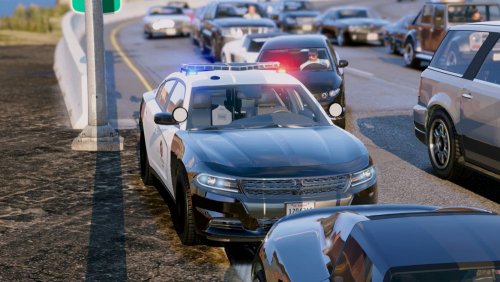 Thank you for downloading, the name suppose to be LAPD style forgot to add that sorry my man. And tkd are at it is it shine white no red and blue. It does have red and blue and white when flashing. Please review so other can use this amazing car
- 38 comments
- 10 reviews
-
Turn on edit mode if its a test the right click and select edit
-

