




AlconH
Members
-
Joined
-
Last visited
Everything posted by AlconH
-
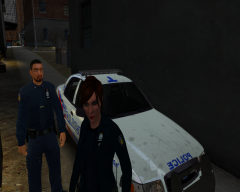
From the album: Rookie Blue Cruiser
-
Which cars use ELS? Police, Police2, Noose?
-
What slots are ELS enabled?
-
Did you get LCPDFR working during the time you got GTA to run?
-
Why would you want to put that on LCPDFR?
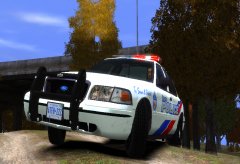
From the album: Rookie Blue Cruiser
Unit 1514 - Mcnally and SwarekPhotoshop, Gimp, Paint.netI edited bxbugs's one as it's a little different to the rookie blue one. @Mawjr, thanks, I'll try that now.Please use the search feature on the site before posting. 1) Make sure your GTA directories are not readonly, especially the COMMON and DATA folders. 2) Also ensure you are running the installer as an administrator. Please use the search feature on the site before posting.Right click the game shortcut, and "run as administrator". Or right click, head into "properties", "compatibility" and then check "run as administrator" so that it is fixed permanently.I'm going to try Sam's now, and see how it goes. Thanks guys.Has anyone got an unlocked crown victoria other than bxbus123's? It's giving me some real problems at the moment, and was wondering if anyone else knew of one. It's only for personal use and won't be released. Thanks Guys, -TomYou need to run as admin.It's Bxbugs123's unlocked CVPI, Here's a screenshot of the material "emerglights vehglass"... I hope it's what you need. Do you want me to go into the "edit" button on each texture? I'm not exactly great with zmodeler, all I've done so far is import the vic and add a lightbar. But even with the crown vic downloaded and imported without modification, it's still there.Ok, I've done that and found that it's using "emerglights vehglass", it's fine in zmodeler, and the problems only exist in game. I've just checked the .wtd and the different textures used by the material are all there. Thanks for your help guys, it's really appreciated.I don't see the point too be honest. If it were to be implemented, we should be able to turn it off and use the red circle option instead.There are no file for the police station installed as it uses an existing building.Thanks for your reply, but I'm having trouble doing as you asked. The section that is blue is part of the chasis_L0, and I have no idea how to check the material it is using. Any ideas? ThanksAnywhere you want.Are you using the left or right alt+P? This is happening because you are forcing duty by pressing CTRL+P. Make sure you are pressing the LEFT ALT+P and not the right one.So I've been playing around with zmodeler for a while, and created a few non-els models, and now I'm moving onto ELS, except I have a bit of a problem (See Spoiler). The glass or whatever that protects the officers from those sat behind, is blue and not transparent as it should be, and it's blue from the roof of the car down to the floor. Here's a screenshot: If anyone with more experience could help me out, it'd be really appreciated. I'm thinking it's something to do with textures, but have no idea how to fix it.... Thanks Guys, -TomPreferably none, but some work others don't it's just a question of trying them for yourself.Why have you created another thread? Use your previous one regarding this:

