




AlconH
Members
-
Joined
-
Last visited
Everything posted by AlconH
-
-
Sounds pretty boring tbh, and would be hard to script as there is no current speech for such scenarios.
-
Head to "Grand Theft Auto IV/Common/Data/Handling.dat" then find the line of the vehicle, and then replace the old line with the new one.
-
Keep the controlmap file though as that keeps your control settings.
-
-
Just downloaded it, and there are no uniforms there, just a empty folder named "Uniforms" with a message:
-
10-4
-
He's looking for the uniforms, which aren't included in the download.
-
You may have moved them by accident then, I do it sometimes. You just need to move them back.
-
You've only moved the dummies from a certain view only. For example, if you've moved them into position by from the left side, looking at the from the front may mean they are too far to the left or to far to the right, and you need to position them from the front view accordingly.
-
Are you running on a laptop?
-
Head to: C:Users<USERNAME>AppDataLocalRockstar GamesGTA IVsavegames and delete any files/folders that appear apart from the ControlMap file.Yes, delete your savegame.Did you save whilst on duty?Are you trying to install cars, skins or what?Wrong section bro, should be in LCPDFR > Support instead.
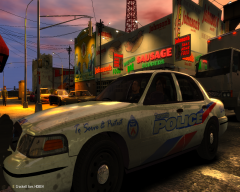 God I Love toronto, I designed the car on Rookie Blue....if you look at the logs, it is evident that they have.Fantastic Thanks! everything works perfectly now! Also, Thanks to Itstern for your help also.Extract all the files, then right click the UpdateTitle.exe and run as administrator.Thanks Magic, The next match should be next weekend. I look forward to playing with you guys!Is it possible to tell which ones? EDIT: It's not helped, it's still jumping round like a bunny rabbit on speed.


