


Dercar32
Members
-
Joined
-
Last visited
Everything posted by Dercar32
-
Hi, I know this mod hasn't been worked on for years now and you might not remember GTA 4 anymore, but is there a way to disable the tire popping from landing from a jump? That feature is really annoying, but this is the best mod I can find to have persistent cars in GTA 4, so I'd like to have a way to use it. Thanks
- 20 comments
- 4 reviews
-
I'm trying to look for more callouts that happen throughout Liberty City. I heard people mention Callouts+, but when I try to download it I can't find a download link anywhere. It looks like it disappeared off the face of the earth. What happened to it? Is there a download link I can use? I'm on LCPDFR 1.0d and a GTA 4 that was downgraded to 1.0.7.0.
-
Could use work; the taillights that light up at night are really glitchy. Leaving a review here in case this isn't fixed.
- 14 comments
- 5 reviews
-
Big problem: Tailights that light up at night have a lot of z fighting / glitching when the car moves around, and are really distracting when driving. Please fix. See attached image for example.
- 14 comments
- 5 reviews
-
I FIXED IT! More or less. My game is a bit unstable and crashes randomly sometimes, but that might be due to the mods I have installed. Here's what I did: Downgrade GTA IV to 1.0.7.0 Install LCPDFR 1.1 manually, using all files EXCEPT the following: aCompleteEditionHook.asi AdvancedHook.dll AdvancedHookInit.asi Download "3. LCPD First Response 1.0d_2 Manual Install.zip" from the official LCPDFR download page here: Click the download button and choose from the list From the zip in Step 3, put these files into your GTA IV directory: AdvancedHook.dll AdvancedHookInit.asi Try the game to see if it works. One more thing: instead of dsound.dll I use xliveless as my ASI loader. My theory is that the "patched" compatibility version of Advanced Hook uses changed memory addresses for its functions, so LCPDFR (being out of date as it is) gets confused and has its keybindings broken. Also, now that I'm downgraded to 1.0.7.0, I might try playing with LCPDFR 1.0d but with the new Scripthook and Scripthookdotnet from 1.1. That was really not helpful. Did you even read my reply?
-
I have the exact same problem. All the keybinds show up as "," and "." and I can't pull over cars; pressing Shift does nothing. I'm running LCPDFR 1.1 on a Steam copy of GTA IV Complete Edition downgraded to 1.0.7.0. I'm using all files but with xliveless as my ASI loader and no using the complete edition ASI script. I've searched online for a while and apparently the only solution is to downgrade to 1.0.7.0, but I'm already on that version. Does anyone have any tips on what I can do at this point?
-
Try reinstalling LCPDFR.
-
It can't load Advanced Hook or one of its dependencies for some reason. Try reinstalling LCPDFR.
-
 Nice, I'l try this mod later.
 -
Looks cool! I'll try it later. I want the Police AI to use cars like the Noose Cruiser and the FIB Buffalo, and not just use the police and police2 all the time. Also, the read me is quite interesting.
- 9 comments
- 2 reviews
-
.thumb.png.89d479af631653fefb1c508c84b8ea55.png) Doesn't work. When I try to load a savegame the game just crashes. The game worked fine before I installed this.
Doesn't work. When I try to load a savegame the game just crashes. The game worked fine before I installed this.- 35 comments
- 8 reviews
-
-

- 1
-
-
You could try removing the modded cars from the game. I'm not sure if that will fix it, but it could.
-
 This mod still crashes, even though I applied Acrylicninja's fix. Can you fix this mod?
 -
 Can you make the keys editable before you add the "perks and things"? I want to try this mod but I play GTA IV on a laptop.
 -
Does anyone have a video explaining how to install this? I searched on YouTube but I can't find anything.
- 13 comments
- 4 reviews
-
Try removing the normal cars.
-
I recommend removing the modded cars. That might fix your problem.
-
Do you have any modded cars? The game can't spawn the Securicar/Stockade for some reason.
-
Try reinstalling LCPDFR. That will put any needed files back into the script folder you mentioned.
-
I fixed my issue by reinstalling LCPDFR. The files were corrupted somehow.
-
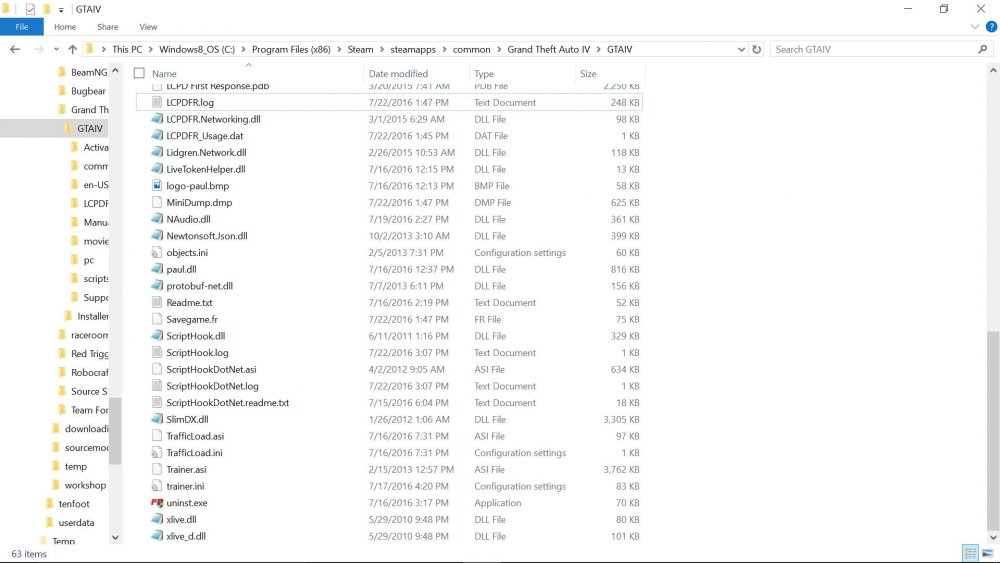
The Problem After clicking "Play (Offline)", the game would open up a black screen and crash back to the desktop after a few seconds. It crashes before the main menu loads. The black screen has no text. Solutions I Have Tried Running the game as administrator Removing some of my mods Currently Installed Mods LCPDFR 1.1 Xliveless TrafficLoad HazardX's .net Scripthook Aru's C++ Scripthook (I think I have this. Not sure.) First Person mod (.asi script) Indicator Script (http://www.lcpdfr.com/files/file/45-indicator-script/) Countryside Mountains V Simple Native Trainer 6.5 Possibly Helpful Information Game was bought through Steam Using LCPDFR 1.1 Installed GTA IV 1.0.7.0 Using Windows 10 (not Windows 8, as the screenshots suggest. My computer came with Windows 8. I upgraded to Windows 10 a while ago.) Logs See attached files. Directory Screenshots Attached are 3 screenshots of the GTA IV main directory. If you want more screenshots or information, please ask me. AdvancedHook.log Diagnostics_22.7.2016_14_58_32.log LCPDFR.log
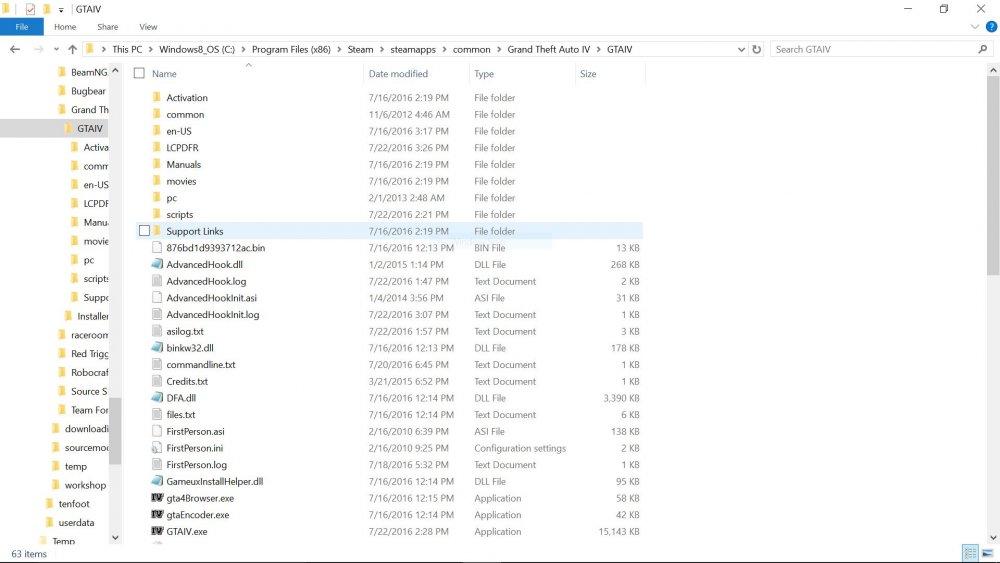
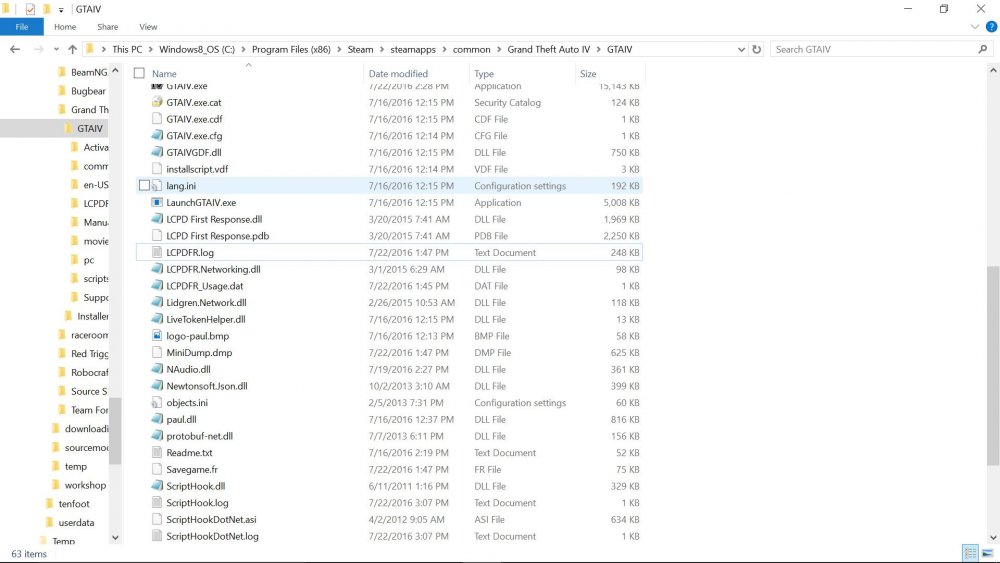

.thumb.png.89d479af631653fefb1c508c84b8ea55.png)


