



Techengage
Members
-
Joined
-
Last visited
Reputation Activity
-
 Techengage got a reaction from Haukur Ottesen for a file, Custom VisualsCustom Visuals v.3.5.0 by Techengage
OVER 18K DOWNLOADS! THANK YOU SO MUCH FOR THE SUPPORT, FOLKS!
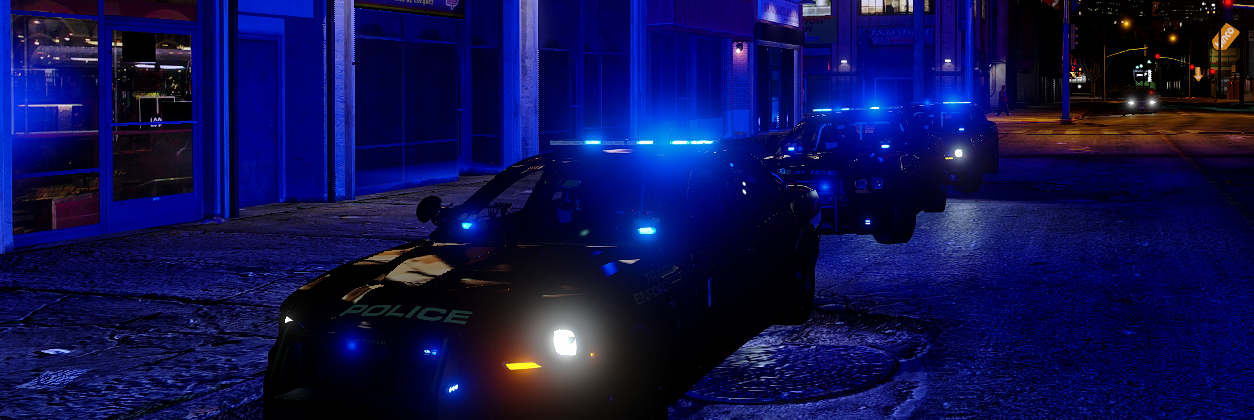
Custom Visuals is a partial graphics overhaul that makes your game look much more realistic; from police lights to clouds! This Mod increases the ambience of all lighting in the game, makes rain, cloud movement, shadows, and sunlight more realistic, makes motion blur more tolerable, and makes coronas more vibrant and lifelike. This Mod also adds environmental lighting to vehicles, especially emergency lights. You also now have the option to have all blue, all red, and all amber lighting! There are many more things to list, but I just recommend trying it out. After all, it's only two files, not twenty.
This Pack includes two Visualsettings.dat versions, two Carcols.ymt, and a All Blue Lights Template Library. Below is an explanation of each.
Bright makes slight changes to the original game settings, while allowing full use of all police sirens. Use this if Brighter is too much.
Brighter is a complete rework of the original game settings, revamping everything from emergency lights to clouds.
Carcols.ymt is necessary to give vehicle environmental effects and allows you to change light color. One gives fast ELS-style lighting, the other is normal light pattern speeds.
Blue Light Templates is an enormous library of blue/blue lighting templates needed to make vehicle lights blue. Any requests to add to this collection will be granted in a reasonable time period.
BEFORE INSTALLING, MAKE SURE TO CREATE BACK UP FILES. I AM NOT RESPONSIBLE FOR CORRUPT SAVES/FILES. THANK YOU!
PLEASE DO NOT ASK ME HOW TO INSTALL THESE FILES BEYOND THE INSTALLATION INSTRUCTIONS. YOUTUBE & GOOGLE ARE GREAT!
IF YOUR LIGHTS ARE NOT BRIGHT OR ARE WHITE ONLY, MAKE SURE YOUR SHADER QUALITY & POST FX ARE AT LEAST ON HIGH!!
INSTALLATION:
Use Open IV to drop either of the visualsettings.dat files into Mods>Update>Update.rpf>Common>Data
Use Open IV to drop the carcols.ymt file into Mods>Update>Update.rpf>x64>Data
Add the lines in "ADD THESE LINES TO CARVARIATIONS.TXT" to your carvariations.meta (I recommend mpvalentines2, it works for every model). Make sure to change the vehicle name and the sirensettings="" to the corresponding number (14 for all blue fast, 15 for all red, etc)
IF YOU WANT ALL AMBER / ALL RED / ALL BLUE / ALL BLAHBLAHBLAH ENVIRONMENTAL LIGHTING/CORONAS (Must have carcols.ymt installed):
All Amber Lighting: Change your vehicles sirensettings to 17 for LEDs, or 9 for rotary strobes. (Rockstar doesn't support amber LED reflections) All Red Lighting: Change your vehicles sirensettings to 15. Recommended for police add-ons used as fire rescue vehicles. All Blue Lighting (Fast Patterns): Change Sirensettings to 14. Then use the blue light templates to replace files within the .ytd file of any car you want with blue lights only. All Blue Lighting (Fast Patterns, alternate sequences): Change Sirensettings to 20. Lighting has different sequences compared to 14. All Blue Lighting (Slow Patterns): Change Sirensettings to 16. Exactly like 14, but with slower light patterns. Blue & Red Lighting (Fast Patterns): Change Sirensettings to 1. Blue & Red Lighting (Slow Patterns): Change Sirensettings to 19. Blue/Blue Highway Patrol Lighting (Rotary+LEDs): Change Sirensettings to 18, used to give F5544's Highway Patrol pack blue/blue lighting. Can be used with similiar models. Blue/Blue Lighting for Desmond98's LAPD FPIU v.0.7.5: Change Sirensetting to 21. Full credits to @CiscoFanboy for creating this specialized carcols.ymt code line for Desmond98's FPIU. This is absolutely necessary if you want the lighting to work on his newest update! Templates are still the same as previous versions.
TO FIX TAXI & TRAM SIGN ISSUES, PLEASE VIEW README IN "TAXI & TRAM SIGN FIX" FOLDER.
Credits:
Bxbugs123 for the inspiration to work on visualsettings.meta TheGreatHah for the inspiration to learn how to work on carcols.ymt Straitdill, POLICESCO, GravelRoadCop, & PNWParksFan for the sequence numbers. I wouldn't have the new patterns without you guys! HUGE credits to JJDawkins for a large amount of my blue light textures and for teaching/motivating me to start coding GTAV. Razontex for contributing some nice screenshots to show off the awesome lighting. -
 Techengage got a reaction from Darnath for a file, Realistic Melee!Realistic Melee Mod v.3.7.0
RECOMMENDED FOR LSPDFR ONLY.
Hello, fellow LSPDFR fans. Are you sick of knocking out your prisoner every time you close out of a menu? Does your officer love to pistol whip suspects with a taser and you've simply had enough? Or maybe you've just wondered what it feels like to relentlessly beat an innocent civilian with your PR-24? With Realistic Melee, you can! This Mod makes all melee attacks less-than-lethal, or removes a weapon's melee abilities completely.
Punches and kicks no longer kill people or knock them out in one hit. You can still kill people, but it's very realistic. Nightstick swings no longer subdue targets unrealistically (Have fun! ). When it comes to your duty pistol and taser; they no longer have a pistol whip function! This Mod also includes an add-on to allow you to utilize a non-lethal beanbag/salt shotgun setting!
This is one of my first Mod releases and is a work in progress, so criticize accordingly! I wasn't going to release this; but it worked very well for me, so I wanted to share with everyone. I am open to any suggestions, advice, or constructive criticism. ALSO, please note I am running on a low-end computer, so my screenshots look pretty terrible.
Open the spoiler below to see a small example of the melee attacks with Realistic Melee! Video shot without the "Non-Lethal Shotgun Add-on". Credits to @Lyrad!
DO NOT RE-UPLOAD/REDISTRIBUTE/EDIT WITHOUT PERMISSION AND/OR PROPER CREDITS.
BEFORE INSTALLING, PLEASE MAKE SURE TO CREATE BACK UP .META FILES. I AM NOT RESPONSIBLE FOR CORRUPT GAMES/SAVES/FILES. THANK YOU!
INSTALLATION:
FOR DAMAGES.META
Using Open IV, navigate to:
Grand Theft Auto V> mods > update > update.rpf > common > data > action
Locate and replace damages.meta
FOR WEAPONS.META
Using Open IV, navigate to:
Grand Theft Auto V> mods > update > update.rpf > common > data > ai
Locate and replace weapons.meta
CREDITS:
Lyrad for the demonstration video. Thank you! AkAPs2 for finding the correct damages.meta directory -
Techengage got a reaction from muhammad zoom for a file, Realistic Melee!Realistic Melee Mod v.3.7.0
RECOMMENDED FOR LSPDFR ONLY.
Hello, fellow LSPDFR fans. Are you sick of knocking out your prisoner every time you close out of a menu? Does your officer love to pistol whip suspects with a taser and you've simply had enough? Or maybe you've just wondered what it feels like to relentlessly beat an innocent civilian with your PR-24? With Realistic Melee, you can! This Mod makes all melee attacks less-than-lethal, or removes a weapon's melee abilities completely.
Punches and kicks no longer kill people or knock them out in one hit. You can still kill people, but it's very realistic. Nightstick swings no longer subdue targets unrealistically (Have fun! ). When it comes to your duty pistol and taser; they no longer have a pistol whip function! This Mod also includes an add-on to allow you to utilize a non-lethal beanbag/salt shotgun setting!
This is one of my first Mod releases and is a work in progress, so criticize accordingly! I wasn't going to release this; but it worked very well for me, so I wanted to share with everyone. I am open to any suggestions, advice, or constructive criticism. ALSO, please note I am running on a low-end computer, so my screenshots look pretty terrible.
Open the spoiler below to see a small example of the melee attacks with Realistic Melee! Video shot without the "Non-Lethal Shotgun Add-on". Credits to @Lyrad!
DO NOT RE-UPLOAD/REDISTRIBUTE/EDIT WITHOUT PERMISSION AND/OR PROPER CREDITS.
BEFORE INSTALLING, PLEASE MAKE SURE TO CREATE BACK UP .META FILES. I AM NOT RESPONSIBLE FOR CORRUPT GAMES/SAVES/FILES. THANK YOU!
INSTALLATION:
FOR DAMAGES.META
Using Open IV, navigate to:
Grand Theft Auto V> mods > update > update.rpf > common > data > action
Locate and replace damages.meta
FOR WEAPONS.META
Using Open IV, navigate to:
Grand Theft Auto V> mods > update > update.rpf > common > data > ai
Locate and replace weapons.meta
CREDITS:
Lyrad for the demonstration video. Thank you! AkAPs2 for finding the correct damages.meta directory -
 Techengage got a reaction from Alekse for a file, Custom VisualsCustom Visuals v.3.5.0 by Techengage
OVER 18K DOWNLOADS! THANK YOU SO MUCH FOR THE SUPPORT, FOLKS!
Custom Visuals is a partial graphics overhaul that makes your game look much more realistic; from police lights to clouds! This Mod increases the ambience of all lighting in the game, makes rain, cloud movement, shadows, and sunlight more realistic, makes motion blur more tolerable, and makes coronas more vibrant and lifelike. This Mod also adds environmental lighting to vehicles, especially emergency lights. You also now have the option to have all blue, all red, and all amber lighting! There are many more things to list, but I just recommend trying it out. After all, it's only two files, not twenty.
This Pack includes two Visualsettings.dat versions, two Carcols.ymt, and a All Blue Lights Template Library. Below is an explanation of each.
Bright makes slight changes to the original game settings, while allowing full use of all police sirens. Use this if Brighter is too much.
Brighter is a complete rework of the original game settings, revamping everything from emergency lights to clouds.
Carcols.ymt is necessary to give vehicle environmental effects and allows you to change light color. One gives fast ELS-style lighting, the other is normal light pattern speeds.
Blue Light Templates is an enormous library of blue/blue lighting templates needed to make vehicle lights blue. Any requests to add to this collection will be granted in a reasonable time period.
BEFORE INSTALLING, MAKE SURE TO CREATE BACK UP FILES. I AM NOT RESPONSIBLE FOR CORRUPT SAVES/FILES. THANK YOU!
PLEASE DO NOT ASK ME HOW TO INSTALL THESE FILES BEYOND THE INSTALLATION INSTRUCTIONS. YOUTUBE & GOOGLE ARE GREAT!
IF YOUR LIGHTS ARE NOT BRIGHT OR ARE WHITE ONLY, MAKE SURE YOUR SHADER QUALITY & POST FX ARE AT LEAST ON HIGH!!
INSTALLATION:
Use Open IV to drop either of the visualsettings.dat files into Mods>Update>Update.rpf>Common>Data
Use Open IV to drop the carcols.ymt file into Mods>Update>Update.rpf>x64>Data
Add the lines in "ADD THESE LINES TO CARVARIATIONS.TXT" to your carvariations.meta (I recommend mpvalentines2, it works for every model). Make sure to change the vehicle name and the sirensettings="" to the corresponding number (14 for all blue fast, 15 for all red, etc)
IF YOU WANT ALL AMBER / ALL RED / ALL BLUE / ALL BLAHBLAHBLAH ENVIRONMENTAL LIGHTING/CORONAS (Must have carcols.ymt installed):
All Amber Lighting: Change your vehicles sirensettings to 17 for LEDs, or 9 for rotary strobes. (Rockstar doesn't support amber LED reflections) All Red Lighting: Change your vehicles sirensettings to 15. Recommended for police add-ons used as fire rescue vehicles. All Blue Lighting (Fast Patterns): Change Sirensettings to 14. Then use the blue light templates to replace files within the .ytd file of any car you want with blue lights only. All Blue Lighting (Fast Patterns, alternate sequences): Change Sirensettings to 20. Lighting has different sequences compared to 14. All Blue Lighting (Slow Patterns): Change Sirensettings to 16. Exactly like 14, but with slower light patterns. Blue & Red Lighting (Fast Patterns): Change Sirensettings to 1. Blue & Red Lighting (Slow Patterns): Change Sirensettings to 19. Blue/Blue Highway Patrol Lighting (Rotary+LEDs): Change Sirensettings to 18, used to give F5544's Highway Patrol pack blue/blue lighting. Can be used with similiar models. Blue/Blue Lighting for Desmond98's LAPD FPIU v.0.7.5: Change Sirensetting to 21. Full credits to @CiscoFanboy for creating this specialized carcols.ymt code line for Desmond98's FPIU. This is absolutely necessary if you want the lighting to work on his newest update! Templates are still the same as previous versions.
TO FIX TAXI & TRAM SIGN ISSUES, PLEASE VIEW README IN "TAXI & TRAM SIGN FIX" FOLDER.
Credits:
Bxbugs123 for the inspiration to work on visualsettings.meta TheGreatHah for the inspiration to learn how to work on carcols.ymt Straitdill, POLICESCO, GravelRoadCop, & PNWParksFan for the sequence numbers. I wouldn't have the new patterns without you guys! HUGE credits to JJDawkins for a large amount of my blue light textures and for teaching/motivating me to start coding GTAV. Razontex for contributing some nice screenshots to show off the awesome lighting. -
Techengage got a reaction from Dominik W for a file, Custom VisualsCustom Visuals v.3.5.0 by Techengage
OVER 18K DOWNLOADS! THANK YOU SO MUCH FOR THE SUPPORT, FOLKS!
Custom Visuals is a partial graphics overhaul that makes your game look much more realistic; from police lights to clouds! This Mod increases the ambience of all lighting in the game, makes rain, cloud movement, shadows, and sunlight more realistic, makes motion blur more tolerable, and makes coronas more vibrant and lifelike. This Mod also adds environmental lighting to vehicles, especially emergency lights. You also now have the option to have all blue, all red, and all amber lighting! There are many more things to list, but I just recommend trying it out. After all, it's only two files, not twenty.
This Pack includes two Visualsettings.dat versions, two Carcols.ymt, and a All Blue Lights Template Library. Below is an explanation of each.
Bright makes slight changes to the original game settings, while allowing full use of all police sirens. Use this if Brighter is too much.
Brighter is a complete rework of the original game settings, revamping everything from emergency lights to clouds.
Carcols.ymt is necessary to give vehicle environmental effects and allows you to change light color. One gives fast ELS-style lighting, the other is normal light pattern speeds.
Blue Light Templates is an enormous library of blue/blue lighting templates needed to make vehicle lights blue. Any requests to add to this collection will be granted in a reasonable time period.
BEFORE INSTALLING, MAKE SURE TO CREATE BACK UP FILES. I AM NOT RESPONSIBLE FOR CORRUPT SAVES/FILES. THANK YOU!
PLEASE DO NOT ASK ME HOW TO INSTALL THESE FILES BEYOND THE INSTALLATION INSTRUCTIONS. YOUTUBE & GOOGLE ARE GREAT!
IF YOUR LIGHTS ARE NOT BRIGHT OR ARE WHITE ONLY, MAKE SURE YOUR SHADER QUALITY & POST FX ARE AT LEAST ON HIGH!!
INSTALLATION:
Use Open IV to drop either of the visualsettings.dat files into Mods>Update>Update.rpf>Common>Data
Use Open IV to drop the carcols.ymt file into Mods>Update>Update.rpf>x64>Data
Add the lines in "ADD THESE LINES TO CARVARIATIONS.TXT" to your carvariations.meta (I recommend mpvalentines2, it works for every model). Make sure to change the vehicle name and the sirensettings="" to the corresponding number (14 for all blue fast, 15 for all red, etc)
IF YOU WANT ALL AMBER / ALL RED / ALL BLUE / ALL BLAHBLAHBLAH ENVIRONMENTAL LIGHTING/CORONAS (Must have carcols.ymt installed):
All Amber Lighting: Change your vehicles sirensettings to 17 for LEDs, or 9 for rotary strobes. (Rockstar doesn't support amber LED reflections) All Red Lighting: Change your vehicles sirensettings to 15. Recommended for police add-ons used as fire rescue vehicles. All Blue Lighting (Fast Patterns): Change Sirensettings to 14. Then use the blue light templates to replace files within the .ytd file of any car you want with blue lights only. All Blue Lighting (Fast Patterns, alternate sequences): Change Sirensettings to 20. Lighting has different sequences compared to 14. All Blue Lighting (Slow Patterns): Change Sirensettings to 16. Exactly like 14, but with slower light patterns. Blue & Red Lighting (Fast Patterns): Change Sirensettings to 1. Blue & Red Lighting (Slow Patterns): Change Sirensettings to 19. Blue/Blue Highway Patrol Lighting (Rotary+LEDs): Change Sirensettings to 18, used to give F5544's Highway Patrol pack blue/blue lighting. Can be used with similiar models. Blue/Blue Lighting for Desmond98's LAPD FPIU v.0.7.5: Change Sirensetting to 21. Full credits to @CiscoFanboy for creating this specialized carcols.ymt code line for Desmond98's FPIU. This is absolutely necessary if you want the lighting to work on his newest update! Templates are still the same as previous versions.
TO FIX TAXI & TRAM SIGN ISSUES, PLEASE VIEW README IN "TAXI & TRAM SIGN FIX" FOLDER.
Credits:
Bxbugs123 for the inspiration to work on visualsettings.meta TheGreatHah for the inspiration to learn how to work on carcols.ymt Straitdill, POLICESCO, GravelRoadCop, & PNWParksFan for the sequence numbers. I wouldn't have the new patterns without you guys! HUGE credits to JJDawkins for a large amount of my blue light textures and for teaching/motivating me to start coding GTAV. Razontex for contributing some nice screenshots to show off the awesome lighting. -
Techengage got a reaction from kale1997 for a file, Custom VisualsCustom Visuals v.3.5.0 by Techengage
OVER 18K DOWNLOADS! THANK YOU SO MUCH FOR THE SUPPORT, FOLKS!
Custom Visuals is a partial graphics overhaul that makes your game look much more realistic; from police lights to clouds! This Mod increases the ambience of all lighting in the game, makes rain, cloud movement, shadows, and sunlight more realistic, makes motion blur more tolerable, and makes coronas more vibrant and lifelike. This Mod also adds environmental lighting to vehicles, especially emergency lights. You also now have the option to have all blue, all red, and all amber lighting! There are many more things to list, but I just recommend trying it out. After all, it's only two files, not twenty.
This Pack includes two Visualsettings.dat versions, two Carcols.ymt, and a All Blue Lights Template Library. Below is an explanation of each.
Bright makes slight changes to the original game settings, while allowing full use of all police sirens. Use this if Brighter is too much.
Brighter is a complete rework of the original game settings, revamping everything from emergency lights to clouds.
Carcols.ymt is necessary to give vehicle environmental effects and allows you to change light color. One gives fast ELS-style lighting, the other is normal light pattern speeds.
Blue Light Templates is an enormous library of blue/blue lighting templates needed to make vehicle lights blue. Any requests to add to this collection will be granted in a reasonable time period.
BEFORE INSTALLING, MAKE SURE TO CREATE BACK UP FILES. I AM NOT RESPONSIBLE FOR CORRUPT SAVES/FILES. THANK YOU!
PLEASE DO NOT ASK ME HOW TO INSTALL THESE FILES BEYOND THE INSTALLATION INSTRUCTIONS. YOUTUBE & GOOGLE ARE GREAT!
IF YOUR LIGHTS ARE NOT BRIGHT OR ARE WHITE ONLY, MAKE SURE YOUR SHADER QUALITY & POST FX ARE AT LEAST ON HIGH!!
INSTALLATION:
Use Open IV to drop either of the visualsettings.dat files into Mods>Update>Update.rpf>Common>Data
Use Open IV to drop the carcols.ymt file into Mods>Update>Update.rpf>x64>Data
Add the lines in "ADD THESE LINES TO CARVARIATIONS.TXT" to your carvariations.meta (I recommend mpvalentines2, it works for every model). Make sure to change the vehicle name and the sirensettings="" to the corresponding number (14 for all blue fast, 15 for all red, etc)
IF YOU WANT ALL AMBER / ALL RED / ALL BLUE / ALL BLAHBLAHBLAH ENVIRONMENTAL LIGHTING/CORONAS (Must have carcols.ymt installed):
All Amber Lighting: Change your vehicles sirensettings to 17 for LEDs, or 9 for rotary strobes. (Rockstar doesn't support amber LED reflections) All Red Lighting: Change your vehicles sirensettings to 15. Recommended for police add-ons used as fire rescue vehicles. All Blue Lighting (Fast Patterns): Change Sirensettings to 14. Then use the blue light templates to replace files within the .ytd file of any car you want with blue lights only. All Blue Lighting (Fast Patterns, alternate sequences): Change Sirensettings to 20. Lighting has different sequences compared to 14. All Blue Lighting (Slow Patterns): Change Sirensettings to 16. Exactly like 14, but with slower light patterns. Blue & Red Lighting (Fast Patterns): Change Sirensettings to 1. Blue & Red Lighting (Slow Patterns): Change Sirensettings to 19. Blue/Blue Highway Patrol Lighting (Rotary+LEDs): Change Sirensettings to 18, used to give F5544's Highway Patrol pack blue/blue lighting. Can be used with similiar models. Blue/Blue Lighting for Desmond98's LAPD FPIU v.0.7.5: Change Sirensetting to 21. Full credits to @CiscoFanboy for creating this specialized carcols.ymt code line for Desmond98's FPIU. This is absolutely necessary if you want the lighting to work on his newest update! Templates are still the same as previous versions.
TO FIX TAXI & TRAM SIGN ISSUES, PLEASE VIEW README IN "TAXI & TRAM SIGN FIX" FOLDER.
Credits:
Bxbugs123 for the inspiration to work on visualsettings.meta TheGreatHah for the inspiration to learn how to work on carcols.ymt Straitdill, POLICESCO, GravelRoadCop, & PNWParksFan for the sequence numbers. I wouldn't have the new patterns without you guys! HUGE credits to JJDawkins for a large amount of my blue light textures and for teaching/motivating me to start coding GTAV. Razontex for contributing some nice screenshots to show off the awesome lighting. -
Techengage got a reaction from winglesschip209 for a file, Custom VisualsCustom Visuals v.3.5.0 by Techengage
OVER 18K DOWNLOADS! THANK YOU SO MUCH FOR THE SUPPORT, FOLKS!
Custom Visuals is a partial graphics overhaul that makes your game look much more realistic; from police lights to clouds! This Mod increases the ambience of all lighting in the game, makes rain, cloud movement, shadows, and sunlight more realistic, makes motion blur more tolerable, and makes coronas more vibrant and lifelike. This Mod also adds environmental lighting to vehicles, especially emergency lights. You also now have the option to have all blue, all red, and all amber lighting! There are many more things to list, but I just recommend trying it out. After all, it's only two files, not twenty.
This Pack includes two Visualsettings.dat versions, two Carcols.ymt, and a All Blue Lights Template Library. Below is an explanation of each.
Bright makes slight changes to the original game settings, while allowing full use of all police sirens. Use this if Brighter is too much.
Brighter is a complete rework of the original game settings, revamping everything from emergency lights to clouds.
Carcols.ymt is necessary to give vehicle environmental effects and allows you to change light color. One gives fast ELS-style lighting, the other is normal light pattern speeds.
Blue Light Templates is an enormous library of blue/blue lighting templates needed to make vehicle lights blue. Any requests to add to this collection will be granted in a reasonable time period.
BEFORE INSTALLING, MAKE SURE TO CREATE BACK UP FILES. I AM NOT RESPONSIBLE FOR CORRUPT SAVES/FILES. THANK YOU!
PLEASE DO NOT ASK ME HOW TO INSTALL THESE FILES BEYOND THE INSTALLATION INSTRUCTIONS. YOUTUBE & GOOGLE ARE GREAT!
IF YOUR LIGHTS ARE NOT BRIGHT OR ARE WHITE ONLY, MAKE SURE YOUR SHADER QUALITY & POST FX ARE AT LEAST ON HIGH!!
INSTALLATION:
Use Open IV to drop either of the visualsettings.dat files into Mods>Update>Update.rpf>Common>Data
Use Open IV to drop the carcols.ymt file into Mods>Update>Update.rpf>x64>Data
Add the lines in "ADD THESE LINES TO CARVARIATIONS.TXT" to your carvariations.meta (I recommend mpvalentines2, it works for every model). Make sure to change the vehicle name and the sirensettings="" to the corresponding number (14 for all blue fast, 15 for all red, etc)
IF YOU WANT ALL AMBER / ALL RED / ALL BLUE / ALL BLAHBLAHBLAH ENVIRONMENTAL LIGHTING/CORONAS (Must have carcols.ymt installed):
All Amber Lighting: Change your vehicles sirensettings to 17 for LEDs, or 9 for rotary strobes. (Rockstar doesn't support amber LED reflections) All Red Lighting: Change your vehicles sirensettings to 15. Recommended for police add-ons used as fire rescue vehicles. All Blue Lighting (Fast Patterns): Change Sirensettings to 14. Then use the blue light templates to replace files within the .ytd file of any car you want with blue lights only. All Blue Lighting (Fast Patterns, alternate sequences): Change Sirensettings to 20. Lighting has different sequences compared to 14. All Blue Lighting (Slow Patterns): Change Sirensettings to 16. Exactly like 14, but with slower light patterns. Blue & Red Lighting (Fast Patterns): Change Sirensettings to 1. Blue & Red Lighting (Slow Patterns): Change Sirensettings to 19. Blue/Blue Highway Patrol Lighting (Rotary+LEDs): Change Sirensettings to 18, used to give F5544's Highway Patrol pack blue/blue lighting. Can be used with similiar models. Blue/Blue Lighting for Desmond98's LAPD FPIU v.0.7.5: Change Sirensetting to 21. Full credits to @CiscoFanboy for creating this specialized carcols.ymt code line for Desmond98's FPIU. This is absolutely necessary if you want the lighting to work on his newest update! Templates are still the same as previous versions.
TO FIX TAXI & TRAM SIGN ISSUES, PLEASE VIEW README IN "TAXI & TRAM SIGN FIX" FOLDER.
Credits:
Bxbugs123 for the inspiration to work on visualsettings.meta TheGreatHah for the inspiration to learn how to work on carcols.ymt Straitdill, POLICESCO, GravelRoadCop, & PNWParksFan for the sequence numbers. I wouldn't have the new patterns without you guys! HUGE credits to JJDawkins for a large amount of my blue light textures and for teaching/motivating me to start coding GTAV. Razontex for contributing some nice screenshots to show off the awesome lighting. -
Techengage got a reaction from
Deactivated Memberfor a file, Realistic Melee!Realistic Melee Mod v.3.7.0
RECOMMENDED FOR LSPDFR ONLY.
Hello, fellow LSPDFR fans. Are you sick of knocking out your prisoner every time you close out of a menu? Does your officer love to pistol whip suspects with a taser and you've simply had enough? Or maybe you've just wondered what it feels like to relentlessly beat an innocent civilian with your PR-24? With Realistic Melee, you can! This Mod makes all melee attacks less-than-lethal, or removes a weapon's melee abilities completely.
Punches and kicks no longer kill people or knock them out in one hit. You can still kill people, but it's very realistic. Nightstick swings no longer subdue targets unrealistically (Have fun! ). When it comes to your duty pistol and taser; they no longer have a pistol whip function! This Mod also includes an add-on to allow you to utilize a non-lethal beanbag/salt shotgun setting!
This is one of my first Mod releases and is a work in progress, so criticize accordingly! I wasn't going to release this; but it worked very well for me, so I wanted to share with everyone. I am open to any suggestions, advice, or constructive criticism. ALSO, please note I am running on a low-end computer, so my screenshots look pretty terrible.
Open the spoiler below to see a small example of the melee attacks with Realistic Melee! Video shot without the "Non-Lethal Shotgun Add-on". Credits to @Lyrad!
DO NOT RE-UPLOAD/REDISTRIBUTE/EDIT WITHOUT PERMISSION AND/OR PROPER CREDITS.
BEFORE INSTALLING, PLEASE MAKE SURE TO CREATE BACK UP .META FILES. I AM NOT RESPONSIBLE FOR CORRUPT GAMES/SAVES/FILES. THANK YOU!
INSTALLATION:
FOR DAMAGES.META
Using Open IV, navigate to:
Grand Theft Auto V> mods > update > update.rpf > common > data > action
Locate and replace damages.meta
FOR WEAPONS.META
Using Open IV, navigate to:
Grand Theft Auto V> mods > update > update.rpf > common > data > ai
Locate and replace weapons.meta
CREDITS:
Lyrad for the demonstration video. Thank you! AkAPs2 for finding the correct damages.meta directory -
Techengage got a reaction from Romires for a file, Custom VisualsCustom Visuals v.3.5.0 by Techengage
OVER 18K DOWNLOADS! THANK YOU SO MUCH FOR THE SUPPORT, FOLKS!
Custom Visuals is a partial graphics overhaul that makes your game look much more realistic; from police lights to clouds! This Mod increases the ambience of all lighting in the game, makes rain, cloud movement, shadows, and sunlight more realistic, makes motion blur more tolerable, and makes coronas more vibrant and lifelike. This Mod also adds environmental lighting to vehicles, especially emergency lights. You also now have the option to have all blue, all red, and all amber lighting! There are many more things to list, but I just recommend trying it out. After all, it's only two files, not twenty.
This Pack includes two Visualsettings.dat versions, two Carcols.ymt, and a All Blue Lights Template Library. Below is an explanation of each.
Bright makes slight changes to the original game settings, while allowing full use of all police sirens. Use this if Brighter is too much.
Brighter is a complete rework of the original game settings, revamping everything from emergency lights to clouds.
Carcols.ymt is necessary to give vehicle environmental effects and allows you to change light color. One gives fast ELS-style lighting, the other is normal light pattern speeds.
Blue Light Templates is an enormous library of blue/blue lighting templates needed to make vehicle lights blue. Any requests to add to this collection will be granted in a reasonable time period.
BEFORE INSTALLING, MAKE SURE TO CREATE BACK UP FILES. I AM NOT RESPONSIBLE FOR CORRUPT SAVES/FILES. THANK YOU!
PLEASE DO NOT ASK ME HOW TO INSTALL THESE FILES BEYOND THE INSTALLATION INSTRUCTIONS. YOUTUBE & GOOGLE ARE GREAT!
IF YOUR LIGHTS ARE NOT BRIGHT OR ARE WHITE ONLY, MAKE SURE YOUR SHADER QUALITY & POST FX ARE AT LEAST ON HIGH!!
INSTALLATION:
Use Open IV to drop either of the visualsettings.dat files into Mods>Update>Update.rpf>Common>Data
Use Open IV to drop the carcols.ymt file into Mods>Update>Update.rpf>x64>Data
Add the lines in "ADD THESE LINES TO CARVARIATIONS.TXT" to your carvariations.meta (I recommend mpvalentines2, it works for every model). Make sure to change the vehicle name and the sirensettings="" to the corresponding number (14 for all blue fast, 15 for all red, etc)
IF YOU WANT ALL AMBER / ALL RED / ALL BLUE / ALL BLAHBLAHBLAH ENVIRONMENTAL LIGHTING/CORONAS (Must have carcols.ymt installed):
All Amber Lighting: Change your vehicles sirensettings to 17 for LEDs, or 9 for rotary strobes. (Rockstar doesn't support amber LED reflections) All Red Lighting: Change your vehicles sirensettings to 15. Recommended for police add-ons used as fire rescue vehicles. All Blue Lighting (Fast Patterns): Change Sirensettings to 14. Then use the blue light templates to replace files within the .ytd file of any car you want with blue lights only. All Blue Lighting (Fast Patterns, alternate sequences): Change Sirensettings to 20. Lighting has different sequences compared to 14. All Blue Lighting (Slow Patterns): Change Sirensettings to 16. Exactly like 14, but with slower light patterns. Blue & Red Lighting (Fast Patterns): Change Sirensettings to 1. Blue & Red Lighting (Slow Patterns): Change Sirensettings to 19. Blue/Blue Highway Patrol Lighting (Rotary+LEDs): Change Sirensettings to 18, used to give F5544's Highway Patrol pack blue/blue lighting. Can be used with similiar models. Blue/Blue Lighting for Desmond98's LAPD FPIU v.0.7.5: Change Sirensetting to 21. Full credits to @CiscoFanboy for creating this specialized carcols.ymt code line for Desmond98's FPIU. This is absolutely necessary if you want the lighting to work on his newest update! Templates are still the same as previous versions.
TO FIX TAXI & TRAM SIGN ISSUES, PLEASE VIEW README IN "TAXI & TRAM SIGN FIX" FOLDER.
Credits:
Bxbugs123 for the inspiration to work on visualsettings.meta TheGreatHah for the inspiration to learn how to work on carcols.ymt Straitdill, POLICESCO, GravelRoadCop, & PNWParksFan for the sequence numbers. I wouldn't have the new patterns without you guys! HUGE credits to JJDawkins for a large amount of my blue light textures and for teaching/motivating me to start coding GTAV. Razontex for contributing some nice screenshots to show off the awesome lighting. -
Techengage got a reaction from Voodoo7 for a file, Realistic Melee!Realistic Melee Mod v.3.7.0
RECOMMENDED FOR LSPDFR ONLY.
Hello, fellow LSPDFR fans. Are you sick of knocking out your prisoner every time you close out of a menu? Does your officer love to pistol whip suspects with a taser and you've simply had enough? Or maybe you've just wondered what it feels like to relentlessly beat an innocent civilian with your PR-24? With Realistic Melee, you can! This Mod makes all melee attacks less-than-lethal, or removes a weapon's melee abilities completely.
Punches and kicks no longer kill people or knock them out in one hit. You can still kill people, but it's very realistic. Nightstick swings no longer subdue targets unrealistically (Have fun! ). When it comes to your duty pistol and taser; they no longer have a pistol whip function! This Mod also includes an add-on to allow you to utilize a non-lethal beanbag/salt shotgun setting!
This is one of my first Mod releases and is a work in progress, so criticize accordingly! I wasn't going to release this; but it worked very well for me, so I wanted to share with everyone. I am open to any suggestions, advice, or constructive criticism. ALSO, please note I am running on a low-end computer, so my screenshots look pretty terrible.
Open the spoiler below to see a small example of the melee attacks with Realistic Melee! Video shot without the "Non-Lethal Shotgun Add-on". Credits to @Lyrad!
DO NOT RE-UPLOAD/REDISTRIBUTE/EDIT WITHOUT PERMISSION AND/OR PROPER CREDITS.
BEFORE INSTALLING, PLEASE MAKE SURE TO CREATE BACK UP .META FILES. I AM NOT RESPONSIBLE FOR CORRUPT GAMES/SAVES/FILES. THANK YOU!
INSTALLATION:
FOR DAMAGES.META
Using Open IV, navigate to:
Grand Theft Auto V> mods > update > update.rpf > common > data > action
Locate and replace damages.meta
FOR WEAPONS.META
Using Open IV, navigate to:
Grand Theft Auto V> mods > update > update.rpf > common > data > ai
Locate and replace weapons.meta
CREDITS:
Lyrad for the demonstration video. Thank you! AkAPs2 for finding the correct damages.meta directory -
Techengage got a reaction from bobafet101 for a file, Custom VisualsCustom Visuals v.3.5.0 by Techengage
OVER 18K DOWNLOADS! THANK YOU SO MUCH FOR THE SUPPORT, FOLKS!
Custom Visuals is a partial graphics overhaul that makes your game look much more realistic; from police lights to clouds! This Mod increases the ambience of all lighting in the game, makes rain, cloud movement, shadows, and sunlight more realistic, makes motion blur more tolerable, and makes coronas more vibrant and lifelike. This Mod also adds environmental lighting to vehicles, especially emergency lights. You also now have the option to have all blue, all red, and all amber lighting! There are many more things to list, but I just recommend trying it out. After all, it's only two files, not twenty.
This Pack includes two Visualsettings.dat versions, two Carcols.ymt, and a All Blue Lights Template Library. Below is an explanation of each.
Bright makes slight changes to the original game settings, while allowing full use of all police sirens. Use this if Brighter is too much.
Brighter is a complete rework of the original game settings, revamping everything from emergency lights to clouds.
Carcols.ymt is necessary to give vehicle environmental effects and allows you to change light color. One gives fast ELS-style lighting, the other is normal light pattern speeds.
Blue Light Templates is an enormous library of blue/blue lighting templates needed to make vehicle lights blue. Any requests to add to this collection will be granted in a reasonable time period.
BEFORE INSTALLING, MAKE SURE TO CREATE BACK UP FILES. I AM NOT RESPONSIBLE FOR CORRUPT SAVES/FILES. THANK YOU!
PLEASE DO NOT ASK ME HOW TO INSTALL THESE FILES BEYOND THE INSTALLATION INSTRUCTIONS. YOUTUBE & GOOGLE ARE GREAT!
IF YOUR LIGHTS ARE NOT BRIGHT OR ARE WHITE ONLY, MAKE SURE YOUR SHADER QUALITY & POST FX ARE AT LEAST ON HIGH!!
INSTALLATION:
Use Open IV to drop either of the visualsettings.dat files into Mods>Update>Update.rpf>Common>Data
Use Open IV to drop the carcols.ymt file into Mods>Update>Update.rpf>x64>Data
Add the lines in "ADD THESE LINES TO CARVARIATIONS.TXT" to your carvariations.meta (I recommend mpvalentines2, it works for every model). Make sure to change the vehicle name and the sirensettings="" to the corresponding number (14 for all blue fast, 15 for all red, etc)
IF YOU WANT ALL AMBER / ALL RED / ALL BLUE / ALL BLAHBLAHBLAH ENVIRONMENTAL LIGHTING/CORONAS (Must have carcols.ymt installed):
All Amber Lighting: Change your vehicles sirensettings to 17 for LEDs, or 9 for rotary strobes. (Rockstar doesn't support amber LED reflections) All Red Lighting: Change your vehicles sirensettings to 15. Recommended for police add-ons used as fire rescue vehicles. All Blue Lighting (Fast Patterns): Change Sirensettings to 14. Then use the blue light templates to replace files within the .ytd file of any car you want with blue lights only. All Blue Lighting (Fast Patterns, alternate sequences): Change Sirensettings to 20. Lighting has different sequences compared to 14. All Blue Lighting (Slow Patterns): Change Sirensettings to 16. Exactly like 14, but with slower light patterns. Blue & Red Lighting (Fast Patterns): Change Sirensettings to 1. Blue & Red Lighting (Slow Patterns): Change Sirensettings to 19. Blue/Blue Highway Patrol Lighting (Rotary+LEDs): Change Sirensettings to 18, used to give F5544's Highway Patrol pack blue/blue lighting. Can be used with similiar models. Blue/Blue Lighting for Desmond98's LAPD FPIU v.0.7.5: Change Sirensetting to 21. Full credits to @CiscoFanboy for creating this specialized carcols.ymt code line for Desmond98's FPIU. This is absolutely necessary if you want the lighting to work on his newest update! Templates are still the same as previous versions.
TO FIX TAXI & TRAM SIGN ISSUES, PLEASE VIEW README IN "TAXI & TRAM SIGN FIX" FOLDER.
Credits:
Bxbugs123 for the inspiration to work on visualsettings.meta TheGreatHah for the inspiration to learn how to work on carcols.ymt Straitdill, POLICESCO, GravelRoadCop, & PNWParksFan for the sequence numbers. I wouldn't have the new patterns without you guys! HUGE credits to JJDawkins for a large amount of my blue light textures and for teaching/motivating me to start coding GTAV. Razontex for contributing some nice screenshots to show off the awesome lighting. -
Techengage reacted to Steele1925 for a file, BetterDispatchAudioAre you tired of hearing "IN, UHHHHHH"? Tired of "DIS BOBCAT 4 EN ROUUUTEE!!!"? So was I. So I fixed that. Better Dispatch Audio (B.D.A.) includes completely new AI Responding Audio (from NFS Most Wanted). Calling for backup (and Helicopter Support) will trigger this. Ending a callout from Albo's "Assorted Callouts" or "Traffic Policer" and finishing up with "BetterEMS" will also trigger new audio, changing "We are Code 4, no further units required" to "All Units you can clear this call, return to patrol". Pursuits are much more immersive. This has been a several weeks long process, with restless nights, and my 1'st mod. I'm happy to release it here for the community. Please let me know what you think of it, and enjoy.
Works with...
LPCallouts
PoliceSmartRadio
HeroCop
AssortedCallouts
TrafficPolicer
AgencyCallouts
BetterEMS
CodeRedCallouts
ArrestWarrantCallouts
PeterUCallouts
ArrestManager
VocalDispatch
Tacco's Highway Callouts
OJ's Plugins
Streetname Addon (All streets)
Standard Dispatch version works with just about any callout pack.
Installation : Simply drag and drop the provided folders to their designated locations. A ReadMe.txt has been provided for your convenience.
A special thanks to mikegolden Games and Gallonman20 on Youtube, for taking interest in this mod, and uploading videos about it. Please check out their channels, as they both do fantastic LSPDFR related Content, plus more
*Disclaimer* Audio used in these videos is outdated by about a year. These sounds were from the very beginning stages, and the mod is much more cleaned up these days.
-
Techengage reacted to TrentMU for a file, LSPD Skin Pack (Captain14's Cars)What's going on guys ! Back with another quick and simple design I was working on, I figured instead of just scraping it like I normally do I will release it ! These do look good with both all blue and red and blue lights ! I do have all the models in game right now running all blue lights so stay tuned for more themes based around all blue lighting ! Tell me what you think and enjoy !
Join my Discord! https://discord.gg/9aUUPNX
-
Techengage reacted to TrentMU for a file, Los Santos Sheriff Department (Captian 14's Cars)What's going on guys! As requested and many of you wanted I present you with a quick LSSD pack ! I do plan on making a few more and releasing but this is my first release FR so hope you guys enjoy it ! I know it's not much but hopefully you enjoy it ! Tell me what you think! I will do more releases in the future with these vehicles so stay tuned !
Join my Discord! https://discord.gg/9aUUPNX
My Video Preview of the models
-
Techengage reacted to Albo1125 for a file, Siren Mastery | Fully master your siren tones!Siren Mastery
SUPPORT IS NO LONGER OFFERED - FEEL FREE TO HELP UPDATE THE CODE
Siren Mastery is now open source. https://github.com/Albo1125/SirenMastery
Siren Mastery is a script modification that allows you to master your siren tones. Toggle to your secondary siren at the press of a key/button, silence your siren using any key/button you like and even control exactly which 'secondary' siren plays! You can be up and running with Siren Mastery within 5 minutes (installation tutorial click HERE).
Requirements - some of these are included (credits go to their appropriate authors):
Albo1125.Common 6.6.4.0 or higher (included) RAGEPluginHook 0.51 or higher (not included) NAudio 1.8.0.0 (included) A legal copy of GTA V (version 1.0.1011.1 or above). There is also a download to free up unneeded controller bindings so they can be used for Siren Mastery. Get it here.
You can find some new, customised UIs for Siren Mastery in the spoiler below:
Summary of current features (please check documentation carefully too):
Change the Siren Toggle key/button and assign it an optional modifier key/button. Change the 'lights only' toggle key/button and assign it an optional modifier key/button. This works even if your siren is off so you can control whether your siren should play before turning your lights on. New 'Toggle Secondary Siren' key/button with an optional modifier key/button. This allows you to switch to secondary sirens without having to hold down a key/button. New 'Toggle Bullhorn' key/button with an optional modifier key/button. This allows you to keep sounding your bullhorn without having to hold down a key/button. Works simultaneously with sirens. New 'Next Siren' key/button that cycles to the next siren. Can optionally include the Off state as a cycle stage. Your siren now stays on when you leave your vehicle and you don't mute it. This can be disabled from the GeneralConfig file. Determine the siren tone that should be playing. You are able to select which siren tone to play, including the ability to differentiate between secondary sirens. Additional Siren Modes Dual Siren Mode. Manual Siren Mode. Additional customisable sirens per vehicle model. Allows you to have up to TEN total sirens per vehicle model. Fully Functional and Customisable UI. Feel free to create and release your own custom UI files. The size and position of the UI can be customised via the UIConfig file. Customisable Siren Switching Tones (like Siren Switch Honker). Sirens are fully customisable per vehicle model via an XML file. All keybindings are customisable and fully customisable controller support is included. The vehicles.awc size and length limits are effectively removed while using Siren Mastery, allowing for greater siren variety. British Users: You can now have British Siren Switch/Toggle sounds (in other words, horns!). Simply replace the relevant files in the Plugins/SirenMastery folder with the ones included in Siren Switch Honker's download.
Support is no longer offered - what to do if you encounter a bug or have problems:
Watch the installation video for my modifications here. Use this tool: http://www.lcpdfr.com/files/file/9755-lspdfr-troubleshooter-by-albo1125/ Read the documentation file if you're having trouble getting a specific feature to work. Suggestions can be made here. If all else fails: Please leave a comment (not a review). Include your RAGEPluginHook.log file, located in your Grand Theft Auto V folder. Also, please provide an accurate description of what happened. Please do not reupload or redistribute this without my permission, rather link back to this original page. Thank you.
-
Techengage got a reaction from straitdill for a file, Custom VisualsCustom Visuals v.3.5.0 by Techengage
OVER 18K DOWNLOADS! THANK YOU SO MUCH FOR THE SUPPORT, FOLKS!
Custom Visuals is a partial graphics overhaul that makes your game look much more realistic; from police lights to clouds! This Mod increases the ambience of all lighting in the game, makes rain, cloud movement, shadows, and sunlight more realistic, makes motion blur more tolerable, and makes coronas more vibrant and lifelike. This Mod also adds environmental lighting to vehicles, especially emergency lights. You also now have the option to have all blue, all red, and all amber lighting! There are many more things to list, but I just recommend trying it out. After all, it's only two files, not twenty.
This Pack includes two Visualsettings.dat versions, two Carcols.ymt, and a All Blue Lights Template Library. Below is an explanation of each.
Bright makes slight changes to the original game settings, while allowing full use of all police sirens. Use this if Brighter is too much.
Brighter is a complete rework of the original game settings, revamping everything from emergency lights to clouds.
Carcols.ymt is necessary to give vehicle environmental effects and allows you to change light color. One gives fast ELS-style lighting, the other is normal light pattern speeds.
Blue Light Templates is an enormous library of blue/blue lighting templates needed to make vehicle lights blue. Any requests to add to this collection will be granted in a reasonable time period.
BEFORE INSTALLING, MAKE SURE TO CREATE BACK UP FILES. I AM NOT RESPONSIBLE FOR CORRUPT SAVES/FILES. THANK YOU!
PLEASE DO NOT ASK ME HOW TO INSTALL THESE FILES BEYOND THE INSTALLATION INSTRUCTIONS. YOUTUBE & GOOGLE ARE GREAT!
IF YOUR LIGHTS ARE NOT BRIGHT OR ARE WHITE ONLY, MAKE SURE YOUR SHADER QUALITY & POST FX ARE AT LEAST ON HIGH!!
INSTALLATION:
Use Open IV to drop either of the visualsettings.dat files into Mods>Update>Update.rpf>Common>Data
Use Open IV to drop the carcols.ymt file into Mods>Update>Update.rpf>x64>Data
Add the lines in "ADD THESE LINES TO CARVARIATIONS.TXT" to your carvariations.meta (I recommend mpvalentines2, it works for every model). Make sure to change the vehicle name and the sirensettings="" to the corresponding number (14 for all blue fast, 15 for all red, etc)
IF YOU WANT ALL AMBER / ALL RED / ALL BLUE / ALL BLAHBLAHBLAH ENVIRONMENTAL LIGHTING/CORONAS (Must have carcols.ymt installed):
All Amber Lighting: Change your vehicles sirensettings to 17 for LEDs, or 9 for rotary strobes. (Rockstar doesn't support amber LED reflections) All Red Lighting: Change your vehicles sirensettings to 15. Recommended for police add-ons used as fire rescue vehicles. All Blue Lighting (Fast Patterns): Change Sirensettings to 14. Then use the blue light templates to replace files within the .ytd file of any car you want with blue lights only. All Blue Lighting (Fast Patterns, alternate sequences): Change Sirensettings to 20. Lighting has different sequences compared to 14. All Blue Lighting (Slow Patterns): Change Sirensettings to 16. Exactly like 14, but with slower light patterns. Blue & Red Lighting (Fast Patterns): Change Sirensettings to 1. Blue & Red Lighting (Slow Patterns): Change Sirensettings to 19. Blue/Blue Highway Patrol Lighting (Rotary+LEDs): Change Sirensettings to 18, used to give F5544's Highway Patrol pack blue/blue lighting. Can be used with similiar models. Blue/Blue Lighting for Desmond98's LAPD FPIU v.0.7.5: Change Sirensetting to 21. Full credits to @CiscoFanboy for creating this specialized carcols.ymt code line for Desmond98's FPIU. This is absolutely necessary if you want the lighting to work on his newest update! Templates are still the same as previous versions.
TO FIX TAXI & TRAM SIGN ISSUES, PLEASE VIEW README IN "TAXI & TRAM SIGN FIX" FOLDER.
Credits:
Bxbugs123 for the inspiration to work on visualsettings.meta TheGreatHah for the inspiration to learn how to work on carcols.ymt Straitdill, POLICESCO, GravelRoadCop, & PNWParksFan for the sequence numbers. I wouldn't have the new patterns without you guys! HUGE credits to JJDawkins for a large amount of my blue light textures and for teaching/motivating me to start coding GTAV. Razontex for contributing some nice screenshots to show off the awesome lighting. -
Techengage got a reaction from
Deactivated Memberfor a file, Custom VisualsCustom Visuals v.3.5.0 by Techengage
OVER 18K DOWNLOADS! THANK YOU SO MUCH FOR THE SUPPORT, FOLKS!
Custom Visuals is a partial graphics overhaul that makes your game look much more realistic; from police lights to clouds! This Mod increases the ambience of all lighting in the game, makes rain, cloud movement, shadows, and sunlight more realistic, makes motion blur more tolerable, and makes coronas more vibrant and lifelike. This Mod also adds environmental lighting to vehicles, especially emergency lights. You also now have the option to have all blue, all red, and all amber lighting! There are many more things to list, but I just recommend trying it out. After all, it's only two files, not twenty.
This Pack includes two Visualsettings.dat versions, two Carcols.ymt, and a All Blue Lights Template Library. Below is an explanation of each.
Bright makes slight changes to the original game settings, while allowing full use of all police sirens. Use this if Brighter is too much.
Brighter is a complete rework of the original game settings, revamping everything from emergency lights to clouds.
Carcols.ymt is necessary to give vehicle environmental effects and allows you to change light color. One gives fast ELS-style lighting, the other is normal light pattern speeds.
Blue Light Templates is an enormous library of blue/blue lighting templates needed to make vehicle lights blue. Any requests to add to this collection will be granted in a reasonable time period.
BEFORE INSTALLING, MAKE SURE TO CREATE BACK UP FILES. I AM NOT RESPONSIBLE FOR CORRUPT SAVES/FILES. THANK YOU!
PLEASE DO NOT ASK ME HOW TO INSTALL THESE FILES BEYOND THE INSTALLATION INSTRUCTIONS. YOUTUBE & GOOGLE ARE GREAT!
IF YOUR LIGHTS ARE NOT BRIGHT OR ARE WHITE ONLY, MAKE SURE YOUR SHADER QUALITY & POST FX ARE AT LEAST ON HIGH!!
INSTALLATION:
Use Open IV to drop either of the visualsettings.dat files into Mods>Update>Update.rpf>Common>Data
Use Open IV to drop the carcols.ymt file into Mods>Update>Update.rpf>x64>Data
Add the lines in "ADD THESE LINES TO CARVARIATIONS.TXT" to your carvariations.meta (I recommend mpvalentines2, it works for every model). Make sure to change the vehicle name and the sirensettings="" to the corresponding number (14 for all blue fast, 15 for all red, etc)
IF YOU WANT ALL AMBER / ALL RED / ALL BLUE / ALL BLAHBLAHBLAH ENVIRONMENTAL LIGHTING/CORONAS (Must have carcols.ymt installed):
All Amber Lighting: Change your vehicles sirensettings to 17 for LEDs, or 9 for rotary strobes. (Rockstar doesn't support amber LED reflections) All Red Lighting: Change your vehicles sirensettings to 15. Recommended for police add-ons used as fire rescue vehicles. All Blue Lighting (Fast Patterns): Change Sirensettings to 14. Then use the blue light templates to replace files within the .ytd file of any car you want with blue lights only. All Blue Lighting (Fast Patterns, alternate sequences): Change Sirensettings to 20. Lighting has different sequences compared to 14. All Blue Lighting (Slow Patterns): Change Sirensettings to 16. Exactly like 14, but with slower light patterns. Blue & Red Lighting (Fast Patterns): Change Sirensettings to 1. Blue & Red Lighting (Slow Patterns): Change Sirensettings to 19. Blue/Blue Highway Patrol Lighting (Rotary+LEDs): Change Sirensettings to 18, used to give F5544's Highway Patrol pack blue/blue lighting. Can be used with similiar models. Blue/Blue Lighting for Desmond98's LAPD FPIU v.0.7.5: Change Sirensetting to 21. Full credits to @CiscoFanboy for creating this specialized carcols.ymt code line for Desmond98's FPIU. This is absolutely necessary if you want the lighting to work on his newest update! Templates are still the same as previous versions.
TO FIX TAXI & TRAM SIGN ISSUES, PLEASE VIEW README IN "TAXI & TRAM SIGN FIX" FOLDER.
Credits:
Bxbugs123 for the inspiration to work on visualsettings.meta TheGreatHah for the inspiration to learn how to work on carcols.ymt Straitdill, POLICESCO, GravelRoadCop, & PNWParksFan for the sequence numbers. I wouldn't have the new patterns without you guys! HUGE credits to JJDawkins for a large amount of my blue light textures and for teaching/motivating me to start coding GTAV. Razontex for contributing some nice screenshots to show off the awesome lighting. -
Techengage got a reaction from kelykel2021 for a file, Custom VisualsCustom Visuals v.3.5.0 by Techengage
OVER 18K DOWNLOADS! THANK YOU SO MUCH FOR THE SUPPORT, FOLKS!
Custom Visuals is a partial graphics overhaul that makes your game look much more realistic; from police lights to clouds! This Mod increases the ambience of all lighting in the game, makes rain, cloud movement, shadows, and sunlight more realistic, makes motion blur more tolerable, and makes coronas more vibrant and lifelike. This Mod also adds environmental lighting to vehicles, especially emergency lights. You also now have the option to have all blue, all red, and all amber lighting! There are many more things to list, but I just recommend trying it out. After all, it's only two files, not twenty.
This Pack includes two Visualsettings.dat versions, two Carcols.ymt, and a All Blue Lights Template Library. Below is an explanation of each.
Bright makes slight changes to the original game settings, while allowing full use of all police sirens. Use this if Brighter is too much.
Brighter is a complete rework of the original game settings, revamping everything from emergency lights to clouds.
Carcols.ymt is necessary to give vehicle environmental effects and allows you to change light color. One gives fast ELS-style lighting, the other is normal light pattern speeds.
Blue Light Templates is an enormous library of blue/blue lighting templates needed to make vehicle lights blue. Any requests to add to this collection will be granted in a reasonable time period.
BEFORE INSTALLING, MAKE SURE TO CREATE BACK UP FILES. I AM NOT RESPONSIBLE FOR CORRUPT SAVES/FILES. THANK YOU!
PLEASE DO NOT ASK ME HOW TO INSTALL THESE FILES BEYOND THE INSTALLATION INSTRUCTIONS. YOUTUBE & GOOGLE ARE GREAT!
IF YOUR LIGHTS ARE NOT BRIGHT OR ARE WHITE ONLY, MAKE SURE YOUR SHADER QUALITY & POST FX ARE AT LEAST ON HIGH!!
INSTALLATION:
Use Open IV to drop either of the visualsettings.dat files into Mods>Update>Update.rpf>Common>Data
Use Open IV to drop the carcols.ymt file into Mods>Update>Update.rpf>x64>Data
Add the lines in "ADD THESE LINES TO CARVARIATIONS.TXT" to your carvariations.meta (I recommend mpvalentines2, it works for every model). Make sure to change the vehicle name and the sirensettings="" to the corresponding number (14 for all blue fast, 15 for all red, etc)
IF YOU WANT ALL AMBER / ALL RED / ALL BLUE / ALL BLAHBLAHBLAH ENVIRONMENTAL LIGHTING/CORONAS (Must have carcols.ymt installed):
All Amber Lighting: Change your vehicles sirensettings to 17 for LEDs, or 9 for rotary strobes. (Rockstar doesn't support amber LED reflections) All Red Lighting: Change your vehicles sirensettings to 15. Recommended for police add-ons used as fire rescue vehicles. All Blue Lighting (Fast Patterns): Change Sirensettings to 14. Then use the blue light templates to replace files within the .ytd file of any car you want with blue lights only. All Blue Lighting (Fast Patterns, alternate sequences): Change Sirensettings to 20. Lighting has different sequences compared to 14. All Blue Lighting (Slow Patterns): Change Sirensettings to 16. Exactly like 14, but with slower light patterns. Blue & Red Lighting (Fast Patterns): Change Sirensettings to 1. Blue & Red Lighting (Slow Patterns): Change Sirensettings to 19. Blue/Blue Highway Patrol Lighting (Rotary+LEDs): Change Sirensettings to 18, used to give F5544's Highway Patrol pack blue/blue lighting. Can be used with similiar models. Blue/Blue Lighting for Desmond98's LAPD FPIU v.0.7.5: Change Sirensetting to 21. Full credits to @CiscoFanboy for creating this specialized carcols.ymt code line for Desmond98's FPIU. This is absolutely necessary if you want the lighting to work on his newest update! Templates are still the same as previous versions.
TO FIX TAXI & TRAM SIGN ISSUES, PLEASE VIEW README IN "TAXI & TRAM SIGN FIX" FOLDER.
Credits:
Bxbugs123 for the inspiration to work on visualsettings.meta TheGreatHah for the inspiration to learn how to work on carcols.ymt Straitdill, POLICESCO, GravelRoadCop, & PNWParksFan for the sequence numbers. I wouldn't have the new patterns without you guys! HUGE credits to JJDawkins for a large amount of my blue light textures and for teaching/motivating me to start coding GTAV. Razontex for contributing some nice screenshots to show off the awesome lighting. -
Techengage got a reaction from legionarius for a file, Realistic Melee!Realistic Melee Mod v.3.7.0
RECOMMENDED FOR LSPDFR ONLY.
Hello, fellow LSPDFR fans. Are you sick of knocking out your prisoner every time you close out of a menu? Does your officer love to pistol whip suspects with a taser and you've simply had enough? Or maybe you've just wondered what it feels like to relentlessly beat an innocent civilian with your PR-24? With Realistic Melee, you can! This Mod makes all melee attacks less-than-lethal, or removes a weapon's melee abilities completely.
Punches and kicks no longer kill people or knock them out in one hit. You can still kill people, but it's very realistic. Nightstick swings no longer subdue targets unrealistically (Have fun! ). When it comes to your duty pistol and taser; they no longer have a pistol whip function! This Mod also includes an add-on to allow you to utilize a non-lethal beanbag/salt shotgun setting!
This is one of my first Mod releases and is a work in progress, so criticize accordingly! I wasn't going to release this; but it worked very well for me, so I wanted to share with everyone. I am open to any suggestions, advice, or constructive criticism. ALSO, please note I am running on a low-end computer, so my screenshots look pretty terrible.
Open the spoiler below to see a small example of the melee attacks with Realistic Melee! Video shot without the "Non-Lethal Shotgun Add-on". Credits to @Lyrad!
DO NOT RE-UPLOAD/REDISTRIBUTE/EDIT WITHOUT PERMISSION AND/OR PROPER CREDITS.
BEFORE INSTALLING, PLEASE MAKE SURE TO CREATE BACK UP .META FILES. I AM NOT RESPONSIBLE FOR CORRUPT GAMES/SAVES/FILES. THANK YOU!
INSTALLATION:
FOR DAMAGES.META
Using Open IV, navigate to:
Grand Theft Auto V> mods > update > update.rpf > common > data > action
Locate and replace damages.meta
FOR WEAPONS.META
Using Open IV, navigate to:
Grand Theft Auto V> mods > update > update.rpf > common > data > ai
Locate and replace weapons.meta
CREDITS:
Lyrad for the demonstration video. Thank you! AkAPs2 for finding the correct damages.meta directory -
Techengage got a reaction from PL0D for a file, Realistic Melee!Realistic Melee Mod v.3.7.0
RECOMMENDED FOR LSPDFR ONLY.
Hello, fellow LSPDFR fans. Are you sick of knocking out your prisoner every time you close out of a menu? Does your officer love to pistol whip suspects with a taser and you've simply had enough? Or maybe you've just wondered what it feels like to relentlessly beat an innocent civilian with your PR-24? With Realistic Melee, you can! This Mod makes all melee attacks less-than-lethal, or removes a weapon's melee abilities completely.
Punches and kicks no longer kill people or knock them out in one hit. You can still kill people, but it's very realistic. Nightstick swings no longer subdue targets unrealistically (Have fun! ). When it comes to your duty pistol and taser; they no longer have a pistol whip function! This Mod also includes an add-on to allow you to utilize a non-lethal beanbag/salt shotgun setting!
This is one of my first Mod releases and is a work in progress, so criticize accordingly! I wasn't going to release this; but it worked very well for me, so I wanted to share with everyone. I am open to any suggestions, advice, or constructive criticism. ALSO, please note I am running on a low-end computer, so my screenshots look pretty terrible.
Open the spoiler below to see a small example of the melee attacks with Realistic Melee! Video shot without the "Non-Lethal Shotgun Add-on". Credits to @Lyrad!
DO NOT RE-UPLOAD/REDISTRIBUTE/EDIT WITHOUT PERMISSION AND/OR PROPER CREDITS.
BEFORE INSTALLING, PLEASE MAKE SURE TO CREATE BACK UP .META FILES. I AM NOT RESPONSIBLE FOR CORRUPT GAMES/SAVES/FILES. THANK YOU!
INSTALLATION:
FOR DAMAGES.META
Using Open IV, navigate to:
Grand Theft Auto V> mods > update > update.rpf > common > data > action
Locate and replace damages.meta
FOR WEAPONS.META
Using Open IV, navigate to:
Grand Theft Auto V> mods > update > update.rpf > common > data > ai
Locate and replace weapons.meta
CREDITS:
Lyrad for the demonstration video. Thank you! AkAPs2 for finding the correct damages.meta directory -
Techengage got a reaction from Albo1125 for a file, Realistic Melee!Realistic Melee Mod v.3.7.0
RECOMMENDED FOR LSPDFR ONLY.
Hello, fellow LSPDFR fans. Are you sick of knocking out your prisoner every time you close out of a menu? Does your officer love to pistol whip suspects with a taser and you've simply had enough? Or maybe you've just wondered what it feels like to relentlessly beat an innocent civilian with your PR-24? With Realistic Melee, you can! This Mod makes all melee attacks less-than-lethal, or removes a weapon's melee abilities completely.
Punches and kicks no longer kill people or knock them out in one hit. You can still kill people, but it's very realistic. Nightstick swings no longer subdue targets unrealistically (Have fun! ). When it comes to your duty pistol and taser; they no longer have a pistol whip function! This Mod also includes an add-on to allow you to utilize a non-lethal beanbag/salt shotgun setting!
This is one of my first Mod releases and is a work in progress, so criticize accordingly! I wasn't going to release this; but it worked very well for me, so I wanted to share with everyone. I am open to any suggestions, advice, or constructive criticism. ALSO, please note I am running on a low-end computer, so my screenshots look pretty terrible.
Open the spoiler below to see a small example of the melee attacks with Realistic Melee! Video shot without the "Non-Lethal Shotgun Add-on". Credits to @Lyrad!
DO NOT RE-UPLOAD/REDISTRIBUTE/EDIT WITHOUT PERMISSION AND/OR PROPER CREDITS.
BEFORE INSTALLING, PLEASE MAKE SURE TO CREATE BACK UP .META FILES. I AM NOT RESPONSIBLE FOR CORRUPT GAMES/SAVES/FILES. THANK YOU!
INSTALLATION:
FOR DAMAGES.META
Using Open IV, navigate to:
Grand Theft Auto V> mods > update > update.rpf > common > data > action
Locate and replace damages.meta
FOR WEAPONS.META
Using Open IV, navigate to:
Grand Theft Auto V> mods > update > update.rpf > common > data > ai
Locate and replace weapons.meta
CREDITS:
Lyrad for the demonstration video. Thank you! AkAPs2 for finding the correct damages.meta directory -
Techengage reacted to thegreathah for a file, Enhanced Emergency LightingPLEASE READ THE DESCRIPTION, I WILL IGNORE SUPPORT REQUESTS IF YOUR QUESTION IS ANSWERED IN THE DESCRIPTION
FAQ:
Q: Why won't it work on this car (Car without coronas)
A: As of right now, cars without coronas cannot have accurate reflections
Q: Can you add X,Y,Z
A: More than likely, yes. If not I will let you know.
Q: How do I get my Coronas to be Blue?
A: Set your siren settings to 14
Q: How do I get my Coronas to red and blue?
A: Set your siren settings to 1
Q: Where is my carvariations for X car
A: I have absolutely no idea. My carvariations are not in a default location and yours probably aren't either
Q: Does this mod have performance issues?
A: My beta testers and I have had no problems running this, but make a back up to be safe
Q: Can you send me the vanilla carcols file?
A: Absolutely no, this is piracy
The carcols.ymt path: GTAV/mods/update/update.rpf/x64/data
As with all my mods you may edit and upload as you wish, just please credit me for the original mod.
I Recommend using this with @Techengage's Custom Visuals mod:
OKAY PEOPLE, LISTEN UP. YOU WILL FIND 2 FILES WITHIN V. 4.0
1) Default Speed: Will have default coronas, realistic reflections ,and default lighting speed
2) Sped up Lighting: Will have default coronas, realistic reflections, and more realistic LED lighting speed
-
Techengage got a reaction from telinha for a file, Realistic Melee!Realistic Melee Mod v.3.7.0
RECOMMENDED FOR LSPDFR ONLY.
Hello, fellow LSPDFR fans. Are you sick of knocking out your prisoner every time you close out of a menu? Does your officer love to pistol whip suspects with a taser and you've simply had enough? Or maybe you've just wondered what it feels like to relentlessly beat an innocent civilian with your PR-24? With Realistic Melee, you can! This Mod makes all melee attacks less-than-lethal, or removes a weapon's melee abilities completely.
Punches and kicks no longer kill people or knock them out in one hit. You can still kill people, but it's very realistic. Nightstick swings no longer subdue targets unrealistically (Have fun! ). When it comes to your duty pistol and taser; they no longer have a pistol whip function! This Mod also includes an add-on to allow you to utilize a non-lethal beanbag/salt shotgun setting!
This is one of my first Mod releases and is a work in progress, so criticize accordingly! I wasn't going to release this; but it worked very well for me, so I wanted to share with everyone. I am open to any suggestions, advice, or constructive criticism. ALSO, please note I am running on a low-end computer, so my screenshots look pretty terrible.
Open the spoiler below to see a small example of the melee attacks with Realistic Melee! Video shot without the "Non-Lethal Shotgun Add-on". Credits to @Lyrad!
DO NOT RE-UPLOAD/REDISTRIBUTE/EDIT WITHOUT PERMISSION AND/OR PROPER CREDITS.
BEFORE INSTALLING, PLEASE MAKE SURE TO CREATE BACK UP .META FILES. I AM NOT RESPONSIBLE FOR CORRUPT GAMES/SAVES/FILES. THANK YOU!
INSTALLATION:
FOR DAMAGES.META
Using Open IV, navigate to:
Grand Theft Auto V> mods > update > update.rpf > common > data > action
Locate and replace damages.meta
FOR WEAPONS.META
Using Open IV, navigate to:
Grand Theft Auto V> mods > update > update.rpf > common > data > ai
Locate and replace weapons.meta
CREDITS:
Lyrad for the demonstration video. Thank you! AkAPs2 for finding the correct damages.meta directory -
Techengage got a reaction from thegreathah for a file, Custom VisualsCustom Visuals v.3.5.0 by Techengage
OVER 18K DOWNLOADS! THANK YOU SO MUCH FOR THE SUPPORT, FOLKS!
Custom Visuals is a partial graphics overhaul that makes your game look much more realistic; from police lights to clouds! This Mod increases the ambience of all lighting in the game, makes rain, cloud movement, shadows, and sunlight more realistic, makes motion blur more tolerable, and makes coronas more vibrant and lifelike. This Mod also adds environmental lighting to vehicles, especially emergency lights. You also now have the option to have all blue, all red, and all amber lighting! There are many more things to list, but I just recommend trying it out. After all, it's only two files, not twenty.
This Pack includes two Visualsettings.dat versions, two Carcols.ymt, and a All Blue Lights Template Library. Below is an explanation of each.
Bright makes slight changes to the original game settings, while allowing full use of all police sirens. Use this if Brighter is too much.
Brighter is a complete rework of the original game settings, revamping everything from emergency lights to clouds.
Carcols.ymt is necessary to give vehicle environmental effects and allows you to change light color. One gives fast ELS-style lighting, the other is normal light pattern speeds.
Blue Light Templates is an enormous library of blue/blue lighting templates needed to make vehicle lights blue. Any requests to add to this collection will be granted in a reasonable time period.
BEFORE INSTALLING, MAKE SURE TO CREATE BACK UP FILES. I AM NOT RESPONSIBLE FOR CORRUPT SAVES/FILES. THANK YOU!
PLEASE DO NOT ASK ME HOW TO INSTALL THESE FILES BEYOND THE INSTALLATION INSTRUCTIONS. YOUTUBE & GOOGLE ARE GREAT!
IF YOUR LIGHTS ARE NOT BRIGHT OR ARE WHITE ONLY, MAKE SURE YOUR SHADER QUALITY & POST FX ARE AT LEAST ON HIGH!!
INSTALLATION:
Use Open IV to drop either of the visualsettings.dat files into Mods>Update>Update.rpf>Common>Data
Use Open IV to drop the carcols.ymt file into Mods>Update>Update.rpf>x64>Data
Add the lines in "ADD THESE LINES TO CARVARIATIONS.TXT" to your carvariations.meta (I recommend mpvalentines2, it works for every model). Make sure to change the vehicle name and the sirensettings="" to the corresponding number (14 for all blue fast, 15 for all red, etc)
IF YOU WANT ALL AMBER / ALL RED / ALL BLUE / ALL BLAHBLAHBLAH ENVIRONMENTAL LIGHTING/CORONAS (Must have carcols.ymt installed):
All Amber Lighting: Change your vehicles sirensettings to 17 for LEDs, or 9 for rotary strobes. (Rockstar doesn't support amber LED reflections) All Red Lighting: Change your vehicles sirensettings to 15. Recommended for police add-ons used as fire rescue vehicles. All Blue Lighting (Fast Patterns): Change Sirensettings to 14. Then use the blue light templates to replace files within the .ytd file of any car you want with blue lights only. All Blue Lighting (Fast Patterns, alternate sequences): Change Sirensettings to 20. Lighting has different sequences compared to 14. All Blue Lighting (Slow Patterns): Change Sirensettings to 16. Exactly like 14, but with slower light patterns. Blue & Red Lighting (Fast Patterns): Change Sirensettings to 1. Blue & Red Lighting (Slow Patterns): Change Sirensettings to 19. Blue/Blue Highway Patrol Lighting (Rotary+LEDs): Change Sirensettings to 18, used to give F5544's Highway Patrol pack blue/blue lighting. Can be used with similiar models. Blue/Blue Lighting for Desmond98's LAPD FPIU v.0.7.5: Change Sirensetting to 21. Full credits to @CiscoFanboy for creating this specialized carcols.ymt code line for Desmond98's FPIU. This is absolutely necessary if you want the lighting to work on his newest update! Templates are still the same as previous versions.
TO FIX TAXI & TRAM SIGN ISSUES, PLEASE VIEW README IN "TAXI & TRAM SIGN FIX" FOLDER.
Credits:
Bxbugs123 for the inspiration to work on visualsettings.meta TheGreatHah for the inspiration to learn how to work on carcols.ymt Straitdill, POLICESCO, GravelRoadCop, & PNWParksFan for the sequence numbers. I wouldn't have the new patterns without you guys! HUGE credits to JJDawkins for a large amount of my blue light textures and for teaching/motivating me to start coding GTAV. Razontex for contributing some nice screenshots to show off the awesome lighting. -
Techengage got a reaction from RyWilson for a file, Realistic Melee!Realistic Melee Mod v.3.7.0
RECOMMENDED FOR LSPDFR ONLY.
Hello, fellow LSPDFR fans. Are you sick of knocking out your prisoner every time you close out of a menu? Does your officer love to pistol whip suspects with a taser and you've simply had enough? Or maybe you've just wondered what it feels like to relentlessly beat an innocent civilian with your PR-24? With Realistic Melee, you can! This Mod makes all melee attacks less-than-lethal, or removes a weapon's melee abilities completely.
Punches and kicks no longer kill people or knock them out in one hit. You can still kill people, but it's very realistic. Nightstick swings no longer subdue targets unrealistically (Have fun! ). When it comes to your duty pistol and taser; they no longer have a pistol whip function! This Mod also includes an add-on to allow you to utilize a non-lethal beanbag/salt shotgun setting!
This is one of my first Mod releases and is a work in progress, so criticize accordingly! I wasn't going to release this; but it worked very well for me, so I wanted to share with everyone. I am open to any suggestions, advice, or constructive criticism. ALSO, please note I am running on a low-end computer, so my screenshots look pretty terrible.
Open the spoiler below to see a small example of the melee attacks with Realistic Melee! Video shot without the "Non-Lethal Shotgun Add-on". Credits to @Lyrad!
DO NOT RE-UPLOAD/REDISTRIBUTE/EDIT WITHOUT PERMISSION AND/OR PROPER CREDITS.
BEFORE INSTALLING, PLEASE MAKE SURE TO CREATE BACK UP .META FILES. I AM NOT RESPONSIBLE FOR CORRUPT GAMES/SAVES/FILES. THANK YOU!
INSTALLATION:
FOR DAMAGES.META
Using Open IV, navigate to:
Grand Theft Auto V> mods > update > update.rpf > common > data > action
Locate and replace damages.meta
FOR WEAPONS.META
Using Open IV, navigate to:
Grand Theft Auto V> mods > update > update.rpf > common > data > ai
Locate and replace weapons.meta
CREDITS:
Lyrad for the demonstration video. Thank you! AkAPs2 for finding the correct damages.meta directory












