Providence Law
Members
-
Joined
-
Last visited
Everything posted by Providence Law
-
I just post it on the forum..
-
Hello, a little something I can suggest for you. Download all these and then see if it happens. http://www.microsoft.com/en-us/download/details.aspx?id=35 http://www.microsoft.com/en-us/download/details.aspx?id=3387 http://www.microsoft.com/en-us/download/details.aspx?id=21254 http://www.microsoft.com/en-us/download/details.aspx?id=29 http://www.microsoft.com/en-us/download/details.aspx?id=15336 http://www.microsoft.com/en-us/download/details.aspx?id=5555 http://www.microsoft.com/en-us/download/details.aspx?id=14632 http://www.microsoft.com/en-US/download/details.aspx?id=35 Keep me posted! Signed Providence Law
-
Recently I've been obsessed with the designs of the Boulder (County) Sheriff's Office in Colorado. Searching for this department yielded completely no results, but I've managed to track down very, very similar vehicle models, and I need someone to make the skins for me! Any takers? I need: 2007/2008 Explorer: Ford Expedition: CVPI, Impala, Charger, Tahoe: If someone could please do this for me, that would be amazing! I'll link some pictures here: Thanks to anyone who can do this! Signed Providence Law
-
Does anyone know if GTAIV has been fixed and able to run on Intel Skylake series processors? I'm hoping so because I got a new system with the following; Intel Core i7-6850K NVIDIA GTX 1080 8GB GDDR5X 16GB Quad-Channel DDR4 @2133 MHz Windows 10 Pro
-
Hello everyone, I'm looking for help as to why my GTAIV might be crashing when I take callouts. I'm not sure about all callouts however, I know that the "officer down" call from Callouts+ crashes my game while I'm checking on the officer, atleast so far. I'll update if I find more but is there anything I can do to stop this? Here is the logfile, incase it helps at all. I've heard it could be missing dependencies but I can't seem to find any. Here are my PC specs: Intel Core i7-5820K OC @ 4GHz 16GB Samsung DDR4-2133 RAM NVIDIA GeForce GTX 980 4GB 1500W 80+ GOLD PSU Thanks for any help you can provide, Signed Providence Law
-
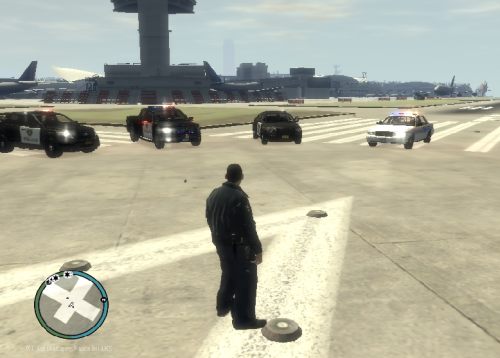 Could use some work but other than that it's awesome! My main suggestion is to try a different badge.
 -
If you don't have GTAIV stored in its default location (C:/Program Files x86/Rockstar Games/Grand Theft Auto IV for retail copies, it will not work.
-
Aw, didn't see that, honestly. Thanks for letting me know.
-
STAFF FEEL FREE TO MOVE THIS POST IF IT IS IN THE WRONG SECTION, I APOLOGIZE. Hello everyone, Please note this is not a support request however I can't put this anywhere else. So, if you're LCPDFR Staff, I sincerely ask that you consider pinning this in the Knowledge Base as it can be very helpful for the community!) As many of you know, on November 29 2016, Rockstar North officially released patch 1 0 8 0 for GTAIV, after a long waiting game. But, you'll be displeased to note that all your scripting mods, as well as other miscellaneous things do not work on 1 0 8 0. One of the key fixes on Patch 8, was getting rid of the Social Club bug, which in most cases would never allow the player to log into the Social Club launcher to go online, despite the account details being correct. The typical error was "Social Club login failed.. please try again." Now, for those of you who didn't know, "paul.dll" is essentially that window, the Social Club Login Client, that has the issue. And yes, Mego Gaming's fix for Patch 7 works most of the time, but I'd rather settle for 100%. On to the instructions, here's what you need to do: 1) Download GTAIV Patch 8. If you're using Steam, it will update your game automatically, but for retail copies, please refer to this link: http://www. .com/gta-4/patches/84932-patch-for-gta-4-1080.html THIS IS NOT A CRACK. I HAVE TESTED THIS AND IT IS A COMPLETELY LEGITIMATE COPY, HOWEVER I CANNOT FIND THE OFFICIAL PATCH FROM ROCKSTAR'S WEBSITE! THIS PATCH WILL *NOT* WORK ON CRACKED COPIES, SO PLEASE DO NOT ASK! 2) Once Patch 8 is installed, right click on the "paul.dll" in your GTAIV root directory, and select "Copy." Then, right click on your desktop and select "Paste." This will save a copy of the Patch 8 "paul.dll" and is necessary to proceed. Please note that the paul.dll from Patch 8 is the only piece of it we will be using, to repair the Social Club error and get rid of the old RGSC launcher. 3) Download GTAIV Patch 7. Again, if you're using steam, it will update your game automatically (make sure you turn on automatic updating) but for retail copies, please refer to this link, directly from Rockstar's website. https://support.rockstargames.com/hc/en-us/articles/200145406--May-28-2010-Grand-Theft-Auto-IV-Patch-7-Title-Update-v-1-0-7-0-English-1-0-6-1-Russian-1-0-5-2-Japanese- 4) Once Patch 7 (1 0 7 0) is installed, take the "paul.dll" you saved to your Desktop from Patch 8 (1 0 8 0) and drag and drop it into your GTAIV root directory, and replace/overwrite the file there. And that's all there is to it! Your game should be free of the RGSC error. This fix is a life-saver. IF YOU HAVE ANY QUESTIONS, COMMENTS, OR CONCERNS, *PLEASE* LEAVE THEM IN THE REPLIES BELOW. PLEASE NOTE I WILL BE RELEASING A GTA IV INSTALLATION & OPTIMIZATION GUIDE SOON, SO STAY TUNED. Signed, Providence Law
-
Hi, As I'm almost positive you know, GTAIV is pretty much complete shit. So, it's very hard to say what the issue is but maybe try a different program. OBS may not agree with GTAIV and causing your performance to dip.
-
You may want to try a fresh copy of GTA. Something is most likely corrupted.
-
You're posted in the wrong section. But, try Albo1125's LSPDFR Troubleshooter.
-
Try to reinstall LCPDFR.
-
You're welcome!
-
Okay so you're on the low end of the specs but, still possible for you to get things working. Your RAM is the biggest downside by the way but, let me see if I can help you. I think perhaps your best option is to install a fresh copy of GTAIV. For everything to work, make sure you install it in it's default location. If you don't have enough space, clear some. It's vital so everything works properly. Test the game to make sure it works. Once you get everything installed, patch it to 1.0.7.0 here: https://support.rockstargames.com/hc/en-us/articles/200145406--May-28-2010-Grand-Theft-Auto-IV-Patch-7-Title-Update-v-1-0-7-0-English-1-0-6-1-Russian-1-0-5-2-Japanese- Test the game again. Make sure it works. After that, install LCPDFR here: Make sure you use the Automatic Install. When the configurator launches, configure it how you like. Test the game and make sure it works. Install your mods and you should be good. If you need more of my help let me know!
-
Did my suggestion help?
-
If you still need help, what are your computer specs?
-
Hello. Let me see if I can help you. It's good you're on Windows 10 but there are still a few things you could do. The London ENB is probably pushing your computer to its limits. Try something similar. It's vital that you want your GTAIV to be STABLE but beautiful at the same time. A few things you can do, notably are: *Disable your AIELS. This means that computer-generated cars (AI) will not use ELS when responding. Let me explain why this works. *When a car has ELS on, it will NOT disappear even if you remove it. So, this means AI vehicles will not use the ELS, and they will disappear so random events aren't staying there forever using your computer's resources that it doesn't need to use. *Find a stable car pack- don't just go downloading a bunch of random cars & mods you don't need. Make sure the cars are low enough poly where your computer won't be pushed to its limits. If you need more help let me know.
-
What do you mean the car spawns everywhere? Meaning it's the only car that spawns with a few other vehicles sometimes? If you created a UV Mapped version of the vehicle, my thought is that you're having the equivalent to the taxi bug. Install a taxi bug fix and see if that helps.
-
Don't listen to these morons. Let me give you some actual advice. Could I have a few details before I help you so I can make sure it's the right way? Where did you install your GTAIV to? Find where you installed it, and then in the main directory find the FR Uninstall file. Uninstall LCPDFR and then go download a fresh copy and install it. In the LCPDFR Configurator, make sure you turn "Don't use Random IV on foot pursuits" or something along those lines. This means that LCPDFR will override GTAIV's choice to add random pursuits. It won't be available for you to join the pursuit anymore. Hope I helped!
-
Hello, I can try to help you. I need a few more details though. What are the specifications of your computer? (Processor, RAM, Hard Drive(s), Graphics Card, etc) Allow me to make you aware that making LCPDFR and GTAIV work won't be easy, but you can do it if you do it properly.
-
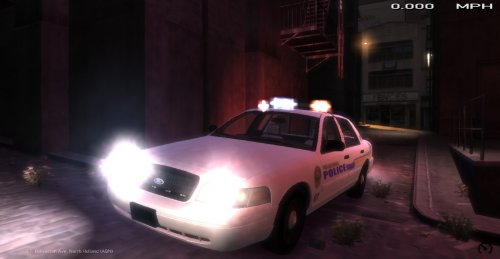 Gives me the powerful feel of a real V8 Engine! My hats are off to you.. Well done. -ProvidenceLaw
- 30 comments
- 2 reviews
-
-
That's great! Glad to hear I could help out c:
-
Sorry to tell you but 30 to 40 minutes is a LONG time to be playing GTAIV. I know these are some dramatic steps but here's what I can recommend. I would personally upgrade to Windows 10 if possible. If not, and you're using ELS, go to your ELS.ini in your main directory and take the AIELS for both SP and MP off. This will prevent random crashes and clean up the scenes you create after they occur (meaning backup will not have ELS on so the cars will disappear after a while) Hope I helped! LC26