



Office Rob Baker
Members
-
Joined
-
Last visited
Everything posted by Office Rob Baker
-
I reinstalled GTA V to have a clean installation path lately but now I face some Problems with the RagePluginHook. If I want to start the game with RPH I get the following error message: Could not hook game process. Insufficient permissions or bad anti-virus. Please try again. If the problem persists, please restart your computer. I tried it with deactivated antivirus, with administrator privilegs and renamed the GTA Folder as mentioned in some youtube videos. But nothing helped yet. I think the problem could be, that it automatically downloaded GTA V to Hard Disc C:/ and I then moved it to E:/. I also copied the full GTA V folder of E:/ to an extern Hard Disc as a clean backup and copied it back to E:/ when it did not work. Could it be some problem with the registry ? I would be thankfull if someone could help me here. I do not want to download it again for 7+ hours :(
-
Thank you ! I will try this
-
Can someone pls help me ? I really do not understand. I managed to install one vehicle but another one keeps crashing the game... Why are there different patchdays ? What are those "Patchdays" ? Can I place mod vehicles in any patchday and it will appear ingame ? How do I know which is "my latest patchday" as it always says in readme ?
-
Hello together ! I just try to install some vehicle mods from this side. I did it once, long time ago and it worked fine. Now I am very confused with this "pathdayxx" path. Because in the different patchday folders that are recommended in read me or tutorials, on my computer there are not the same vehicle files in it. This is confusing me, because I remember there had been one folder with ALL vehicles and now I have all this patchday folders with only a few vehicles ?? Where do I find Police, Police2, Police3, Police4 and sherriff ? I tried to find them but I could only find Police2 Can anybody help me ? :S Thank you ! Rob
-
 How do I install this ??? No readme file... No description on this page... Is it still working with the latest LSPDFR ??
- 542 comments
- 98 reviews
-
Wow, very interesting and helpfull guide... It all makes sense now :) Thank you for the link !
-
Hello together ! I have some questions about isntalling vehicles. I tried out many things the last day and learned a lot of modding GTA V. What I did not really find our, and its because it seems a bit confusing to me, is if u can just rename a mod-vehicle-fileyou downloaded so it will replace another vanilla vehicle. FOR EXAMPLE: I downloaded a mod that will replace police vehicle 2 so I have those four files: police2.yft police2.ytd police2_hi.yft police2+hi.ytd Can I now just rename them to: sheriff.yft sheriff.ytd sheriff_hi.yft sheriff+hi.ytd - would it work ? Also I am a bit confused by the different ways of installing vehicles. Some have included file like visualsettings.dat handling.meta vehicles.meta carvariations.met - what exactly are those files for ? - If I rename the yft and ytd file do I have to change those meta files too ? - Or will it not work to rename mod vehicles including such files ? Then I discovered that lot of mod-vehicles use different installation paths in the readme files like: mods\update\x64\dlcpacks\patchday3ng\dlc.rpf\x64\levels\gta5\vehicles.rpf mods\Update\x64\dlcpacks\patchday4ng\dlc\x64\levels\gta5\vehicles mods\x64e\levels\gta5\vehicles.rpf - Is it important to put the mod-vehicle in exactly that folder ? - Or can I just put them all into one (correct) folder ? After I installed all of the mod-vehicles like in the readme files I experienced that only some of them replaced the vanilla vehicles being used in LSPDFR - Which folder do I have to use to replace the LSPDFR vanilla vehicles ? I would be very thankful for your help and I continue learning. Rob !
-
ok thank you guys ! Question answered :)
-
nvm. ! I found another tutorial video and finally it worked !
-
@Hystery: you're cool mate ! @SuperStumpje @Hotwingers: Thank you two ! :)
-
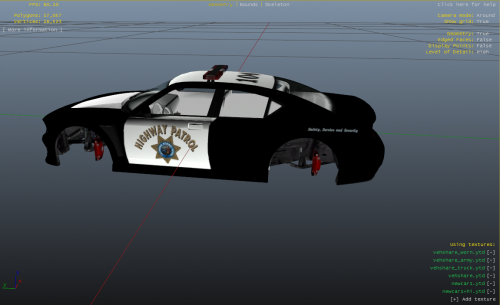 I do not get any step further when it comes to the editing of the interior List. With ctrl+f search it cant find any of my vehicles ??
 -
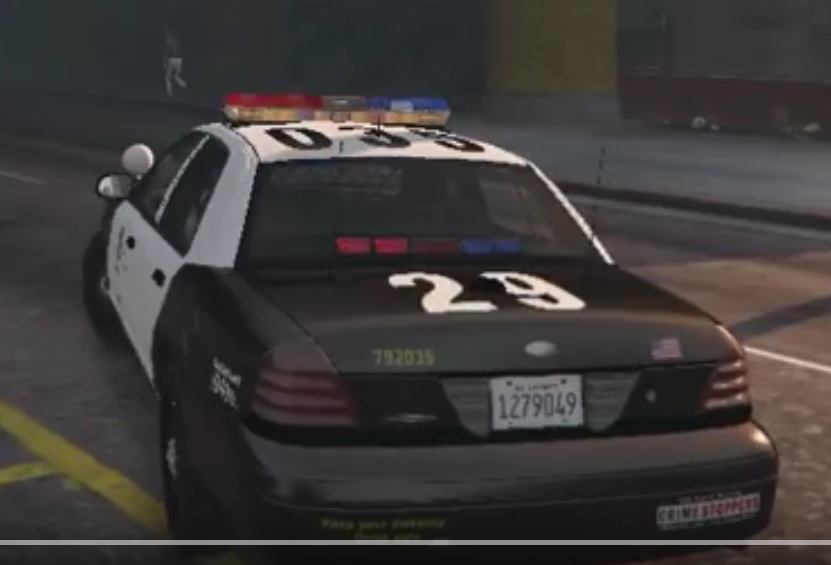
I saw this Police car on youtube video but there was no link or something in the description so Id like to ask here if anyone can tell me which mod vehicle it is I would be thankfull ! :)
-
with "compatible" I mean that the trainer can be used while playing LSPDFR and is not disturbing the mod !
-
Hello ! Is there a trainer for GTA V Version 1.0.678.1 out yet which is compatible to RAGEPluginhook and LSPDFR ? All Trainers I tested yet did not work. Even the RAGE Trainer.dll got me an error relating to incompatibility :( Thank you ! Rob
-
I know and I did it always as its written in the readme... That was not my question ;) I just wanted to know if it POSSIBLE to put them in lspdfr-folder and it will automatically load with lspdfr then !... I think BlackJesus1 answered my question :) THank you !
-
Hello ! Can I put ANY plugin into the plugin/lspdfr folder or only those who are especially made for lspdfr ? Thank you ! Rob.
-
[delete]
-
I did ! Now its downloading the last 53,00 / 55,00 GB ???
-
Hello ! I have installed several mods and now got some troubles with the Game. If I launch the game with the RAGEPluginHook I get the message that my current game version is not supported ! "The current game version is not supported. Please visit http://ragepluginhook.net/Downloads.aspx to see if an updated version of RAGE Plugin Hook with support for this game version has been released. You can also follow us on Twitter at https://twitter.com/RAGEPluginHook to get status reports and notifications on new updates." Before I only had LSPDFR installed and it worked !!! ---------------------------------------------------------------------------------------------------------------- Here is the list of mods I recently installed: TOOLS: - RagePlugin - OpenIV LSPDFR: - lspdfr031setup ---> (installed into GTA V Main folder) CALLOUTS: - Conchs Callouts - More Callouts - Simple Callouts - Strays Callouts ---> (I have placed all like descriped in the readme-files in plugins/lspdfr-folder) LSPDFR MODS: - BreathalyzerRAGE - Cop Holster V3_10 - YetAnotherPartnerMod - PedSearch 20v1.1.1 - Police Radio 0.55.1.0 - RPH0.37+ - SaferChases - Speed Radar by Stray - SpotlightMod v0.9 - Street name addon - Tow_Truck_Service - Vehicle Search ---> (I have placed all like descriped in the readme-files either in plugins-, plugins/lspdfr- or scripts- folder) OTHER MODS: - Rescue Mod V 0.3 by gangrenn (script-folder) - Bus Missions (script-folder) TRAINER: - German Native Trainer (into GTA mainfolder) VEHICLES: - CVPI_2.1 - SAHP 20CVPI - LSPD 20CVPI 201.3.5 - Marcopolo Paradiso 1800 ---> (I have replaced the vanilla vehicles with OpenIV in x64e.rpf/levels/gta5/vehicles.rpf like descriped in the readme-files) ---------------------------------------------------------------------------------------------------------------- So my questions are: - Are there any incompatibilities ? - Which mod could cause the error message ? - what can I do to fix it ? THANK YOU ! Rob.
-
Ah ! ok, just for my understanding... All those mods need the SAME RageNativeUI.dll and it is just added to some mod.zips ? So I just have to remove it with the newest one online and all those mods will work ?
-
Hello together ! I am very new to GTA V modding and I learned a lot with testing out different mods of this site the last days :) But sometimes there are still some open questions or errors that I do not understand yet. I do my best to read the readme files and search online or in faqs but english is not my native language so sometimes I do not understand everything. So please dont judje me if I ask stupid questions :/ The plugin or special LSPDFR mods are easy for me to install now... With the OpenIV I sometimes have trouble with vehicles I installed exactly like the orders but they do not appear ingame (Police vehicles) but there are still the vanilla ones. My Problem atm: And there are some mods where I have to copy a RAGENativeUI.dll file to the main folder of GTA V. Then windows always asks me to overwrite an existing RAGENativeUI.dll... ?? Should I say "yes" ?? And if I want to install different mods which want me to copy RAGENativeUI.dll file into mainfolder and I always overwrite them, arent there some RAGENativeUI.dll files missing ?? I also experienced some troubles with the game, often after installing a mod with a RAGENativeUI.dll file. Often I get an error message, that my GTA V Game installation is corrupt or broken ? So my questions are: So what am I doing wrong with RAGENativeUI.dll ? Overwrite the existing one yes or no ? how to handle several mods including RAGENativeUI.dll ? I hope you can help me :) Thank you ! Rob.

