St.Kizza
Members
-
Joined
-
Last visited
Everything posted by St.Kizza
-
-
 Thanks :-) I am Norwegian.
 -
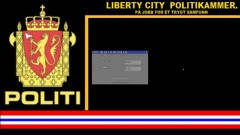
Installation: Open SparkIV and press browse. Scroll down to the bottom. There you will see models- Cdimages and textures. Open textures by doubleclicking it. Then Scroll down (or use filter) till you see "policecomputer.wtd" click on this and press Edit. First click on badge_dds3. Then press import. import the file with the same name. Do the same thing on the files with the same name as the one in this download.Remember! you must click one time one the files in SparkIV so you mark them before you import anything. Enjoy. P.S: if it doesnt come up in game simply do the same thing all over again. SparkIV might glitch out sometimes. dont worry. EDIT: Put the PoliceBG.PNG here: GTAIV maindirectory/scripts/LCPDFR. and remember before you start the game Make sure your folder options show all extensions (even known ones), you can change this setting in your Control Panel. Then, rename the file to "PoliceBG", remove either ".png" or ".jpg" and you're done! It will come up a warning saying that the file might get useless or something. click yes or ok or you know..proceed with the operation ;-) Then the file will change appearance. Dont worry....this means SUCCESS!!! ENJOY! Credits to Corleone for making the cars. Check out his youtube channel: Norpolice123
-
From the album: Policecomputer
Thanks to Jay from Development team, Francis Morissette from Community team and Dhruv. (member) for patience and help. Download:© St.Kizza
-
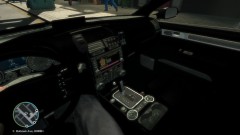
From the album: Policecomputer
Thanks to Jay from Development team, Francis Morissette from Community team and Dhruv. (member) for patience and help. -
Success! Screenshots uploaded. Thanks for all help! :-D Huge gratitude from me.
-
ah ok. But if i cut it out from gta folders. Wouldnt that cause taxibug? or is it different online with other players included?
-
Does this include Traffic flow version V5 R2 aswell?
-
Ah ok. i`ll check it out. Thanks :thumbsup:
-
I`ve seen on youtube that people playing LCPD:FR MP has disabled A.I police. How do you do that? Note: I guess the reason is because it`s a smaller chance for the game to crash. Correct me if im wrong :-)
-
I see you also have the blackbars on the Ford Mondeo lightbar. have you managed to get rid of them?
- 5 comments
- 2 reviews
-
-

- 1
-
-
-
ok then. Ill give this a shot. I`ll let you know how it turns out :-) Thank you btw.
-
i guess you mean th LCPD:FR folder within the script folder? If yes then i THINK i understand. i`ll give it a try.
-
uuumm.....how? :blush:
-
ok. Not to nag to much but what should i do with the file? and should i open it in Paint.NET?
-
LoL thanks. :-)
-
Nope. Didnt work.
-
emerglights_d.DDS has one with blueglass in it. emerglights_i.DDS have writings that say "Police Stop" they are slightly different with other small things but i hope you know wich one it is. And what is rectify? Dhruv posted it.
-
Didnt work. i placed it in Scripts/LCPDFR. named it PoliceBG as you said. It is in the same folder as the file Audio. GUID and Installedversion. Tried with PNG. JPG and both together. Maybe wrong place?
-
There are two of them. emerglights_d.DDS and emerglights_i.DDS. Wich one and how do i rectify it? sorry im not good at this.
-
-
im not quite sure what you mean.Do you mean if the black spots are supposed to light up then yes they are. The black spots are not supposed to be there.
-
Anyone knows what it is and how i can fix this? The car and skin is not made by me I downloaded it and imported it with SparkIV. i have re-imported it several times in hope that it would fix itself, but with no luck. It is the black spots on the lightbar im talking about btw. EDIT:Sorry for starting this up again. Uploaded the emerglight files as pictuers. Can someone see whats wrong with them? And if you can download the picture and draw arrows and lines to explain where i should put things that would be great. and much easyer to understand. :-)
-