



CossackGames
Members
-
Joined
-
Last visited
Everything posted by CossackGames
-
 Currently the chances are hardcoded with different odds based on charge severity and for realism purposes. I have plans to make the court system a little more in depth in the future to integrate evidence and potentially reports and witnesses but that will be down the road. I could potentially open up the court odds as a config file for people to adjust as well I suppose.
- 284 comments
- 17 reviews
-
-
You are correct. I will fix that. Thanks! I might look into that when I rework the UI depending on if a lot of people prefer it to be windowed rather than full screen.
- 284 comments
- 17 reviews
-
I didn't even think about controller as I was initially making this for myself and I play exclusively mouse and keys.... whoops Give me a little bit of time, I will add controller keybind support
- 284 comments
- 17 reviews
-
Do you have Policing Redefined installed? That is a requirement for the ID to auto populate. Policing Redefined I will look into it but in my testing it has always populated if I requested the id from the npc.
- 284 comments
- 17 reviews
-
Looked into the code, I missed having it populate from pat down. I have made the change in the code but I need to test it before I release an update. Should be out later today.
- 284 comments
- 17 reviews
-
Thank you! I will revisit the offense codes. Just fyi all of the offenses are fully customizable
- 284 comments
- 17 reviews
-
-

- 1
-
-
I appreciate your concern with the content of the code. There was certainly some agentic coding involved in creating this, mainly in researching API links and such to make the process more efficient for me.
- 284 comments
- 17 reviews
-
Yes, there is a cursor that is used to navigate. There are currently no "windows" in the computer, rather each menu section you see on the left functions as a tab that you can click into. I may explore a true "desktop" feel with windows in a future update depending on community feedback.
- 284 comments
- 17 reviews
-
-

- 1
-
-
It should not interact with your in game keybinds while the computer is active. I was very much focusing on functionality for initial release to get it out there, UI upgrades and nice to have features are coming in future updates!
- 284 comments
- 17 reviews
-
-
- 1
-
-
Join the Discord Community for tech support and updates New Plugin Showcase:pdComp — Police Computer for LSPDFR A modern, immersive police computer for LSPDFR with deep records-framework integration. pdComp transforms police roleplay in GTA V with a fully interactive MDT/CAD system featuring a simulated police-computer desktop, draggable applications, persistent records, evidence-aware court systems, and integrated records support. It now works with either Policing Redefined (via CDF) or Stop The Ped as its records backend. Built from the ground up for immersion, pdComp replaces outdated menu-driven police computers with a realistic in-game operating system complete with: Rugged police laptop interface Draggable and resizable windows Desktop wallpaper and app icons Window snapping On-foot patrol tablet ALPR/BOLO notifications Standalone ALPR plate reader and speed radar Persistent criminal justice records Persistent dark mode Deep Records-Framework IntegrationA records integration is required — pdComp has no standalone vanilla mode. Choose your backend with `[Integration] Mode`: When used with Policing Redefined + CDF, pdComp becomes part of a connected policing ecosystem: Pulls synchronized suspect and vehicle records directly from PR Supports evidence-linked arrest reports Integrates with PR citation workflows Tracks warrants, suspended licenses, insurance status, registrations, permits, and more Uses tested evidence and relevance checks in court outcomes When used with Stop The Ped, pdComp combines LSPDFR persona/vehicle data with STP's: Document-status API (license, registration, insurance) Alcohol-over-limit and drug-influence advisories Contraband/evidence search results, importable as current-call evidence Core FeaturesPedestrian & vehicle lookup Citation issuing Arrest reports Court docket & hearings Evidence-aware case outcomes Prior stop and citation history Persistent case database Standalone ALPR & speed radar Persistent vehicle BOLOs with ALPR-style hit alerts Report Center for incident, use-of-force, and vehicle damage reports Mouse, keyboard, and controller support Full-screen immersive UI Current Versionv0.3.7
- 284 comments
- 17 reviews
-
-
-
-

- 28
-
-
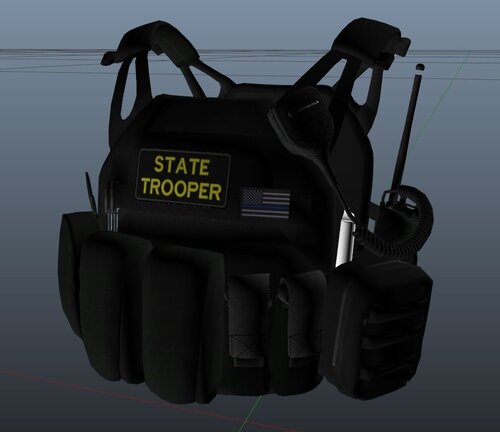 Grand Theft Auto V\mods\update\x64\dlcpacks\eup\dlc.rpf\x64\eup_componentpeds.rpf\
 -
I made this skin for myself and decided to post it here for anyone else who wants to use it. https://www.lcpdfr.com/downloads/gta5mods/character/25692-eup-vest&earpiece-beta/
-
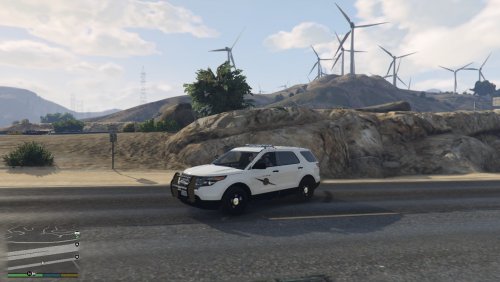 I threw together some Washington State Patrol textures due to the lack of any on here. This is my first attempt at anything mod related so I hope y'all enjoy! And yes I realize WSP doesn't have State Trooper on the back of the cars but I added that in there so it doesn't look so plain. The cars they go with: Crown Vic- http://www.lcpdfr.com/files/file/10610-lspd-cvpi-pack/ Impala- http://www.lcpdfr.com/files/file/8952-2014-chevrolet-impala-lspdlssd/ Explorer- http://www.lcpdfr.com/files/file/9751-ford-explorer-interior-fedral-signal-valor-lightbar-by-pimdslr/

