JZersche
Members
-
Joined
-
Last visited
Everything posted by JZersche
-
 requiredExtras only makes it so that if you have.. Okay example. Let's say that you have a car with 3 Lightbars, Each lightbar is an extra. If you set all three of those extras under requiredExtras's the game will use ONE out of those 3 at random, but never more than 1 at a time. If you ave Required A, B and C, it will use either A, or B, or C, But never more than one at a time. You should see if bxBuggs will help you if you want to put a better lightbar on this car, you can mention that me and you were talking about it. not worried about credits, Yeah I made them. Anyone can use them. If I make textures, they're all opensource. People are going to do what they want with them anyway.
- 106 comments
- 9 reviews
-
This looks best, In next update, you should just get rid of the spoiler all together in my opinion, and just put it inside the carcols instead in the modkit. @Masterschwag Sirensettings 13 only messes it u and 2 of the lights stop working, 1 works best but the front lights don't work on either 1 or 13
- 106 comments
- 9 reviews
-
-

- 1
-
-
I made some changes, it looks better if you do it this way. Nope. They were both set to 1.
- 106 comments
- 9 reviews
-
I redid the lightbar textures so that they look better. If the transparency isn't preserved on this image, it should be transparent here http://cubeupload.com/im/betgzC.png
- 106 comments
- 9 reviews
-
OH! So the Siren actually comes from the emergency flag, I should have known.
- 106 comments
- 9 reviews
-
I'm pretty sure Extras can't be removed via carcols, as I've done quite a lot of studying with carcols. Let me install your model and test it first and I'll let you know what configuration looks best. Cheers. Give me about 10 minutes, and I'll edit this comment if I can. One more thing, I put models in by editing them in to my own DLC, one thing I have't been able to figure out is what the first number for modkits is for? What does the 27 correspond to? Like the ID could be 33, and I understand the ID is based off many kits there are, like kit 1 (id 1) kit 2 (id 2) and so on, but what does the second number mean? I usually just make the second number the same as the ID, haven't noticed any issue so far. <Item>27_noose_modkit</Item> Okay, get rid of Extra 1, 3, 4 and 7. One of those is the computer, I was debating on whether or not the computer should be in the unmarked slicktop version or not, and I'm voting not. One other problem is the front emitters don't seem to be working? Oh, and response to neo's review. The reason for no siren is because the audioNameHash isn't sent to a police vehicle. It's set to dominator.
- 106 comments
- 9 reviews
-
-
- 1
-
-
How can I remove them? The model is locked? I want AI Cars to spawn without those extras.
- 106 comments
- 9 reviews
-
-
I figured out how to do it. Your setup2.xml file should look like this: <?xml version="1.0" encoding="UTF-8"?> <SSetupData> <deviceName>dlc_jzersche</deviceName> <datFile>content.xml</datFile> <timeStamp>00/00/0000 00:00:00</timeStamp> <contentChangeSetGroups> <Item> <NameHash>GROUP_STARTUP</NameHash> <ContentChangeSets> <Item>jzersche_AUTOGEN</Item> </ContentChangeSets> </Item> </contentChangeSetGroups> <type>EXTRACONTENT_COMPAT_PACK</type> <order value="99" /> </SSetupData> Notice order value is 99, this can be an even higher number and your models will replace in 99th priority. In content.xml, you should have a line like this <Item> <filename>dlc_jzersche:/%PLATFORM%/vehicles.rpf</filename> <fileType>RPF_FILE</fileType> <locked value="true" /> <overlay value="true" /> <disabled value="true" /> <persistent value="true" /> </Item> persistent should be true, and so should overlay and locked value.
-
I know how to make DLCs, What I don't know how to do is add police2 to that DLC as police2, therefore NOT ADDING a vehicle, but updating it, without having to rename,
-
I might be able to reverse-engineer RDE, and see how they did it.
-
Yeah, I got it from the carcols.ymt file. Anyone programming savvy willing to relay what the process of figuring out how to open unknown files like YMTs for example involves? Like as a developer, where do you even start, what are some of the first things you need to know in order to figure out how a file like the YMT files could be opened and read? I didn't make a new topic for this question, because I didn't think it would get a good response, but if anyone knows, please tell me lol.
-
I figured it out, just like sirensettings controls the lightbars, lightsettings controls all the vehicles exterior lighting (headlights, interior lights, taillights, reverse, etc) You can actually specify those settings with an id value inside of the carcols file. <Item> <id value="75"/> <indicator> <intensity value="0.37500000"/> <falloffMax value="2.50000000"/> <falloffExponent value="8.00000000"/> <innerConeAngle value="20.00000000"/> <outerConeAngle value="50.00000000"/> <emmissiveBoost value="false"/> <color value="0xFFFF7300"/> <textureName/> <mirrorTexture value="true"/> </indicator> <rearIndicatorCorona> <size value="0.00000000"/> <size_far value="0.00000000"/> <intensity value="0.00000000"/> <intensity_far value="0.00000000"/> <color value="0x00000000"/> <numCoronas value="1"/> <distBetweenCoronas value="128"/> <distBetweenCoronas_far value="255"/> <xRotation value="0.00000000"/> <yRotation value="0.00000000"/> <zRotation value="0.00000000"/> <zBias value="0.25000000"/> <pullCoronaIn value="false"/> </rearIndicatorCorona> <frontIndicatorCorona> <size value="0.00000000"/> <size_far value="0.00000000"/> <intensity value="0.00000000"/> <intensity_far value="0.00000000"/> <color value="0x00000000"/> <numCoronas value="1"/> <distBetweenCoronas value="128"/> <distBetweenCoronas_far value="255"/> <xRotation value="0.00000000"/> <yRotation value="0.00000000"/> <zRotation value="0.00000000"/> <zBias value="0.25000000"/> <pullCoronaIn value="false"/> </frontIndicatorCorona> <tailLight> <intensity value="0.25000000"/> <falloffMax value="4.00000000"/> <falloffExponent value="16.00000000"/> <innerConeAngle value="45.00000000"/> <outerConeAngle value="90.00000000"/> <emmissiveBoost value="false"/> <color value="0xFFFF0000"/> <textureName/> <mirrorTexture value="true"/> </tailLight> <tailLightCorona> <size value="1.20000000"/> <size_far value="2.50000000"/> <intensity value="5.00000000"/> <intensity_far value="1.00000000"/> <color value="0xFFFF0F05"/> <numCoronas value="1"/> <distBetweenCoronas value="128"/> <distBetweenCoronas_far value="255"/> <xRotation value="0.00000000"/> <yRotation value="0.00000000"/> <zRotation value="0.00000000"/> <zBias value="0.25000000"/> <pullCoronaIn value="false"/> </tailLightCorona> <tailLightMiddleCorona> <size value="0.00000000"/> <size_far value="0.00000000"/> <intensity value="0.00000000"/> <intensity_far value="0.00000000"/> <color value="0x00000000"/> <numCoronas value="1"/> <distBetweenCoronas value="128"/> <distBetweenCoronas_far value="255"/> <xRotation value="0.00000000"/> <yRotation value="0.00000000"/> <zRotation value="0.00000000"/> <zBias value="0.25000000"/> <pullCoronaIn value="false"/> </tailLightMiddleCorona> <headLight> <intensity value="1.50000000"/> <falloffMax value="35.00000000"/> <falloffExponent value="16.00000000"/> <innerConeAngle value="0.00000000"/> <outerConeAngle value="60.00000000"/> <emmissiveBoost value="false"/> <color value="0xFF7FA7E3"/> <textureName>VehicleLight_car_LED1</textureName> <mirrorTexture value="false"/> </headLight> <headLightCorona> <size value="0.10000000"/> <size_far value="7.00000000"/> <intensity value="7.00000000"/> <intensity_far value="5.00000000"/> <color value="0xFF61A5FF"/> <numCoronas value="2"/> <distBetweenCoronas value="32"/> <distBetweenCoronas_far value="68"/> <xRotation value="0.00000000"/> <yRotation value="0.18221200"/> <zRotation value="0.58433600"/> <zBias value="0.25000000"/> <pullCoronaIn value="false"/> </headLightCorona> <reversingLight> <intensity value="0.50000000"/> <falloffMax value="7.20000000"/> <falloffExponent value="32.00000000"/> <innerConeAngle value="20.00000000"/> <outerConeAngle value="78.00000000"/> <emmissiveBoost value="false"/> <color value="0xFFFFFFFF"/> <textureName/> <mirrorTexture value="true"/> </reversingLight> <reversingLightCorona> <size value="0.80000000"/> <size_far value="2.00000000"/> <intensity value="1.50000000"/> <intensity_far value="1.00000000"/> <color value="0x00F7F7F7"/> <numCoronas value="1"/> <distBetweenCoronas value="128"/> <distBetweenCoronas_far value="255"/> <xRotation value="0.00000000"/> <yRotation value="0.00000000"/> <zRotation value="0.00000000"/> <zBias value="0.25000000"/> <pullCoronaIn value="false"/> </reversingLightCorona> <name>fugitive</name> </Item> There's an example, the fugitive has lightsettings 75! So if you apply lightsettings="75" in carvariations, to any vehicle, it will use those settings. (theoretically) CARCOLS.YMT <Item> <id value="3"/> <indicator> <intensity value="0.37500000"/> <falloffMax value="2.50000000"/> <falloffExponent value="8.00000000"/> <innerConeAngle value="30.00000000"/> <outerConeAngle value="80.00000000"/> <emmissiveBoost value="false"/> <color value="0xFFFF8000"/> <textureName/> <mirrorTexture value="true"/> </indicator> <rearIndicatorCorona> <size value="0.00000000"/> <size_far value="0.00000000"/> <intensity value="0.00000000"/> <intensity_far value="0.00000000"/> <color value="0x00000000"/> <numCoronas value="1"/> <distBetweenCoronas value="128"/> <distBetweenCoronas_far value="255"/> <xRotation value="0.00000000"/> <yRotation value="0.00000000"/> <zRotation value="0.00000000"/> <zBias value="0.25000000"/> <pullCoronaIn value="false"/> </rearIndicatorCorona> <frontIndicatorCorona> <size value="0.00000000"/> <size_far value="0.00000000"/> <intensity value="0.00000000"/> <intensity_far value="0.00000000"/> <color value="0x00000000"/> <numCoronas value="1"/> <distBetweenCoronas value="128"/> <distBetweenCoronas_far value="255"/> <xRotation value="0.00000000"/> <yRotation value="0.00000000"/> <zRotation value="0.00000000"/> <zBias value="0.25000000"/> <pullCoronaIn value="false"/> </frontIndicatorCorona> <tailLight> <intensity value="1.00000000"/> <falloffMax value="4.00000000"/> <falloffExponent value="8.00000000"/> <innerConeAngle value="45.00000000"/> <outerConeAngle value="90.00000000"/> <emmissiveBoost value="false"/> <color value="0xFFFF0000"/> <textureName/> <mirrorTexture value="true"/> </tailLight> <tailLightCorona> <size value="0.15000000"/> <size_far value="0.75000000"/> <intensity value="1.00000000"/> <intensity_far value="5.00000000"/> <color value="0xFFFF1A00"/> <numCoronas value="1"/> <distBetweenCoronas value="128"/> <distBetweenCoronas_far value="255"/> <xRotation value="0.00000000"/> <yRotation value="0.00000000"/> <zRotation value="0.00000000"/> <zBias value="0.25000000"/> <pullCoronaIn value="false"/> </tailLightCorona> <tailLightMiddleCorona> <size value="0.00000000"/> <size_far value="0.00000000"/> <intensity value="0.00000000"/> <intensity_far value="0.00000000"/> <color value="0x00000000"/> <numCoronas value="1"/> <distBetweenCoronas value="128"/> <distBetweenCoronas_far value="255"/> <xRotation value="0.00000000"/> <yRotation value="0.00000000"/> <zRotation value="0.00000000"/> <zBias value="0.25000000"/> <pullCoronaIn value="false"/> </tailLightMiddleCorona> <headLight> <intensity value="4.00000000"/> <falloffMax value="40.00000000"/> <falloffExponent value="160.00000000"/> <innerConeAngle value="15.00000000"/> <outerConeAngle value="70.00000000"/> <emmissiveBoost value="false"/> <color value="0xFFFFE894"/> <textureName>VehicleLight_misc_searchlight</textureName> <mirrorTexture value="false"/> </headLight> <headLightCorona> <size value="8.00000000"/> <size_far value="1.80000000"/> <intensity value="2.80000000"/> <intensity_far value="10.00000000"/> <color value="0xFFFFFFFF"/> <numCoronas value="1"/> <distBetweenCoronas value="128"/> <distBetweenCoronas_far value="255"/> <xRotation value="0.00000000"/> <yRotation value="0.00000000"/> <zRotation value="0.00000000"/> <zBias value="0.25000000"/> <pullCoronaIn value="false"/> </headLightCorona> <reversingLight> <intensity value="0.50000000"/> <falloffMax value="4.00000000"/> <falloffExponent value="32.00000000"/> <innerConeAngle value="45.00000000"/> <outerConeAngle value="90.00000000"/> <emmissiveBoost value="false"/> <color value="0xFFFFFFFF"/> <textureName/> <mirrorTexture value="true"/> </reversingLight> <reversingLightCorona> <size value="0.80000000"/> <size_far value="2.00000000"/> <intensity value="1.50000000"/> <intensity_far value="1.00000000"/> <color value="0x00F7F7F7"/> <numCoronas value="1"/> <distBetweenCoronas value="128"/> <distBetweenCoronas_far value="255"/> <xRotation value="0.00000000"/> <yRotation value="0.00000000"/> <zRotation value="0.00000000"/> <zBias value="0.25000000"/> <pullCoronaIn value="false"/> </reversingLightCorona> <name>Submersible</name> CARVARIATIONS.META <variationData> <Item> <modelName>submersible2</modelName> <colors> <Item> <indices content="char_array"> 132 0 122 156 </indices> <liveries> <Item value="false" /> <Item value="false" /> <Item value="false" /> <Item value="false" /> <Item value="false" /> <Item value="false" /> <Item value="false" /> <Item value="false" /> </liveries> </Item> </colors> <kits /> <windowsWithExposedEdges /> <plateProbabilities> <Probabilities /> </plateProbabilities> <lightSettings value="3" /> <sirenSettings value="0" /> </Item> Submersible2 [Lightsettings=3]
-
No, that's sirensettings. Seems that lightsettings messes with the headlights, so I'm going to assume that Rockstar have a setting file somewhere that has a whole database of lightsettings, setting it to 992 gave me no headlights, and setting it to 2 gave me headlights. Modeling tested on [Ford Raptor SVT]
-
Creating a personal DLC Pack with vehicles, and replacing overriding previous models, like what controls whether or not the content inside of DLC will override all the originals models? I created a DLC named JZersche, if I were to put a police model in it, and then spawn a police car, the original model from the game would spawn, what determines what models override the previous?
-
For example, In the carvariations file, vehicles have lightsettings, sometimes 998, sometimes 2, sometimes 1, 18, etc. What exactly does that all do? Does anyone know?
-
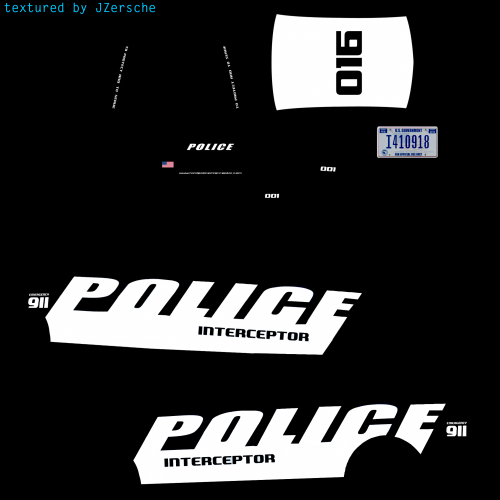 Just made these textures, enjoy.
 -
 Use the photoshop dds plugin, you can get it off google, you can alternatively export as png, but there are some textures you will run in to occasional that will need to be dds from what I can remember, like sometimes you might export a dds texture that's mipmapped to DXT5, DXT1, A8R8G8B8, in photoshop and when saving as dds you'll need to generate new mipmaps. DXT1 for RGB maps, DXT5 for RGB + Alpha, you can also use existing mipmaps but I've had issues with that option from what I remember.
- 148 comments
- 34 reviews
-
.thumb.jpg.1db0be3e377ccefdd47e57a95ec56762.jpg) edit carvariations Yes, but the reason would be for the AI drivers to spawn with both.
edit carvariations Yes, but the reason would be for the AI drivers to spawn with both.- 239 comments
- 70 reviews
-
-
It's caused by the emissive texture being tinted slightly orange, it needs to be completely red. Other than that, if emissive settings are set too high, it will over expose the light. So you just edit the texture and correct the hue.
- 239 comments
- 70 reviews
-
-
- 1
-
-
-
Just saw this model on a YouTube video, I won't ask release date, but it looks like it's very well done. You should definitely link the Antennas with the Radar since a model usually won't spawn with more than 2-3 extras at a time, and stick in a version with all the extras as separate, it allows for more flexibility. Please, Pleaseee update your OSS V1.4OSS model and get rid of the white coronas on the tag lights, if you can. Other than that keep up the good work. Absolutely amazing
- 239 comments
- 70 reviews
-
-
- 1
-
-
So you would think, but extraIncludes doesn't work that way, at least it makes no difference. Hey buggs,could you do a quick update to your and get rid of the white coronas on the tag lights? That's also a really nice model, but the coronas ruin it. I don't mean to complain, if anything it's constructive criticism, you don't have coronas on this model here, and they both look like the same models, but the light configurations are different. I personally think you should get rid of the brake light coronas on this model and that one as well, and just have it so the brake light itself is the only thing that lights up. 2011 CROWN VICTORIA LASD/LSSD OSS V1.4OSS
- 239 comments
- 70 reviews
-
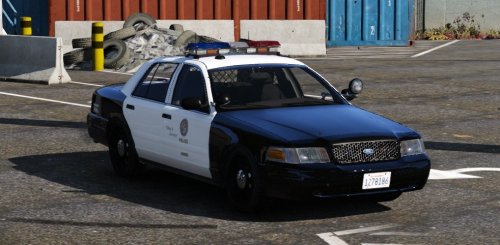 the taillights have ugly black lines in them, when siren is enable, the lines go away, I see you have cut part of the taillight out to make use of the blinkers, but the entire sides f the taillight don't light up to compensate, you should just make the entire taillights light up. Like this model has perfectly working taillights, https://www.gta5-mods.com/vehicles/1999-ford-crown-victoria-with-whelen-edge-lightbar
- 49 comments
- 19 reviews

.thumb.jpg.1db0be3e377ccefdd47e57a95ec56762.jpg)