JZersche
Members
-
Joined
-
Last visited
Everything posted by JZersche
-
 The previous version works because you have AddTextEntryByHash(0x00089FF9, "Lamar"), AddTextEntryByHash(0x000E7C17, "Parachute dangerously."), , symbols after each line. They'll need to be removed to make the new version work.
 -
I figured it out. Nevermind.
-
Yeah, but what's the actual process of setting the materials up I don't know. There's like no tutorials on how exactly that's done.
-
I'm also trying to figure this out. I want to model the lightbar from scratch but I'm not sure how the material asignment or setup is done to get the lights to work.
-
How exactly do the lights work? Is it just separate textures? Like if I just make a simple rectangle right now in Maya, create 2 planes and then assign a new material to each one and name them siren1 and 2 or what? What exactly is the process for modeling the lightbars?
-
Thank you so much
-
When I press the L key I want the default pattern to be 5. But it's 0. Is there a way? I've been looking at the xml file, but there's only a config for the secondarys to do that. Pressing K activates LSTG1, Pressing L activates no light stages?
-
You need police xml inside the ELS Folder which is in your GTA V root directory, and you need a ELS vehicle, then press Ctrl + P and hit J in game.
-
 Any way to toggle only the Primary Lights? Also when pressing 'L for WRNL lights, is there a way to set them to default at pattern 5? They seem to start at 0.
- 2,699 comments
- 240 reviews
-
Thanks man.
-
https://youtu.be/mVcTkxmnoVA?t=1360
-
-
All good lol, I'm just saying it makes it easier when somebody might have their own DLC Folder, like I have one named Police, and I have like police1, police2, police3, police4, police5, police6, police7, police8 If I download a vehicle, and I know what the sirensettings is, I can just replace police8, and then go in and check and make sure the police8 in carvariations is accurate. You know what I mean? It's just good practice to include those details. I might have police8 set to 1 from the previous model that was in it's place, and the model I'm swapping in, might be associated with sirensettings13. I mean yeah I can look up what sirensettings police1-4 use, but it would be cool if modders would include that detail in the description just to save the hassle. I've seen people commenting on vehicles asking what siresettings certain vehicles use, they may have changed their files so that the police2 settings aren't the default, so they would have to look it up, and it just saves time if you don't have to look it up, and you can immediately know from the model description. That's all I'm saying.
-
I created my own DLC with police1, police2, police3, police4, police5, police6 Sometimes I'll put a car that might be associated with different sirensettings in the police2 slot. So it's nice to know that if I'm gonna download an addon model and replace police2 with it, and my police2 isn't currently set as a sirensettings1, I don't have to look it up, like I said, it's nice to know in the description. BxBuggs does it. So there's no reason anyone else shouldn't do it. End of discussion, lol
-
" non-ELS cars don't use .xml files " I just figured you were thinking that I thought Non-ELS vehicles used .xml files, I know they don't. I was just saying if I put an ELS xml with it, would it work? That question has been answered, thanks to you, and also, I know that model is ELS, though it doesn't specify that it's ELS, so he should update the title to state that. But for the sake of the argument, there are vehicles on here that don't directly mention what the sirensettings is optimized for so sometimes, if you have a custom carvariations, you have to scroll through their own carvariations file just to figure out what sirensettings the vehicle is using, or you have to change your setting from 1 or 13. With the majority of vehicles coming out now being ELS, it doesn't matter much anymore, but like I was saying, It's easier when you can look at a vehicle, and see in the description what sirensettings it's optimized for. I actually had trouble finding a non-ELS car nowadays but for the sake of this. This car doesn't specify the sirensettings in the description. I'm sure it does specify it in the non-existent carvariations.meta that it doesn't come with or in the readme where it's also not mentioned, but yeah. Some modders release their vehicles without a variations file and without any mention of what sirensettings the vehicle uses, but since with ELS now, it doesn't matter, so yeah. It doesn't matter lol. End of the thread. On another note there's a lot of vehicles on here that don't specify [ELS] in their title. The site admin should add a checkbox. Does this vehicles support ELS? Y/N If ELS is checked it adds a prefix to the title of the file release. [ELS]
-
You're completely twisting what I'm saying ass backwards. I'm not saying non-ELS cars use XML files. I'm saying the opposite. If somebody else comments on here they'll understand what I said. Because what you're saying I'm saying is not correct. I know non-ELS cars don't use xml files. I'm saying, or at least trying to say that if you take a non-ELS car, and then attach a ELS XML file to it, then you could theoretically setup ELS to work with that car, but I guess not. I haven't had the time to get in to the 3D modeling part of this yet, so I don't necessarily know.
-
That's what I was saying. I was saying, for a car non-optimized for ELS, to make it use ELS, you could just assign an ELS XML file to it and match the components to the patterns manually, right, and again. I meant like in the actual description of the vehicle. Quote, Unquote: but I meant like in the description of the vehicle, not having to look in the actual files to figure it out. Example: In the actual DESCRIPTION, it would be nice to know without having to heck the .meta file. Some modders will write in their description, like BxBuggs does for example: Optimized for: SirenSettings 1
-
If a car isn't optimized for ELS, It's just a matter of setting up an XML file, right? I didn't know that, but I meant like in the description of the vehicle, not having to look in the actual files to figure it out. Anyway, that's cool.
-
Almost every car that's released, more than half the people releasing them never indicate what sirensettings the car is optimized for, if it doesn't come with a carvariations file. It can be kind of bothersome having to restart the game just to change the sirensettings from 13 to 1 or 1 to 13. Nothing we can do about it I guess, but I just wish all modders would include this in the description of their release.
-
Where can I find information on how this is done?
-
 I think all of Gumps models, especially the tahoe have this issue as well. @Gump any idea how to fix this? Also, what do you think about updating your tahoes to have high quality interiors?
- 50 comments
- 26 reviews
-
 Yeah the Tahoe lightbar isn't bright', changing defaultlight in visualsetting which would normally increase brightness on the lightbar has no effect, model wasn't put together right.
- 117 comments
- 28 reviews
-
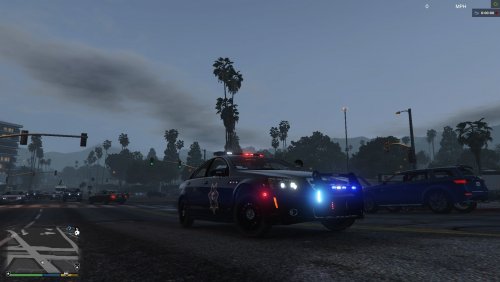 Still doesn't look bright enough, even with visualsettings tweak, all other cars look fine.
- 60 comments
- 5 reviews
-
-
<txdRelationships> <parent>vehicles_banshee_interior</parent> <parent>vehicles_blista2_interior</parent> <parent>vehicles_boat_interior</parent> <parent>vehicles_bob_interior</parent> <parent>vehicles_bob_brown_interior</parent> <parent>vehicles_bob_worn_interior</parent> <parent>vehicles_bodhi_interior</parent> <parent>vehicles_btype_interior</parent> <parent>vehicles_cav_interior</parent> <parent>vehicles_cavarmy_interior</parent> <parent>vehicles_chopperbk_interior</parent> <parent>vehicles_comet_interior</parent> <parent>vehicles_coquette_interior</parent> <parent>vehicles_dom_interior</parent> <parent>vehicles_dom_w_interior</parent> <parent>vehicles_elegy_interior</parent> <parent>vehicles_faction_interior</parent> <parent>vehicles_faction_w_interior</parent> <parent>vehicles_feltzer_interior</parent> <parent>vehicles_feroci_interior</parent> <parent>vehicles_flyer_interior</parent> <parent>vehicles_futo_interior</parent> <parent>vehicles_jet_interior</parent> <parent>vehicles_journey_interior</parent> <parent>vehicles_monroe_interior</parent> <parent>vehicles_monster_interior</parent> <parent>vehicles_peyote_interior</parent> <parent>vehicles_peyote_w_interior</parent> <parent>vehicles_poltax_interior</parent> <parent>vehicles_schaf_interior</parent> <parent>vehicles_schaf_brown_interior</parent> <parent>vehicles_schaf_w_interior</parent> <parent>vehicles_speedo_interior</parent> <parent>vehicles_speedo2_interior</parent> <parent>vehicles_sportbk_interior</parent> <parent>vehicles_stinger_interior</parent> <parent>vehicles_sultan_interior</parent> <parent>vehicles_supergt_interior</parent> <parent>vehicles_tornado_interior</parent> <parent>vehicles_vacca_interior</parent> <parent>vehicles_van_interior</parent> <parent>vehicles_voodoo_interior</parent> <parent>vehshare_worn</parent> <parent>vehicles_worn_army_flyer_interior</parent> <parent>vehicles_wornflyer_interior</parent> <parent>vehicles_worn_interior</parent> <parent>vehicles_worn_van</parent>