


ZADDYSteve
Members
-
Joined
-
Last visited
Everything posted by ZADDYSteve
-
 Thanks for your feedback! I just released an update. Please download the new version and let me know how it goes.
- 29 comments
- 2 reviews
-
-

- 1
-
-
Really?? I haven't had any other reports yet and I have not come across this myself. Of course, I always test releases before posting them. Could you send me an example of what's happening? If you cannot send here, you can send it to me via discord on my channel. Info is in the description. I would like to investigate further to fix the issue.
- 29 comments
- 2 reviews
-
It can now. :) Just uploaded a new version to do just that. In the settings.ini file, use the ELS file name for add-on vehicles. My apologies, there was a small issue with the code so it did not properly ignore other emergency vehicles. With this new update, this issue has been fixed. :D
- 29 comments
- 2 reviews
-
-

- 1
-
-
I actually have not yet tried it with this plugin. If you do, please let me know if it's successful or not.
- 29 comments
- 2 reviews
-
Thank you so much. And yes, I remember seeing one but only for FiveM. As far as the lightbars go, you are right. It doesn't matter. But because everyone who creates vehicles, can place extras in different areas, it just makes it more uniform and stands out a bit better, especially if you have multiple units at the scene. 🙂 I have gone through 2 days of troubleshooting to be able to sync the players lights with AI, but as I stated in my YT video, it's really difficult, as no matter how I write the code, the limitations of RPH itself is what is holding me back. I will keep working at it though and hopefully have another update soon. 🙂 I have not yet tested this plugin with DLS (non-ELS vehicles) to be honest. If you do, would you let me know how it goes?
- 29 comments
- 2 reviews
-
-
You are not wrong, but I have had little to no issues with it. 🙂 It's just something that works for me. Until I can find out how to reset light stages, this is a small workaround.
- 29 comments
- 2 reviews
-
-
-

- 2
-
-
TYSM!!! Please let me know how it goes. I hope soon to get the players vehicle sync'd with AI as well! 🙂
- 29 comments
- 2 reviews
-
-
- 1
-
-
AS MY PLUGIN IS A WIP, I WOULD RECOMMEND YOU "FOLLOW" MY PLUGIN SO YOU RECIEVE UPDATES WHEN I PUBLISH NEW VERSIONS OF THE FILE BY CLICKING ON THE FOLLOW BUTTON ON THE TOP RIGHT HAND SIDE OF THE PAGE. Recommendations: Use my plugin with Automatic Siren Cutout. (NOT REQUIRED) Use vehicle packs with the same type of light bar/extras. Please remember that this file is still a work in progress. This plugin is for ELS vehicles only, at this time. This is an early release build of my plugin and is not yet completed, however it does work as intended with AI vehicles. You can report issues, request support via my discord channel or view other plugins I have made. https://discord.gg/vPHYbJsWVX This plugin works with all emergency vehicle slot vehicles, including the EMS and Fire. Currently the tow truck(s) are the only slots not sync'd with this plugin. If you would like me to add this, please let me know. You can view the showcase video here: Installation Instructions 1. Download the zip file 2. Extract the zip file. 3. Place ALL 3 files in: GTA V ROOT FOLDER > PLUGINS > LSPDFR 4. Launch your game. When you go on duty, the plugin will automatically load. NOTE - EDIT THE ELSLightSync.ini file to your liking. File will be set to default values. You may not distribute, post, or attempt to edit this file in any way. Currently, I only have this plugin posted here. If you would like this posted elsewhere, please reach out to me. Known Bugs 1. Plugin is having issues with non-ELS vehicles (fix is in progress) 2. Issue with player vehicle syncing with AI vehicles.
- 29 comments
- 2 reviews
-
-
-
-

-
- 13
-
-
Hello, Please move to the proper thread if this is not the correct thread. I could not find other solutions to reach out. I have created a plugin and would like to upload it to the plugins page. How can I go about doing so? Thank you.
-
 Thank you so much. This all makes sense, and helps me to understand how the plugin works. I will edit the phrase lol. The other commands, DO work, and this adds so much more emersion to the game. TYSM for doing such an amazing job with this mod!!! ❤️
- 295 comments
- 15 reviews
-
-
-
- 2
-
-
I am running into this error when asking for their ID. I am literally right next to the window. Any thoughts? Anyone else facing this issue?
- 295 comments
- 15 reviews
-
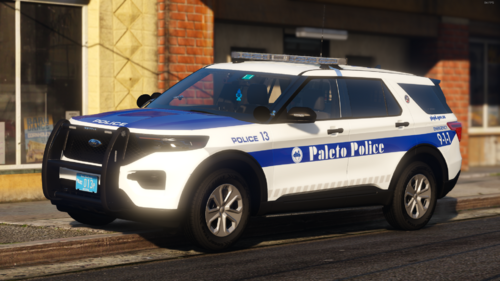 @Jedahdiah - Would you ever consider making these replace? These are some beautiful models.
 -
 Yes, you can still use this. I currently use it to date. No issues. Works fine. 🙂
- 436 comments
- 16 reviews
-
-
- 1
-
-
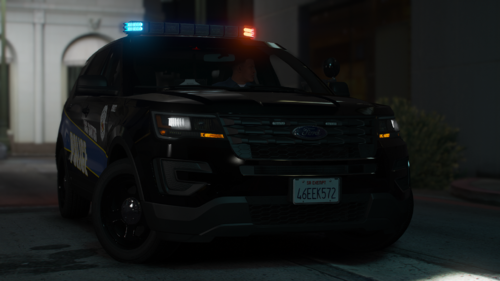 Would you ever make this "replace" and not add-on? 🙂
 -
.thumb.png.9d0943161b37f863c291d6d6664edefb.png) Here are your issues based on your log. -Update RAGEPluginHook (if not already done) -Update GTAV (if not already done) -Update LSPDFR (if not already done) -You are missing the following file for one of your plugins: plugins\LSPDFR\HWYCallouts.xml -This file does NOT belong in GTAV/plugins/LSPDFR. Reinstall/move them in your main GTA folder. >> Microsoft.Expression.Drawing -Update CompuLite (if not already done) As @SuperPyroManiac mentioned in an earlier comment: Lastly, this plugin it is known to cause random crashes when it can't find the Spotlight plugin (dependency) although the player obviously has it installed and loaded. Typically, reinstalling both this and spotlight will fix the issue. Hope this helps. 🙂
Here are your issues based on your log. -Update RAGEPluginHook (if not already done) -Update GTAV (if not already done) -Update LSPDFR (if not already done) -You are missing the following file for one of your plugins: plugins\LSPDFR\HWYCallouts.xml -This file does NOT belong in GTAV/plugins/LSPDFR. Reinstall/move them in your main GTA folder. >> Microsoft.Expression.Drawing -Update CompuLite (if not already done) As @SuperPyroManiac mentioned in an earlier comment: Lastly, this plugin it is known to cause random crashes when it can't find the Spotlight plugin (dependency) although the player obviously has it installed and loaded. Typically, reinstalling both this and spotlight will fix the issue. Hope this helps. 🙂- 366 comments
- 33 reviews
-
-
- 1
-
-
-
 @Nightz Development Looks like the download is invalid for v3.7. When I try to download the file I get an error message: Thought you'd might wanna know to fix? Great map though. Cannot wait to install it!
 -
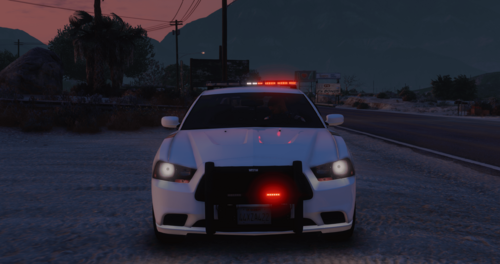 Understood, thank you for the response. I appreciate it. 🙂
 -
Just curious, will you ever create a script for single player? I've been trying to find something similar to this for single player.
-
This sounds like a performance issue. How's your VRAM usage? Did you check the menu?
-
Have you properly installed the ELS files?
-
 @Veteranfighter Is there a way or line of code to add to not have the GPS voice? It's super loud lol and I record videos for YouTube. I know it's because this plugin needs it to point the respond AI to the callout location. Thank you!
 -
Mods, please move to appropriate forum if this is not correct. I wasn't sure where to post this. Crash occurs with no error messages, and only when activating stage 3 lighting. Anyone else having similar issues? I cannot figure out the issue. I can run the game fine without Reshade, but obviously I want to use Reshade, lol. Thank you in advance.
-
Your not the only one. It is happening to me as well. I have even tried other browsers to no avail, as I get the same message. Anyone have a fix? I recorded it, if a mod wants to see it. I cannot upload it here because the screen clip is 46MB and max upload size is 4MB here.

.thumb.png.9d0943161b37f863c291d6d6664edefb.png)
.thumb.png.656f907bc2febc81911b0b821cb502c8.png)
