

9Lincoln20
Members
-
Joined
-
Last visited
Everything posted by 9Lincoln20
-
 Tried that, still doesn’t work.
 -
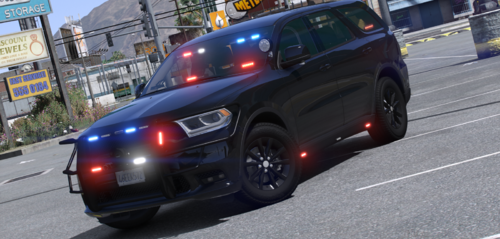
Does anyone know the vehicle name for this add on vehicle for Dashcam V? I have tried Durango, Doddurango, and the dashcam won’t work.
-
 Is anyone having an issue with the public disturbance call out. I respond to the call and there is a unit on scene and 2 red dots however no persons are fighting. I’ve spawned the call 3 times and the same thing happens, red dots appear but no one is fighting. I am running the latest version of United Callouts and the latest GTA version 2802.
- 643 comments
- 55 reviews
-
 For some really weird reason the indicators to the CVPI keep turning on and I can’t turn them off using the indicator key bindings.
- 53 comments
- 10 reviews
-
 Is anyone having an issue when you ignore a call out no other units attach themselves. After installing the new update other units picked up the calls I ignored and the data showed up on the MDT on which unit took the call. However after a few calls the other units stopped taking calls the audio of other units responding and has stopped playing and no data of other units displays on the MDT.
- 453 comments
- 50 reviews
-
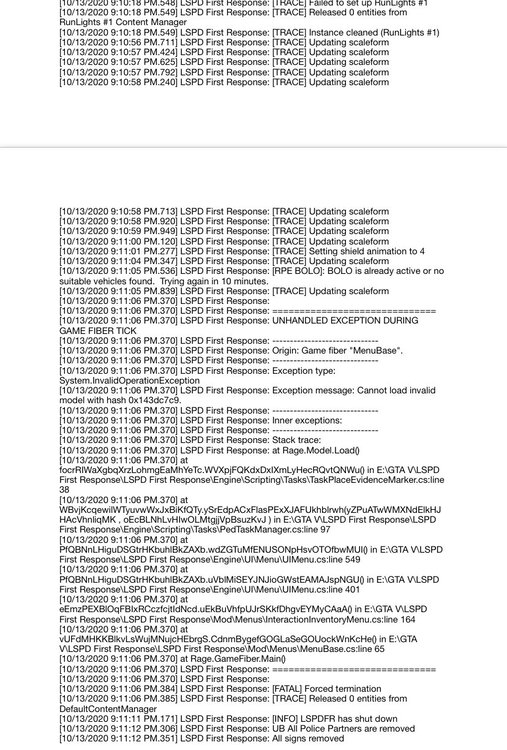
I wonder what the error is causing the crash at Menu Base. All other versions of LSPDFR have run fine with this exact mods folder.
-
I haven’t installed anything in patchday 23. When I updated GTAV in Open IV I updated the update.rpf as Open IV suggested but that is it. what do I update my mods folder with?
-
just installed my usual palm beach county vehicles. ive used these vehicles before with my same mods folder and no issues. I just noticed there are dlc packs from the update folder that aren’t in my mods folder since the latest GTA update. For example my mods folder has patchday 21 as the last patchday where as my update folder has patchday 23
-
so it worked with my mods folder disabled
-
Surely you can play lspdfr 0.4.8 with a mods folder
-
Doesn’t that disable your mods folder?
-
Hi, I have updated to LSPDFR 0.4.8 and every time I go to use a evidence marker from inventory LSPDFR crashes. My rage log showing the crash is attached. Any help would be apprecaiated.
-
-
-
do you think it’s because I still running LSPDFR 0.4.6 and not 0.4.7 for your latest version of the callouts? thanks for your help too I appreciate it.
- 643 comments
- 55 reviews
-
I am still on 0.4.6. The previous version of your callouts the person with a knife callout worked perfectly.
- 643 comments
- 55 reviews
-
Ok no worries. For some reason I tried it 3 times in sandy shores and twice in Paleto Bay but there was no suspect with a knife after searching the entire yellow circle area.
- 643 comments
- 55 reviews
-
-
For some reason in the person with knife call out I can’t seem to find a suspect carrying a knife. I’ve searched the entire yellow circle from top to bottom and no person with a knife is anywhere. I tried it 3 times in different locations, same result no person with a knife. One call I was on scene in 10 seconds. any ideas?? Other than that a threat callout pack.
- 643 comments
- 55 reviews
-
problem solved. You change the GTAV Interaction menu key In keybindings as LSPDFR replaces this.
-
thanks, I checked that and there is no key binding to change the menu button
-
Hi, By default the LSPDFR menu key for LSPDFR 0.4.4 is M but this conflicts with other scripts I have installed. Is there anyway to change this key binding from M to something else. I can’t find any setting to do it. Any help is appreciated.
-
Ummm I’m sorry but I don’t understand. If you told me the plugins that might be responsible for the game crashes I could look at deleting them because I am sick and tired of my game crashing and hence why I am asking for help. Also the crash seems to occur when I respond to the standard LSPDFR Robbery callout, I’m not sure which one of these plugins has a Scenario manager element to it.
-
what plugins are you referring too?
-
I just started a new game but here is a log from yesterday with an identical "ScenarioManager" crash. RagePluginHook.log