




BlueLine Vibes
Insiders
-
Joined
-
Last visited
Everything posted by BlueLine Vibes
-
 Well this is an easy 5/5 star Rating ✅Easy Install ✅Easy to load/unload ✅Doesn't crash if you missppell a veehiccle cars namme ✅The AI will also respond with the vehicle components on/off with your settings ❌Will not change the car model year I should take a star off for that alone, but I'm being nice today.
 -
Yep, confirmed that it works. Great job! Was getting annoying fixing that stuff through the Vehicle mod menu with the trainer, only to have the AI still show up with the extras on/off this fixes that.
-
Interesting, so this XML configurator controls the AI vehicles as well? I might have to take a look at this.
-
So changing the mods folder name to _mods was still causing your game to crash? If so, then you can take NVE out of the equation as it is in your newly named mods folder called _mods and GTA can't find that folder. DId you say you reinstalled a clean game? Meaning a complete new game directory, with no scripts or other asi type plugins in your main game directory?
-
-
 My apologies, I forgot to leave a review for you @RangerZ 5/5 Another Great Vehicle
- 175 comments
- 25 reviews
-
-

- 1
-
-
 Might be a plugin to open all doors, not really sure. But you can press the M key in game > vehicle > then open certain doors if you want. A bit slow but might get the job done
- 57 comments
- 33 reviews
-
 Thanks for the info
 -
So I am assuming that if I turn up the volume on East Los FM it will not detect other radio station audio? That is what I was referring to. I have my stations volume at 0 due to content creation. All good, I will test it out. Thanks.
-
Interesting concept actually. Will it cause other radio station audio to play from other vehicles? Just wondering due to content creation and copyright music etc.
-
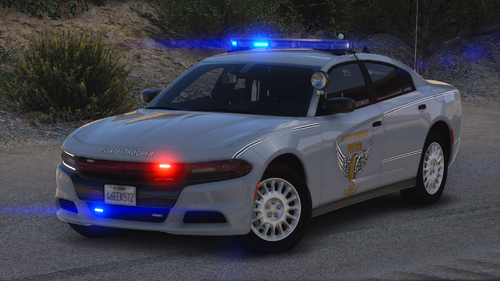 Looks Great!
 -
 Why stop there, make it 10 long guns strapped with Duck Tape and a Katana for good measure
- 264 comments
- 22 reviews
-
-

-

- 2
-
-
 I think you totally missed the point of how to upload content on this site. If you want people to download and try out the mods that you work on, you promote and show your work in the description. No one should have to go searching for it elsewhere. People on this website have zero patience already.
 -
-
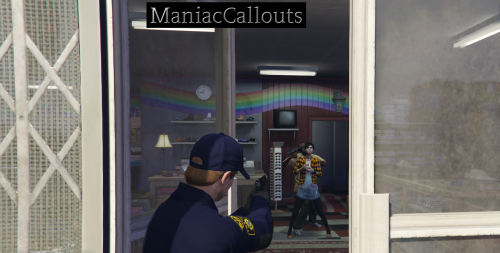 I still enjoy this callout pack. However, I am noticing a white X during gameplay. Could be tied to an ambient event as I notice the X moving slightly. Wasn't sure if this callout pack is totally abandoned or not. Disregard: Was another issue on my end that I need to figure out.
 -
 Good question. I am unable to add a addon weapon to the WeaponInventory under Rifle.
 -
agency_eupfr.xml ? Haven't seen the fr before, do you have a link for that? I only seen the agency_eup.xml
-
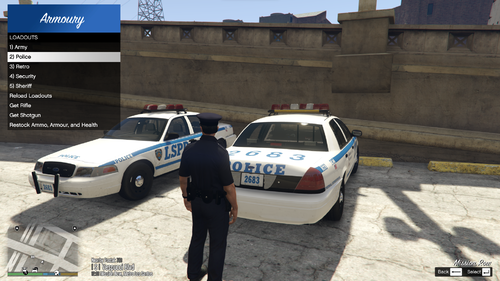 Easy to make a CustomPatrol loadout and very easy to add the addon-DLC weapons. If you are like me and you like to change your character in game after going on Duty using Skin Control or anything like that, the Realistic Weapon System from Stop The Ped will not routinely give you the regular loadouts that you want from Realistic Weapon system. Sometimes you are missing a flashlight, or possibly an addon weapon. Well this mod changes that, you can now go to the back of the trunk and equip a Custom Load out (sort of like Easy Loadout plugin but better) and get your loadouts easier. You can also equip a rifle from the back as well.
- 50 comments
- 5 reviews
-
-
-
- 4
-
-
- rph
- lspdfr plugin
- legacy
- rph
-
Tagged with:
-
Coffee is on me, thanks! If you ever get a chance in the future, I did notice that on the majority of the vehicles, the trunk for some reason does not fully extend up. Not a big deal for me, but just thought I would mention it here.
- 50 comments
- 5 reviews
-
-
- 1
-
-
- rph
- lspdfr plugin
- legacy
- rph
-
Tagged with:
-
 I am enjoying the plugin so far. Great job on implementing the radar system from Traffic Policer. Feels like old school LSDPFR OG Note: I made a few suggestions at the end of the video
 -
I am enjoying the plugin so far. Great job on implementing the radar system from Traffic Policer. Feels like old school LSPDFR OG EDIT: June 29th, 2026 Updated Video to match new update https://youtu.be/Cg_IDb1dbz0
-
@SteveOhByte Just wanted to pop in and say thank you for your time creating this plugin. Works great with addon weapons. Was trying to give you a tip via PayPal link next to your download button, but getting this message This organization can't accept donations right now. not sure if this is a lspdfr site issue or not. I will try again soon. Thanks again.
- 50 comments
- 5 reviews
-
-
- 1
-
-
- rph
- lspdfr plugin
- legacy
- rph
-
Tagged with:
-
 @HazyTube Is there a way to get the EasyLoadout to work with an addon weapon by chance? For example the Colbaton I managed to get to work with Fast Draw with the Hash number, but I am perplexed on how to get this into Easy Loadout. I can have Stop The Ped give the Colbaton at the start of shift, but if I use any character swaps with Skin Control for example, it of course changes the starting character and thus no loadout from Stop The Ped. Any help would be appreciated.
- 68 comments
- 12 reviews
-
-
- 1
-
-
 Cool, glad you saw that. Look forward to an update, no rush though. Enjoying the pack.
- 243 comments
- 16 reviews
-
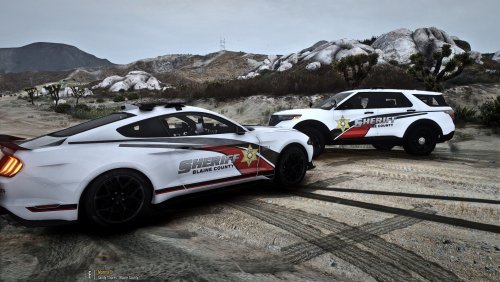 Love the livery on these. Great job




