




BlueLine Vibes
Insiders
-
Joined
-
Last visited
Everything posted by BlueLine Vibes
-
I have that mod, haven't really noticed a problem with response times. I mean its fairly realistic, it takes about 10-15 seconds for them to arrive sometimes. However, during certain ANPR hits they do not come at all, until a certain point in time because it sort of a choreographed style call out. Only thing I have noticed is some Zentornos parked out in the forest areas lol
-
Can you give more details? Is it for your partner? Or the enemy in general?
-
Very nice indeed! This is the stuff I think most of us want. Seriously, it really immerses you into the gameplay so that you feel like part of a team. Can't wait for this one.
-
-
 Ya the video above shows it working. Could be something I am not updating correctly
- 159 comments
- 53 reviews
-
Quick question about the Rambar light. Facing the car. The left light which is blue is working correctly. However, the Right one which is probably red is not working. Any ideas? I see, so you can potentially just put police2 inside Patchday4ng? Also any ideas as to why the red light is out in the rambar? Blue side works fine
- 159 comments
- 53 reviews
-
Thanks for this upload F5544 Looking really nice. I will probably do an episode with this bad boy. Oh btw, not sure if some of the new guys that do not know how to use OpenIV, some get put off by the short cut wording you have in the Read Me. So here is the tip for the new guys out there. Use Open IV for the program and here is the correct pathway for vehicle. GTA V /update/x64/dlcpacks/patchday4ng/dlc.rpf/x64/levels/gta5/vehicles.rpf Also you might want to use the (mod) pathway. If that is the case just use the (mods) folder after GTAV. I think your readme just starts with (mods)/patchday4ng this will leave people scratching their heads. So hope that helps some of the new guys out there. Take care Also noticed that the vehicle in the download is police2 replacement. There is no police2 in the patchday4ng Were you wanting to direct people to patchday3ng instead? Or just rename it to police3, because that could work as well. -Benzo
- 159 comments
- 53 reviews
-
-

- 1
-
-
That would be pretty nice. The Riot doesn't always have to be armed civilians, you can have like 15 civilians with picket signs and some are violent. It would take some finesse with the modder. Because I can see it getting out of hand really fast, have officers roll up and start killing everyone. I think it would be kinda cool to have the Fire Dept. show with water hoses and tear gas from some swat etc. and some get tazed and perhaps one may get killed because he has a weapon, but have several either flee or get arrested and put into transport units. Now that would be some call out.
-
This is definitely looking promising. Love this mod. Keep up the good work guys. HAH!! no doubt Ahhh did you hear that ineseri just said it will be released next week..... j/k
-
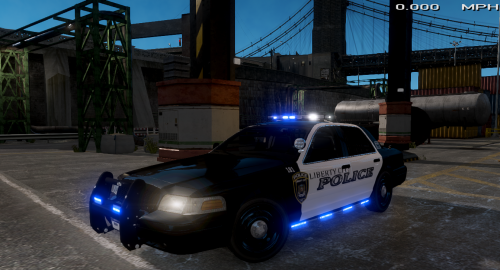 I think they are about to release a really really nice charger that has side lights. I can't wait for that one to be released. We have some really nice police units where I live in North Texas and they just came out with a fleet of SUVs that have side lights and the wheelen inner edge style lights. You should see those at night. You can spot them from 5 miles away.
- 17 comments
- 6 reviews
-
-
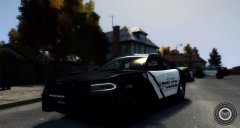 Looks nice man. Should do an upload.
 -
 Want to see this Plugin in action. Visit the video here https://youtu.be/7UMPeY8uTqY - Benzo
- 89 comments
- 36 reviews
-
-
- 2
-
-
Having an issue with this mod. I hit F11 and nothing really happens. My ini looks just like torbeng86 EDIT: I think I spy the problem. Gonna take a peek and will report back. Ok Ya I found the problem it was very simple. Did not see the modifier key LCtrl Key F11. I did have to change the Ini a bit because too many units were showing up. I think I counted up to 15 last call out. So I lowered the number and I will see what happens.
- 89 comments
- 36 reviews
-
I like some of these ideas. The VIP escort you can roleplay really nice with that one. Good suggestion. One thing I have learned about Albo is that he reads all suggestions and takes them into consideration and will indeed try to implement it if its possible. When he first started off, we were firing all kinds of ideas to him and it would take him sometimes like 2 days and it would be there. Amazing mind he has. Sam should recruit him onto the LSPDFR team no joke.
-
One thing I heave learned which I am sure you did too Albo. It doesn't matter how clear you are in your Post, you will STILL have guys ask the obvious. Not sure if its a language issue or pure laziness man.
-
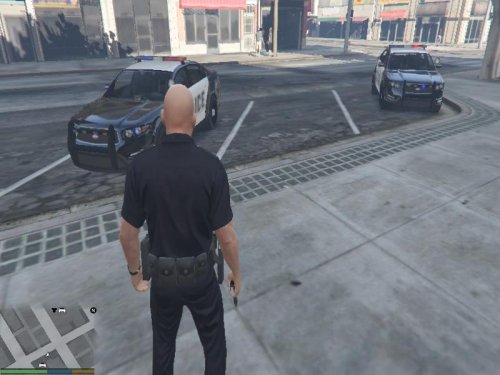 Ahhh very nice man
 -
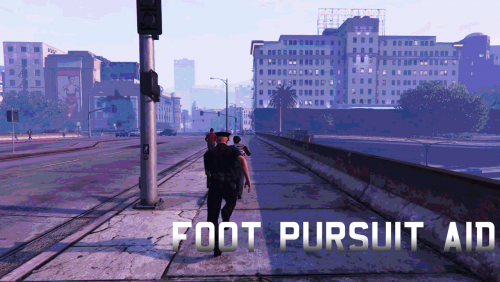 Yep it comes with a very nice ini file. HOWEVER, Be careful when editing your ini file other wise you will end up like my video here https://youtu.be/HxL6z6uIAr8?t=30m3s I linked it to where I use Foot Pursuit Aid so you don't have to watch the whole thing. Check it out. -Benzo
- 40 comments
- 20 reviews
-
-
- 1
-
-
Damn I would love to get one of those. I would definitely pump a shot gun into that mofo.
-
have not tried this yet. Does this automatically set all these things for you, or can you open a menu to customize things?
-
Ya I can't wait for that bro. I have had some random events occur very very rarely around me. It makes me feel like part of the team to actually help the other officers and not have to be told to do so by dispatcher. Can't wait for this.
-
Albo is right. I remember when Albo first started out here. He had like under 10 reps and released his first ever Multiple Jailpoints, then prisoner teleport and now look at how far he has come for us. By the way, I am really looking forward to the backup functionality Albo. Would love to play as a secondary car sometimes. Just adds some flavor. Also, an idea that you could possibly implement as a random event is a road rage shooting or a fight, without ANY call out. Just something you run into you know. I was up north near Blaine County in my doing my episodes and I ran into a couple of random events of someone with a gun and a police officer was pinned down. I literally just heard the shots and came on it by accident so it turned into a shootout. It felt really nice that it wasn't even a call out.
-
.thumb.jpg.bb1e8ecec8228dbd477e7dcb330fb034.jpg) Video Review so you can see this in action Day & Night https://youtu.be/gdOYdj4bfzM -Benzo
Video Review so you can see this in action Day & Night https://youtu.be/gdOYdj4bfzM -Benzo- 97 comments
- 62 reviews
-
-
 Ummmm Wow? I just watched the video by Alex (Great Video bro) I mean I know what it takes to edit and that was pretty bad ass and I know it took you a very long time. So props alone for the video. Just looking at this mod pics and the menu system, I have to give this a try. This is something I have been looking for. I will give it a try and perhaps do a video review as well. I love to do videos for guys on the LSPDFR site, already did several for Car Mods, Plugins. Just stumbled upon this as the models with LSPDFR were getting drab. Trying it now.
- 2,346 comments
- 236 reviews

.thumb.jpg.bb1e8ecec8228dbd477e7dcb330fb034.jpg)
