Drewster327
Members
-
Joined
-
Last visited
Everything posted by Drewster327
-
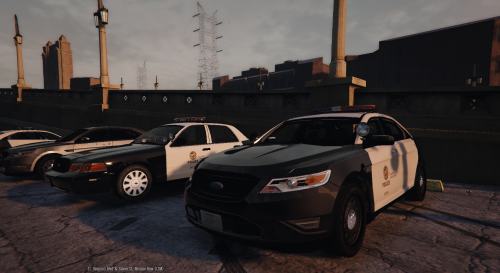
 Great car, the Arjent is spot on especially with the yellow traffic advisors, only thing I would like to see is maybe grill LED lights
- 563 comments
- 116 reviews
-
-
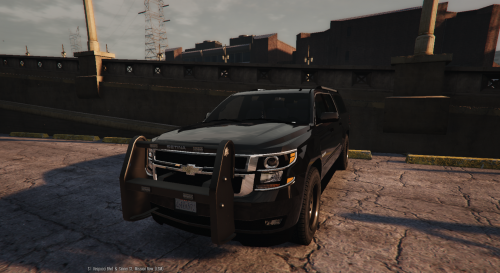 Not a fan of the window light being off set to the passenger side, but that may just be my OCD kicking in LOL
- 38 comments
- 21 reviews
-
I've looked around for it but all i found was topics in the GTA IV forum and I'm not sure if it's the same. I've asked on the Corona Mod comments and even people that have done it on youtube videos and no one has gotten back to me so I figured I'd try here. The light bloom is just too big and too bright for me,I've seen on videos where people have changed the flash light bloom to almost go away. I've tried editting the car.defaultlight.night.emissive.on and car.defaultlight.day.emissive.on line to 20.00 in the visualsettings.da and still huge and bright so i figured it's one of the light Bloom lines just not sure which ones. Can anyone help me with this?
-
 The light Bloom is just Rediculously bright and big on the CVPI, even put it down to 30 and still this bright, any ideas?
- 246 comments
- 40 reviews
-
 Anyway to change the location of the Dash cam view, it's really low, hard to see over the dash
- 202 comments
- 51 reviews
-
 I've had the same crash reports today as well, Keep calm and Stealth22 is the main cause
- 268 comments
- 44 reviews
-
 The LSPD skin was just the car skin, shouldn't effect the taillights, same car file from the 1st installation. but ya, the lighter red of the trunk lights, it's annoying as heck LOL
- 95 comments
- 38 reviews
-
My taillights color don't match but before the patch they did, any ideas how to fix this?
- 95 comments
- 38 reviews
-
 [10/22/2015 5:19:38 AM.233] LSPD First Response: UNHANDLED EXCEPTION DURING GAME THREAD TICK [10/22/2015 5:19:38 AM.233] LSPD First Response: ------------------------------ [10/22/2015 5:19:38 AM.233] LSPD First Response: Origin: Game fiber "<UNNAMED THREAD>". [10/22/2015 5:19:38 AM.233] LSPD First Response: ------------------------------ [10/22/2015 5:19:38 AM.233] LSPD First Response: Exception type: Rage.Exceptions.InvalidHandleableException [10/22/2015 5:19:38 AM.233] LSPD First Response: Exception message: Operation is not valid because this Rage.AnimationTask is invalid. [10/22/2015 5:19:38 AM.234] LSPD First Response: ------------------------------ [10/22/2015 5:19:38 AM.234] LSPD First Response: Inner exceptions: [10/22/2015 5:19:38 AM.234] LSPD First Response: ------------------------------ [10/22/2015 5:19:38 AM.234] LSPD First Response: Stack trace: [10/22/2015 5:19:38 AM.246] LSPD First Response: at Rage.Task.WaitForStatus(TaskStatus status, Int32 timeout) [10/22/2015 5:19:38 AM.246] at ????????????????????????????????????????.????????????????????????????????????????.????????????????????????????????????????(Task ) [10/22/2015 5:19:38 AM.263] at ????????????????????????????????????????.????????????????????????????????????????.????????????????????????????????????????() [10/22/2015 5:19:38 AM.264] at Rage.GameFiber.Main() [10/22/2015 5:19:38 AM.264] LSPD First Response: ============================== [10/22/2015 5:19:38 AM.264] LSPD First Response: [10/22/2015 5:19:38 AM.607] LSPD First Response: System.Threading.ThreadAbortException: Thread was being aborted. [10/22/2015 5:19:38 AM.618] at Rage.GameFiber.SleepThis(Int32 duration) [10/22/2015 5:19:38 AM.619] at Traffic_Policer.Callouts.DrugsRunners.????????????????????????????????????????(Int32 ) [10/22/2015 5:19:38 AM.619] at Traffic_Policer.Callouts.DrugsRunners.drugsPursuit() [10/22/2015 5:19:38 AM.620] at Traffic_Policer.Callouts.DrugsRunners.<situationFive>b__54_0() [10/22/2015 4:13:14 AM.723] LSPD First Response: PlayAction: Failed to find UNIT_RESPONDING_DISPATCH, reverted to random voice [10/22/2015 4:13:17 AM.195] LSPD First Response: [10/22/2015 4:13:17 AM.195] LSPD First Response: ============================== [10/22/2015 4:13:17 AM.195] LSPD First Response: UNHANDLED EXCEPTION DURING GAME THREAD TICK [10/22/2015 4:13:17 AM.195] LSPD First Response: ------------------------------ [10/22/2015 4:13:17 AM.195] LSPD First Response: Origin: Game fiber "<UNNAMED THREAD>". [10/22/2015 4:13:17 AM.195] LSPD First Response: ------------------------------ [10/22/2015 4:13:17 AM.195] LSPD First Response: Exception type: Rage.Exceptions.InvalidHandleableException [10/22/2015 4:13:17 AM.195] LSPD First Response: Exception message: Operation is not valid because this Rage.Ped is invalid. [10/22/2015 4:13:17 AM.195] LSPD First Response: ------------------------------ [10/22/2015 4:13:17 AM.196] LSPD First Response: Inner exceptions: [10/22/2015 4:13:17 AM.196] LSPD First Response: ------------------------------ [10/22/2015 4:13:17 AM.196] LSPD First Response: Stack trace: [10/22/2015 4:13:17 AM.197] LSPD First Response: at Rage.Entity.get_IsDead() [10/22/2015 4:13:17 AM.197] at Rage.Entity.get_IsAlive() [10/22/2015 4:13:17 AM.197] at ????????????????????????????????????????.????????????????????????????????????????(Entity ) [10/22/2015 4:13:17 AM.197] at ????????????????????????????????????????.????????????????????????????????????????() [10/22/2015 4:13:17 AM.197] at ????????????????????????????????????????.????????????????????????????????????????.????????????????????????????????????????() [10/22/2015 4:13:17 AM.197] at Rage.GameFiber.Main() [10/22/2015 4:13:17 AM.197] LSPD First Response: ============================== [10/22/2015 4:13:17 AM.197] LSPD First Response: [10/22/2015 4:13:17 AM.492] LSPD First Response: System.Threading.ThreadAbortException: Thread was being aborted. [10/22/2015 4:13:17 AM.495] at Rage.GameFiber.SleepThis(Int32 duration) [10/22/2015 4:13:17 AM.496] at Traffic_Policer.Callouts.DrugsRunners.????????????????????????????????????????(Int32 ) [10/22/2015 4:13:17 AM.496] at Traffic_Policer.Callouts.DrugsRunners.drugsPursuit() [10/22/2015 4:13:17 AM.496] at Traffic_Policer.Callouts.DrugsRunners.<situationFive>b__54_0() [10/22/2015 4:13:43 AM.358] [10/22/2015 4:13:43 AM.359] Plugin verification is disabled. Allowing plugin to run. [10/22/2015 4:13:43 AM.360] Loading plugin from path: C:\Program Files (x86)\Steam\steamapps\common\Grand Theft Auto V\Plugins\lspd first response.dll [10/22/2015 4:13:44 AM.964] <UNLOADED PLUGIN>: Initializing input system [10/22/2015 4:13:44 AM.967] <UNLOADED PLUGIN>: Initializing game console [10/22/2015 4:13:44 AM.970] <UNLOADED PLUGIN>: Initializing forms manager
- 3,646 comments
- 306 reviews
-
Just today for some reason every ANPR drug runner call I get crashes the LSPDFR
- 3,646 comments
- 306 reviews
-
-
-
Sorry I have no idea why that made that your quote, weird
-
So I download the American Siren pack 4.0, it has a bunch of sirens but it has the wrong siren I want programmed for primary and FBI, how do I go about changing that? I looked though the whole readme couldn't find it
-
Sorry, I'm a little new at this, I downloaded the GTA 5 Realistic American Sirens pack 4.0 and I can only get the Smart Siren to be the primary. I'd like to get the Mastercom B siren as the primary and FBI, I've looked all over the readme to find out how but no luck. Can anyone give me some pointers?
-
There is no cheat to get rid of that?
-
Cool, appreciate the response, unless the 100% gamesave does anything that effects LSPDFR I'm just gonna start modding, I've watched and read so many tutorials hopefully I can figure it out rather quick LOL
-
I've been watching a lot of videos of this mod and I really want to go out and buy it and play, my question though is how far in the game do you have to get to be able to use LSPDFR or can you use download the mod, install and run it right off the bat, I beat the game on my XBOX so I really don't want to beat the game AGAIN! Thanks and sorry for dumb question