


MFDHoward
Members
-
Joined
-
Last visited
Everything posted by MFDHoward
-
DirectX 12 will support stacking and I have already preordered some cards that allow this. I need it for my business. Edit: Mind you these cards aren't gaming cards that I need, I switched to quadro after I decided I needed a workstation.
-
Since the game came out I have been working on breaking down the files and getting a understanding of how Rockstar constructed them. Happily today with ScriptHookV I can say I am a step closer at being able to test some things out. So hopefully I will have time to go into the programming lab at my college and work on something in peace since I don't get much of it at home. I will say that this game definitely has more potential then GTA IV ever offered us. However we do have a huge hill in front of our journey because things are just not the same anymore with the files. Rockstar changed the file formats to a lot of things but there are things that we are still familiar with which is great, so my buddies from the modding community are going to reverse engineer this game as much as we can and hopefully come out with some amazing stuff. Another thing is once Open IV/V gets its updates in order I can test out replacing some files and editing some files to see what it does.
-
I have a 560ti 2gb...with 32gb memory. 1TB....game runs 120 fps on normal...the real limit is the video memory. I just spent over like 5 grand on my new PC parts so I can get 24gb of video memory and start doing some nice gaming.
-
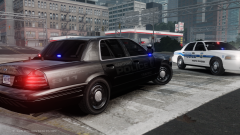 Sorry to be a pain in the butt but Hartford has a new black and white theme. http://www.policecarwebsite.net/fc/pcarsite/hartford119.jpg http://www.policecarwebsite.net/fc/pcarsite/hartford116.jpg http://www.policecarwebsite.net/fc/pcarsite/hartford125.jpg http://www.policecarwebsite.net/fc/pcarsite/hartford117.jpg http://www.policecarwebsite.net/fc/pcarsite/hartford115.jpg http://www.policecarwebsite.net/fc/pcarsite/hartford114.jpg
 -
Yes which was mainly for L.A. Noire. Trust me on this.
-
This is false information. Contacting the company works. '>
-
Their information is not accredited and not peer reviewed so don't even bother trusting it.
-
Hey guys, I work at my college and get a lot of software information that I share with my fellow students. Autodesk is offering 3 years of any needed software to anyone who is a enrolled college student. THIS MEANS YOU MUST HAVE ACCESS TO A SCHOOL EMAIL! http://www.autodesk.com/education/free-software/all You're welcome! Enjoy!
-
It's possible...I'll give it a go later. I'll go for this one first.
-
-
Ripping from EA is one thing but ripping from our community is disruptive and disrespectful. You know what people do when they want the rights to use something? They buy it. You want the rights to use a unlocked model or something ask the creator if you can purchase a unlocked copy with rights for private use.
-
Excuse me sir....EA is a terrible company. We rip from them because they rip from us!
-
Nope it simply stays as a .WFT. You can either import it into ZModeler or 3Ds Max with the new .WFT importer. A lot has been going on in the background of the modding community that no one knows about.
-
Yep there is sadly.
-
There is now a .WFT unlocker...so I don't think developers want to release any new models.
-
I've been in school for four years and am finishing my masters degree in National Security at University of New Haven.
-
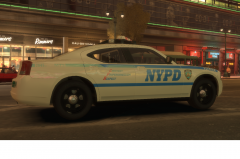
From the album: NYPD Midtown South
NYPD Midtown South Charger -
-
Well every time I go to post something a EMS or FIRE call comes over my radio so I was a little bit busy. I'll update this post later with the releases after I get some sleep.
-
MIDTOWN SOUTH: "The Busiest Precinct In The World!" RESERVED POST AREA! DETAILS COMING SOON!
-
-
 Just letting you know Westerly police don't use impalas.


